This document is the reference overview of the DataLab Platform ecosystem: what each component is, how they fit together, how they differ, and where the platform is heading. For a quick introduction, see the organization profile.
- What is the DataLab Platform?
- Terminology
- History and milestones
- Architecture
- The products in detail
- Interoperability
- DataLab vs DataLab-Web
- Technology stacks
- Quality and testing
- Governance, licensing and funding
- Roadmap
- Resources and links
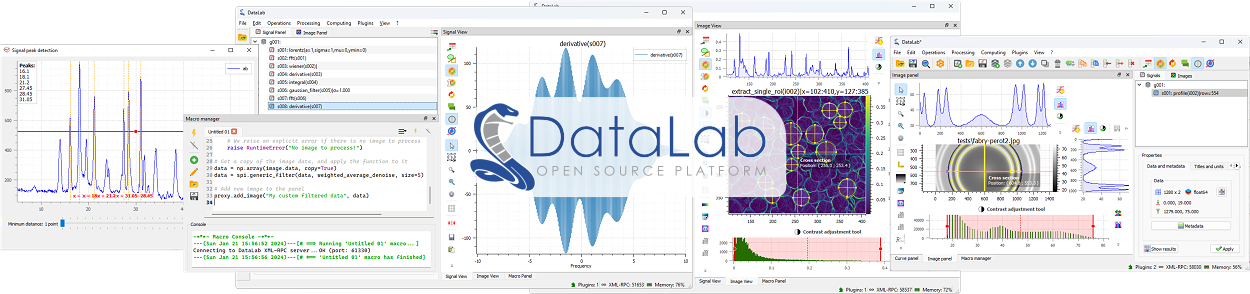
The DataLab Platform is an open-source ecosystem for scientific and technical data processing, focused on 1D signals (curves) and 2D images (arrays). It serves both research (exploratory analysis, prototyping) and industry (test benches, quality control, non-destructive testing) with the same tools.
What started in 2023 as a single desktop application has grown into a family of complementary products sharing one scientific core:
- a desktop application (DataLab) with a rich Qt-based interactive GUI,
- a browser-native edition (DataLab-Web) running entirely client-side via WebAssembly — no install, no server, no upload,
- a Jupyter kernel (DataLab-Kernel) for notebook-driven workflows,
- a headless computation engine (Sigima) powering all of the above,
- a reusable Qt application framework (SigimaX) extracted from DataLab for building scientific desktop applications,
- an open workspace provenance and capsule package (DataLab-Capsule) for exchanging, comparing, and verifying analyses across editions,
- a plugin catalog and official application plugins extending both Desktop and Web with domain-specific workflows and instrument simulators.
The guiding principle: one processing catalog, one object model, one workspace and provenance format — several access modes. Results are identical for the same inputs, whichever edition you use, and HDF5 workspaces and .dlcapsule archives flow freely between them.
| Name | Meaning |
|---|---|
| DataLab Platform | The umbrella term for the whole ecosystem (all products below). |
| DataLab | The reference desktop application (Qt-based). The historical product. |
| DataLab-Web | The browser-native edition: the full platform running inside a browser tab. |
| DataLab-Kernel | A Jupyter kernel exposing DataLab workspaces to notebooks. |
| Sigima | The headless computation engine (signal and image processing) shared by all of the above. |
| SigimaX | The reusable Qt application framework (main window skeleton, configuration, plot docks, HDF5 workspace, scientific widgets) on which DataLab Desktop is built. |
| DataLab-Capsule | The provenance and capsule library, CLI, and optional registry for packaging, comparing, and verifying workspaces as open RO-Crate .dlcapsule archives. |
| DataLab Plugin Catalog | The curated plugin catalog (datalab-platform.com/plugins) serving official and community plugins for DataLab Desktop and DataLab-Web. |
| PlotPyStack | The Qt visualization foundation used by the desktop application (guidata, PythonQwt, PlotPy) — a sibling organization maintained by the same team. |
| Date | Milestone |
|---|---|
| 2023 | DataLab launched as an open-source desktop application for signal/image processing, built on the PlotPyStack (guidata + PlotPy). |
| 2024 | Talks at SciPy 2024, PyData Paris 2024, and Open Source Experience (OSXP 2024). |
| 2025 | DCAR project (DataLab Core Architecture Redesign, funded by NLnet / NGI0 Commons Fund): extraction of all processing logic into the standalone, GUI-independent Sigima library. |
| 2025-10-28 | Sigima v1.0.0 released on PyPI. |
| 2025-11 | DataLab v1.0.0 released — complete rewrite using Sigima as its processing backend. DCAR completed. |
| 2025-12 | Talk at Open Source Experience (OSXP 2025) on automatic X-ray scene reconstruction with Python and DataLab. |
| 2026 | DEW project (DataLab Experimental Web Interface, funded by NLnet / NGI0 Commons Fund): browser-native reimplementation and reproducible workspace capsules. |
| 2026-06-26 | DEW Task 1 (feature-rich browser-native DataLab) fully delivered — live demo with off-thread runtime, on-disk storage, internationalization (EN/FR). |
| 2026-07 | DataLab desktop packaged for NixOS by the Nix@NGI team (NLnet partner) and published on the NGI Forge. Presentation at EuroSciPy 2026 (Kraków). |
| 2026-08 | SigimaX extracted as a standalone Qt application framework; DataLab v1.3 released (History panel, built-in AI assistant, command palette, spectral peak tools). |
| 2026-10 | DataLab-Capsule v0.1.0 and DataLab v1.4 released: end-to-end workspace provenance (/DataLab_Provenance), open RO-Crate capsules (.dlcapsule) and optional registry across Desktop and Web, Applications catalog with live instrument simulators, DataLab Plugin Catalog, and official Camera & Pulse characterization plugins. |
Full project reports and Architecture Decision Records are published on the DataLab wiki.
The platform follows a strict layered design: the science lives in one place (Sigima), and each product is an access mode on top of it.
flowchart TB
    subgraph Access["Access modes"]
        DL["DataLab (desktop)<br/>Qt + SigimaX + PlotPyStack"]
        DLW["DataLab-Web<br/>React + Plotly.js, Pyodide/WASM"]
        DLK["DataLab-Kernel<br/>Jupyter (Xeus-Python)"]
    end
    subgraph Provenance["Provenance & exchange"]
        DLC["DataLab-Capsule<br/>/DataLab_Provenance · RO-Crate .dlcapsule · registry"]
    end
    subgraph Engine["Computation engine"]
        SIG["Sigima<br/>objects · proc · tools"]
    end
    subgraph Foundation["Scientific foundation"]
        NP["NumPy · SciPy · scikit-image · OpenCV · pandas"]
        GD["guidata (parameter DataSets)"]
    end
    DL --> SIG
    DLW --> SIG
    DLK --> SIG
    DL --> DLC
    DLW --> DLC
    SIG --> NP
    SIG --> GD
    DL <-. "XML-RPC / Web API" .-> DLK
    DL <-. "HDF5 workspaces & .dlcapsule" .-> DLW
Key architectural facts:
- Sigima is GUI-independent (no Qt), organized in three layers:
sigima.objects(data model:SignalObj,ImageObj, ROIs),sigima.proc(high-level computation functions on objects),sigima.tools(low-level NumPy algorithms). - SigimaX separates the generic Qt application skeleton (main window,
OptionFieldconfiguration, dockable plot widgets, HDF5 browser/workspace, scientific dialogs) from DataLab's domain-specific signal/image workflows. - Processing parameters are declarative
guidataDataSets: every edition auto-generates its parameter dialogs from the same schemas (Qt widgets on desktop, React forms on the web). - The processing catalog is discovered by introspection: a function registered in Sigima with
@computation_functionautomatically appears in the desktop menus, the web menus, and the kernel API — no per-edition wiring. - Interoperability and provenance are contract-based: the HDF5 workspace format, the
/DataLab_Provenanceledger, the RO-Crate.dlcapsuleformat (DataLab-Capsule), the renderer-independent plot annotations, the object model, and the remote-control API surfaces are shared contracts between editions.
The reference application — richest feature set and fastest experience.
- Repository: DataLab-Platform/DataLab · PyPI:
datalab-platform· Docs: datalab-platform.com - GUI: Built on SigimaX and the PlotPyStack — full interactive PlotPy visualization tools (zoom, cross-sections, brightness/contrast adjustment with live histogram, portable annotations, ROI editing), welcome page, and VS Code-style command palette.
- Processor pattern: a registration layer maps Sigima functions to generic processing types (1→1, 1→0, 1→n, n→1, 2→1) with multi-selection semantics, X-array compatibility checks, auto-interpolation, and optional live processing previews.
- History & provenance: a History panel records, edits, and replays processing chains; a Provenance tab tracks how every object was obtained, checks data integrity, and recomputes steps to verify results without modifying the workspace; Workspace capsules (
.dlcapsule) export, inspect, compare, and exchange verifiable workspaces. - Applications & plugin system: extensible plugin architecture with hot-reload, wheel installation from file or from the DataLab Plugin Catalog,
datalab-pluginscaffolding CLI, and a top-level Applications catalog supporting declarative multi-input recipes, datasets, tools, and live instrument simulators. - Macro system & AI Assistant: user-scriptable automation in Python through the proxy API, plus an optional built-in AI Assistant dock (compatible with any OpenAI endpoint or offline mock) that can inspect the workspace, run processings, and propose macros with explicit user confirmation.
- Remote control: XML-RPC API (
RemoteProxy) plus a FastAPI-based Web API (HTTP/JSON, token-authenticated) used notably by DataLab-Kernel. - Persistence: HDF5 workspaces on disk with stable
#UUID8object references; broad file-format support for signals and images (CSV, TIFF, DICOM, FITS, and more via plugins). - Deployment: pip, conda-forge, NixOS (NGI Forge), standalone Windows installer (PyInstaller/WiX) and DataLab-WinPython; runs on Windows, Linux, macOS.
- Languages: English and French (UI and documentation).
The open-source scientific core powering every edition.
- Repository: DataLab-Platform/Sigima · PyPI:
sigima· Docs: sigima.readthedocs.io - Headless by design: no Qt dependency; runs on CPython and on Pyodide (WebAssembly) unchanged.
- Three-layer model:
sigima.objects— data model (SignalObj,ImageObjwrapping NumPy arrays, ROI types, scalar and table results),sigima.proc— high-level computation functions operating on objects (filtering, FFT, fitting, morphology, detection, stability analysis, exposure, …) with declarative operation metadata shared across editions,sigima.tools— low-level NumPy/SciPy algorithms usable independently of the object model.
- Dual calling conventions: every
procfunction accepts either a parameter DataSet or plain keyword arguments — GUI-friendly and script-friendly at once. - ROI system: segment ROIs for signals; rectangular, circular and polygonal ROIs for images, with automatic masking and clipping.
- I/O: signal/image readers and writers shared across the platform.
- Validation-oriented testing: pytest suite with a strict validation mode and optional GUI-assisted visual checks.
The reusable Qt GUI framework extracted from DataLab for building scientific desktop applications.
- Repository: DataLab-Platform/SigimaX · PyPI:
sigimax· Docs: sigimax.readthedocs.io - Derivation pattern: subclass
SigimaXOptions+SGMXMainWindow+ callsigimax.app.run()to build a production-grade Qt scientific application with splash screen, menus, toolbars, and dockable views. - Extensible configuration:
OptionField-based settings withget()/set()/context()API and JSON persistence. - Rich scientific widget catalog: ready-to-use dialogs and widgets for curve fitting, peak detection, signal baseline, intensity windowing, HDF5 browser/importer, log viewer, embedded Python console (
DockableConsole), and memory-monitored status bar. - PlotPy integration:
DockablePlotWidgetand adapters for signal, image, and ROI objects.
The full platform in a browser tab — zero install, zero server, zero upload.
- Repository: DataLab-Platform/web · Live demo: datalab-platform.com/web
- Runtime: Pyodide (CPython compiled to WebAssembly) executes Sigima locally in the browser — data never leaves the user's machine. Static hosting is enough (the demo runs on GitHub Pages).
- UI: custom React + TypeScript interface modelled on the desktop application, with Plotly.js visualization (canvas-rasterized level-of-detail image rendering for large arrays).
- Off-thread execution: the whole Python runtime lives by default in a dedicated Web Worker behind a typed façade, with zero-copy transfers — the UI never freezes during computation.
- On-disk storage: an optional OPFS (Origin Private File System) engine spills heavy arrays to disk, lifting the ~2 GB WebAssembly memory ceiling — the working set becomes bounded by disk quota, not RAM.
- Interruptible batch processing: multi-object operations can be cancelled at object boundaries.
- Feature parity highlights: signals, images, ROIs, the full Sigima processing catalog with optional live previews, interactive fits, HDF5 workspace import/export, end-to-end workspace provenance and
.dlcapsulecapsules, Applications catalog with live instrument simulators (bundled Camera & Pulse characterization plugins), plugins, macros, multi-tab notebooks, command palette, guided tours, AI assistant panel, demo/application deep links, and 70+ scientific colormaps. - SDK: a TypeScript host SDK (
@datalab-platform/web-sdk) allows embedding and remote-controlling DataLab-Web viapostMessage. - Languages: English and French, with automatic browser-language detection.
A custom Jupyter kernel bridging DataLab and the notebook ecosystem.
- Repository: DataLab-Platform/DataLab-Kernel · PyPI:
datalab-kernel· Docs: datalab-kernel.readthedocs.io - Built on Xeus-Python: runs in JupyterLab, Jupyter Notebook, VS Code — and in JupyterLite (browser-based, no server).
- Single stable user API:
workspace(data access and persistence),plotter(Plotly interactive or Matplotlib static),sigima(processing). - Two execution modes, one notebook:
- Live mode — auto-discovers a running DataLab desktop instance (via its Web API) and keeps workspace and views synchronized with the GUI,
- Standalone mode — notebook-only execution, fully reproducible, no DataLab required.
- Reproducibility by design: analyses persist as
.h5files; notebooks run unchanged across environments. - Try it online: live notebooks via notebook.link (JupyterLite, zero setup).
Exchange and verify scientific workspace provenance as open RO-Crate capsules (library, CLI, and optional registry — no DataLab required).
- Repository: DataLab-Platform/DataLab-Capsule · PyPI:
datalab-capsule· Profile: datalab-platform.com/capsule/0.1 (DataLab-Platform/capsule) - Neutral provenance model: records operation calls, parameters, input/output object states (
datalab-signal-v1anddatalab-image-v1SHA-256 fingerprints covering data, calibration, units, and ROIs), activities, and execution environments in the HDF5 workspace (/DataLab_Provenance), read and written withh5pyalone. - Replay preparation & verification reports: prepares deterministic recomputation of qualified Sigima operations in Desktop or Web and compares results against stored states with four explicit verdicts:
exact,within_tolerance(under the operation's declared tolerance),different, ornot_verified(with the reason). Altered objects or missing inputs are reported explicitly. - Open RO-Crate capsules (
.dlcapsule): safe, uncompressed ZIP archives bundlingworkspace.h5(or referencing it by IRI with SHA-256 and size verification), an RO-Crate 1.3 / Process Run Crate 0.6 manifest (ro-crate-metadata.json), optional light attachments (attachments/), revision lineage (dlc:revisionOf), and detached reviews (review-1). - Semantic diff & offline verification:
workspace-capsuleCLI (validate,inspect,diff,verify,create,review,attachment,workspace,registry) sorts changes between revisions into scientific, presentation, storage, environment, and attachment categories, and verifies archive/state integrity without executing code. - Optional capsule registry: lightweight FastAPI server (
workspace-capsule-registry) for publishing and retrieving verified manifests, attachments, and reviews (never raw workspaces), accessible from the CLI, DataLab Desktop, and DataLab-Web.
An open plugin ecosystem and domain-specific scientific applications shared across Desktop and Web.
- DataLab Plugin Catalog: DataLab-Platform/plugins · Published catalog: datalab-platform.com/plugins
- Validates pure-Python wheels in CI (SHA-256 digest, static inspection without code execution, entry points for
datalab.pluginsand/ordatalab.web_plugins, compatible dependencies, OSI-approved license) and publishescatalog.jsonand mirrored wheels. - Installable in one click from DataLab Desktop (Plugins > Configure plugins... > Available plugins) or from a local
.whlfile (including in the standalone installer).
- Validates pure-Python wheels in CI (SHA-256 digest, static inspection without code execution, entry points for
- Applications framework: plugins can declare structured scientific Applications with multi-input recipes, live selection and metadata readiness checks, one-click examples, tools, and interactive instrument simulators (live acquisition view + parameter controls).
- Official application plugins:
- Camera & Detector Characterization — characterizes scientific cameras and detectors: relative characterization in DN (response, temporal noise, linearity, DSNU/PRNU maps), photon transfer curve (conversion gain, read noise, full-well capacity, dynamic range), dark current & hot pixels, plus a live Scientific camera simulator.
- Pulse & Transient Characterization — analyzes repeated pulse acquisitions: single-channel pulse campaigns (per-shot metrics, quality flags, raw & aligned mean pulses), shot-to-shot stability (timing jitter, drifts, Allan deviations), step response, two-channel delay & jitter, pulse-height spectra, plus a live Oscilloscope simulator.
The editions are not competitors — they are interchangeable access modes:
- HDF5 workspaces are the common persistence format: a workspace saved on desktop opens in DataLab-Web, in a notebook, and vice versa, with portable renderer-independent plot annotations.
- Workspace provenance and
.dlcapsulearchives are recorded and verified identically by DataLab Desktop and DataLab-Web usingDataLab-Capsule: a result computed on the web can be inspected and recomputed on the desktop (and vice versa). - The processing catalog is discovered from Sigima in every edition: same functions, same parameters, same results.
- Parameter dialogs are auto-generated from the same guidata DataSet schemas everywhere.
- Plugins and Applications are portable between desktop and web: the same plugin recipes, examples, and instrument simulators run in both editions.
- Remote control surfaces: XML-RPC and Web API on desktop; in-browser proxy and
postMessageSDK on the web; live synchronization from notebooks via DataLab-Kernel.
A common pattern: desktop application on your personal workstation, DataLab-Web everywhere else, notebooks for reproducible reporting, and .dlcapsule archives for peer review and audit — all sharing the same .h5 files.
The differences are about the runtime environment, not about the science.
| Topic | DataLab (desktop) | DataLab-Web |
|---|---|---|
| Installation | Installed locally (Windows, Linux, macOS) | None — runs in the browser |
| Python runtime | System CPython | Pyodide (CPython on WebAssembly, in a Web Worker) |
| Graphical interface | Qt + SigimaX + PlotPy | React + Plotly.js |
| Plotting | PlotPy (Qt), full interactive tools | Plotly.js + canvas LOD rendering (interactive tools) |
| File access | Native file system I/O | Browser file picker, drag-and-drop |
| Persistence & provenance | HDF5 & .dlcapsule on disk |
HDF5 & .dlcapsule download / upload (interoperable) |
| Plugins & Applications | Installed from catalog, .whl, or .py |
Bundled official apps + in-browser plugin manager |
| Memory | Limited by system RAM (64-bit) | ~2 GB WASM heap by default; optional OPFS on-disk storage mode lifts the limit (bounded by disk quota) |
| Remote control | XML-RPC and FastAPI Web API | In-browser proxy and optional postMessage SDK |
| Privacy | Local | Local too — no server, no account, no upload |
What is not different: the object model (SignalObj, ImageObj, ROIs, groups), the processing catalog, the auto-generated parameter dialogs, the portable plot annotations, the HDF5 workspace format, and the /DataLab_Provenance & .dlcapsule verification model.
The table describes the next development releases: the Desktop packages and PlotPyStack require Python 3.10 or later. Already published releases retain their own Python requirements; archived reports describe the environments actually tested at the time.
| Product | Version | Core stack |
|---|---|---|
| DataLab (desktop) | 1.x | Python 3.10+, Qt (SigimaX ≥ 1.1, PlotPy ≥ 2.11, guidata ≥ 3.16), Sigima ≥ 1.3, DataLab-Capsule, NumPy, SciPy, scikit-image, OpenCV, FastAPI (Web API) |
| Sigima | 1.x | Python 3.10+, NumPy, SciPy, scikit-image, pandas, guidata (parameters only) — no GUI dependency |
| SigimaX | 1.x | Python 3.10+, Qt (PlotPy ≥ 2.11, guidata ≥ 3.15), Sigima ≥ 1.3, psutil |
| DataLab-Web | 0.x | TypeScript, React, Plotly.js, Vite, Pyodide (pinned, worker runtime), Sigima, DataLab-Capsule, Vitest, Playwright |
| DataLab-Kernel | 0.x | Python 3.10+, Xeus-Python, Plotly / Matplotlib backends, DataLab Web API client |
| DataLab-Capsule | 0.x | Python 3.10+ / Pyodide, jsonschema, NumPy & h5py (hdf5 extra), FastAPI & uvicorn (registry extra) |
| PlotPyStack (foundation) | — | Python 3.10+, guidata, PythonQwt, PlotPy (Qt via QtPy: PyQt5/PyQt6/PySide6) |
- Sigima: headless pytest suite with a strict validation mode (numerically validated results), plus optional GUI-assisted visual checks; independent CI/CD.
- SigimaX: pytest suite (with
pytest-xvfbon Linux) testing the application skeleton, configuration system, HDF5 browser/workspace, and scientific widgets. - DataLab: pytest suite covering GUI features, processing integration, provenance/capsules, and application plugins; Ruff linting; gettext-based i18n with French translations for UI and Sphinx documentation.
- DataLab-Web: three-layer test pyramid — pytest running inside Pyodide (Python core, provenance, and bundled plugins), Vitest + React Testing Library (unit/component), Playwright (end-to-end in Chromium, worker mode); i18n catalog checks in CI; a shim registry with anti-drift tests tracks temporary backports of upstream fixes.
- DataLab-Capsule: pytest suite on CPython and Pyodide covering canonical JSON, state fingerprints, replay qualification, archive safety, semantic diffs, and registry endpoints, plus cross-edition performance benchmarks.
- DataLab-Kernel: tested in both live (DataLab-attached) and standalone modes.
- License: BSD 3-Clause across the platform (DataLab, Sigima, SigimaX, DataLab-Web, DataLab-Kernel, DataLab-Capsule, and official plugins).
- Copyright: DataLab Platform Developers.
- Funding: two projects funded by the NLnet Foundation through the NGI0 Commons Fund:
- DCAR (DataLab Core Architecture Redesign) — completed December 2025 with Sigima v1.0.0 and DataLab v1.0.0,
- DEW (DataLab Experimental Web Interface) — Task 1 (browser-native application) delivered June 2026; Task 2 (verifiable workspace capsules and registry via DataLab-Capsule) delivered October 2026; Task 3 (accessibility and security hardening) in progress.
- Distribution: as part of this NGI funding, the desktop application has been packaged for NixOS by the Nix@NGI team (an NLnet partner) and is available from the NGI Forge.
- GenAI policy: development follows the NLnet policy on generative AI — AI is a development aid only; review, architecture and scientific validation remain under human responsibility, and AI-assisted commits are labelled.
- Industrial backing: DataLab was born from industrial needs (test benches, metrology) and is maintained with the support of CODRA.
Publicly announced directions (see the wiki reports for details):
- Accessibility and security (DEW Task 3): WCAG-driven accessibility improvements and a security hardening pass on DataLab-Web.
- Official application plugins: advancing the Camera & Detector Characterization and Pulse & Transient Characterization plugins from Alpha to Stable with real-instrument validation campaigns, and expanding the DataLab Plugin Catalog.
- wasm64: transitioning DataLab-Web to 64-bit WebAssembly once stable, natively lifting the memory ceiling.
- Continuous growth of the Sigima processing catalog, automatically surfacing in every edition.
| Resource | URL |
|---|---|
| Website (and desktop docs) | https://datalab-platform.com/ |
| DataLab-Web live demo | https://datalab-platform.com/web/ |
| DataLab Plugin Catalog | https://datalab-platform.com/plugins/ |
| DataLab Capsule profile (0.1) | https://datalab-platform.com/capsule/0.1 |
| Sigima documentation | https://sigima.readthedocs.io/ |
| SigimaX documentation | https://sigimax.readthedocs.io/ |
| DataLab-Kernel documentation | https://datalab-kernel.readthedocs.io/ |
| NixOS package (NGI Forge) | https://ngi.nixos.org/app/datalab |
| Project reports & ADRs (wiki) | https://github.com/DataLab-Platform/DataLab/wiki |
| EuroSciPy 2026 talk (slides & details) | https://datalab-platform.com/en/outreach/euroscipy2026.html |
| SciPy 2024 talk (video) | https://www.youtube.com/watch?v=MKPUuV1LEqk |
| PyData Paris 2024 talk (video) | https://www.youtube.com/watch?v=yn1bR-BVfn8 |
| PlotPyStack organization | https://github.com/PlotPyStack |