opencode, the open-source AI coding agent, running natively on your Android phone through Termux. No proot, no chroot, no VM, no root, no glibc. One self-contained binary, a signed apt repository, two channels (stable and dev).


Native TUI, rendered on-device — no proot, no VNC, no WebView:
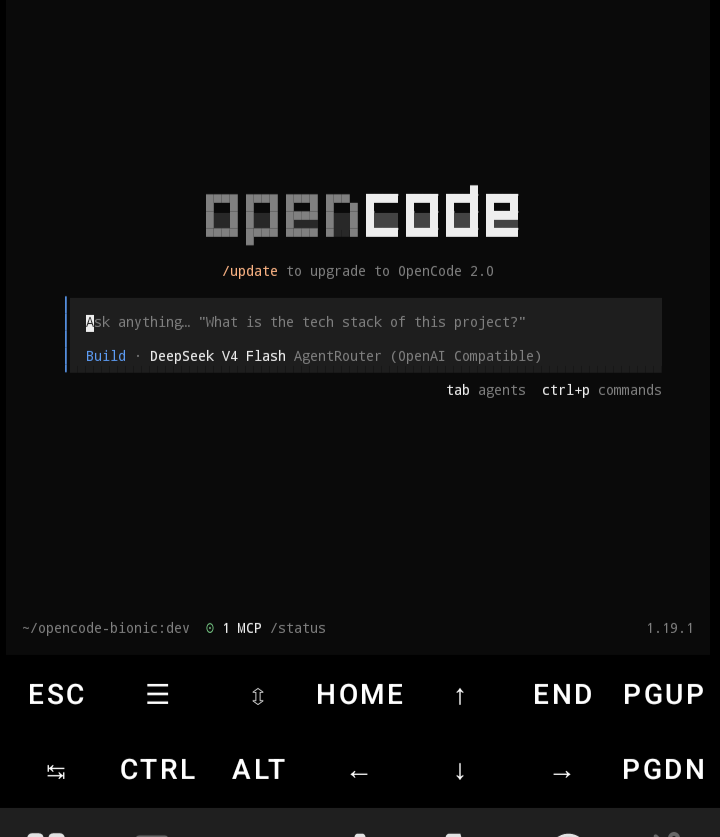
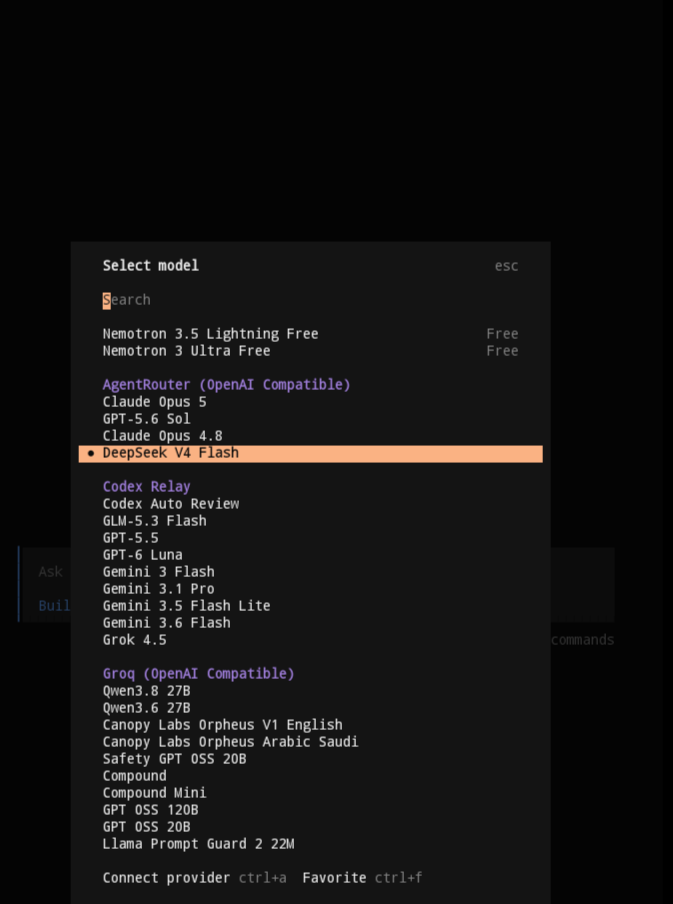
Free models are in the picker too — you can start coding without paying for anything.
Pick a line, paste one command inside Termux:
Stable (newest upstream release — default, recommended) — copy, paste, run:
curl -fsSL https://raw.githubusercontent.com/bd-loser/opencode-bionic/main/repo-setup.sh | bashv1 (legacy 1.x line):
curl -fsSL https://raw.githubusercontent.com/bd-loser/opencode-bionic/main/repo-setup.sh | OPENCODE_CHANNEL=v1 bashDev (bleeding edge):
curl -fsSL https://raw.githubusercontent.com/bd-loser/opencode-bionic/main/repo-setup.sh | OPENCODE_CHANNEL=dev bashThe script installs the signing key, points apt at this repo, and installs
opencode. From then on pkg upgrade opencode keeps you current. Prefer
typing the commands yourself?
mkdir -p $PREFIX/etc/apt/trusted.gpg.d $PREFIX/etc/apt/sources.list.d
curl -fsSL https://bd-loser.github.io/opencode-bionic/opencode-bionic.gpg \
  -o $PREFIX/etc/apt/trusted.gpg.d/opencode-bionic.gpg
echo "deb [arch=aarch64] https://bd-loser.github.io/opencode-bionic stable main" \
  > $PREFIX/etc/apt/sources.list.d/opencode-bionic.list
pkg update && pkg install opencode
To switch lines — say, stable to v1 — rerun the one-liner for the other line
(it rewrites the sources entry and installs across downgrades), or edit the
suite (stable/v1/dev) in
$PREFIX/etc/apt/sources.list.d/opencode-bionic.list yourself. The package
is opencode on every line.
Each apt line only ever carries the newest build on that line — apt
downloads a .deb from pool/<line>/ (rebuilt from the newest release on
every publish), so pkg install opencode=<old version> won't work and there
is nothing older to downgrade to. To install or pin a specific/older build,
use install.sh with OPENCODE_VERSION, or grab the .deb from that
release's assets (releases/download/v<ver>/); the recipe is in the
FAQ.
All lines build automatically from upstream — an hourly watcher mirrors upstream moves, at most about an hour behind, one release per upstream version:
| Channel | Tracks | Releases |
|---|---|---|
| stable (default) | newest upstream release (now 2.x) | tags |
| v1 | newest upstream 1.x release | prereleases |
| dev | upstream dev branch |
prereleases |
stable tracks whatever upstream tags newest — currently the 2.x line — so it is the recommended start. Still on 1.x? The v1 channel keeps shipping 1.x releases. Live package index: bd-loser.github.io/opencode-bionic.
stable and v1 embed the web UI in the binary, so it works offline out of the
box:
opencode serve     # prints the URL and a password
opencode pair      # or: one-time link that authenticates the browser for you
Open the printed http://127.0.0.1:<port> in any browser on the device — it is
a PWA, so "Add to home screen" gives you an app icon. Embedding it costs about
25 MB (binary 172 → 197 MB); the dev channel skips it to keep the hourly
rolling downloads small.
Hope2333/opencode-termux and guysoft/opencode-termux also ship native-Bionic OpenCode and both have bigger communities than this repo. What is different here:
| opencode-bionic | Hope2333/opencode-termux | guysoft/opencode-termux | |
|---|---|---|---|
| libc | native Bionic | native Bionic | native Bionic |
| release lines | stable + v1 + dev, built automatically from upstream | v1 + v2 | v1 + v2 side-by-side |
| dev freshness | tracks upstream commits hourly | — | — |
| terminal sessions (PTY) | works, bun-pty rebuilt for Bionic | — | — |
| what you install | one self-contained .deb | one of five package families | package + wrapper + libs |
| exact pinning | by version or upstream commit via install.sh; apt tracks the newest per channel |
— | — |
Blank cells: not verified, read their README.
An open-source, terminal-based AI coding agent — MIT-licensed and model-agnostic (Anthropic, OpenAI, OpenRouter, local models via any OpenAI-compatible endpoint). Developed at anomalyco/opencode with prebuilt binaries for macOS, Linux, and Windows — but none for Android. This repo provides the Android line.
opencode's TUI runs on opentui, a native Zig library. Upstream ships only glibc binaries; Android's Bionic linker rejects them. This project assembles the three pieces that make opencode run on Bionic:
- a Bun runtime patched for Bionic (SELinux-safe JIT, syscall traps, shebang remap, FFI paths),
- opentui rebuilt for android-arm64, published as
@androidtui/*npm packages (16 KiB-page-aligned Bionic.so), - this repo — patch delta, version pins, release pipeline: one command installs a single self-contained binary.
This channel's exact build inputs, regenerated automatically on every
release. The other channel lives on its own branch
(dev), all sourced from
versions.json.
| Component | Version |
|---|---|
| opencode (upstream) | 2.2.5 |
@opentui/{core,keymap,solid} (JS, via @androidtui) |
0.8.0 |
@androidtui/core-android-arm64 (native .so) |
0.8.0 |
bun-termux runtime |
1.4.4-patched (bd-loser/bun-termux) |
bun-pty (Bionic pty .so, embedded) |
0.4.11 (release asset) |
Root? 32-bit? Minimum Android?
No root, no proot, no chroot. Only aarch64 (arm64-v8a) is built, covering essentially every Android device from the last ~7 years. Minimum: Android 10 — the patched Bun runtime needs API 29.
Why not just npm install -g opencode in Termux?
Broken: opencode pulls in @opentui/core, whose glibc
.so Bionic refuses. This build substitutes the Bionic-native
@androidtui/* packages and compiles everything into one
self-contained binary.
Which LLM providers work?
All of upstream's: Anthropic, OpenAI, and any OpenAI-compatible endpoint (OpenRouter, Groq, Ollama, …). Configuration is identical to upstream — see opencode.ai/docs.
How fast do updates land?
Automatically, within about an hour: upstream stable and dev activity each trigger a matching build here (one release per upstream version). See Channels.
How do I install an older or specific version?
apt can't do it — each line's pool keeps only the newest build. Use the
release installer with an explicit version, or the .deb from the release:
curl -fsSL https://raw.githubusercontent.com/bd-loser/opencode-bionic/main/install.sh \
  | OPENCODE_VERSION=2.2.4 bash
Both verify before installing (SHA256SUMS/sha256sum -c). Note that apt
will then see a newer build and pkg upgrade opencode will move you back to
the newest one.
| Repo | Role |
|---|---|
| bd-loser/bun-termux | Bun runtime patched for Bionic |
| bd-loser/opentui | opentui android-arm64 rebuild, publishes @androidtui/* (fork of anomalyco/opentui) |
Upstream credit: anomalyco/opencode and anomalyco/opentui.
MIT — same as upstream opencode. See LICENSE.