







A local Python CLI for GitHub repository traffic and release asset download stats. GitPulse can build a dashboard for a whole organization, and it keeps SQLite snapshots so you have history beyond GitHub's short traffic window.
Part of Full-Stack-Spectrum ↗: small, sharp, open-source utilities that each do one job and install in one line.
What GitHub can tell you: aggregate daily views and clones, unique counts, popular paths, referrers, and release-asset download totals. It does not identify individual visitors or people who cloned a repository. GitHub's traffic data is generally available for the most recent 14 days. Release asset downloads are not Homebrew formula install counts.
-
Python 3.10+
-
A GitHub token with access to the repositories you want to inspect. Classic tokens need the
reposcope for private repositories. For fine-grained tokens, grant these repository permissions:Permission Needed for Metadata: read All commands (always included) Contents: read downloads, and release downloads inorgAdministration: read traffic,snapshot, and traffic inorgA fine-grained token only covers repositories owned by its resource owner, so org-owned repositories need a token whose resource owner is that org. Without a required permission, GitHub returns
Resource not accessible by personal access token.
Traffic endpoints only work for repositories you have push access to. Public visibility alone does not grant access to traffic analytics.
Homebrew (macOS and Linux):
brew install fullstackspectrum/gitpulse/gitpulsepipx or pip. The package is called gitpulse-analytics on PyPI; the command it installs is gitpulse:
pipx install gitpulse-analytics
# or
python -m pip install gitpulse-analytics
Docker. Images for linux/amd64 and linux/arm64 are on Docker Hub. Mount a directory at /data to keep the HTML dashboard and snapshot history:
docker run --rm -e GITHUB_TOKEN -v "$PWD:/data" fullstackspectrum/gitpulse org ORGThe image is built on a Docker Hardened Image (Alpine), so it has no shell or package manager and runs as the non-root UID 65532. On Linux, if that UID can't write the mounted directory, add --user "$(id -u):$(id -g)".
From source, for development:
python3 -m venv .venv
source .venv/bin/activate
python -m pip install --upgrade pip
python -m pip install -e '.[dev]'
Check the install with gitpulse --version.
Set a token in your shell. GITHUB_TOKEN and GH_TOKEN are both supported. GitPulse never saves the token:
export GITHUB_TOKEN="github_pat_..."If you use the GitHub CLI and are signed in with gh auth login, you can reuse its token instead:
export GITHUB_TOKEN="$(gh auth token)"gitpulse org ORG # terminal summary + gitpulse-ORG.html
gitpulse org ORG --open # also open the dashboard in your browser
gitpulse org ORG --save # also save views/clones snapshots for `history`
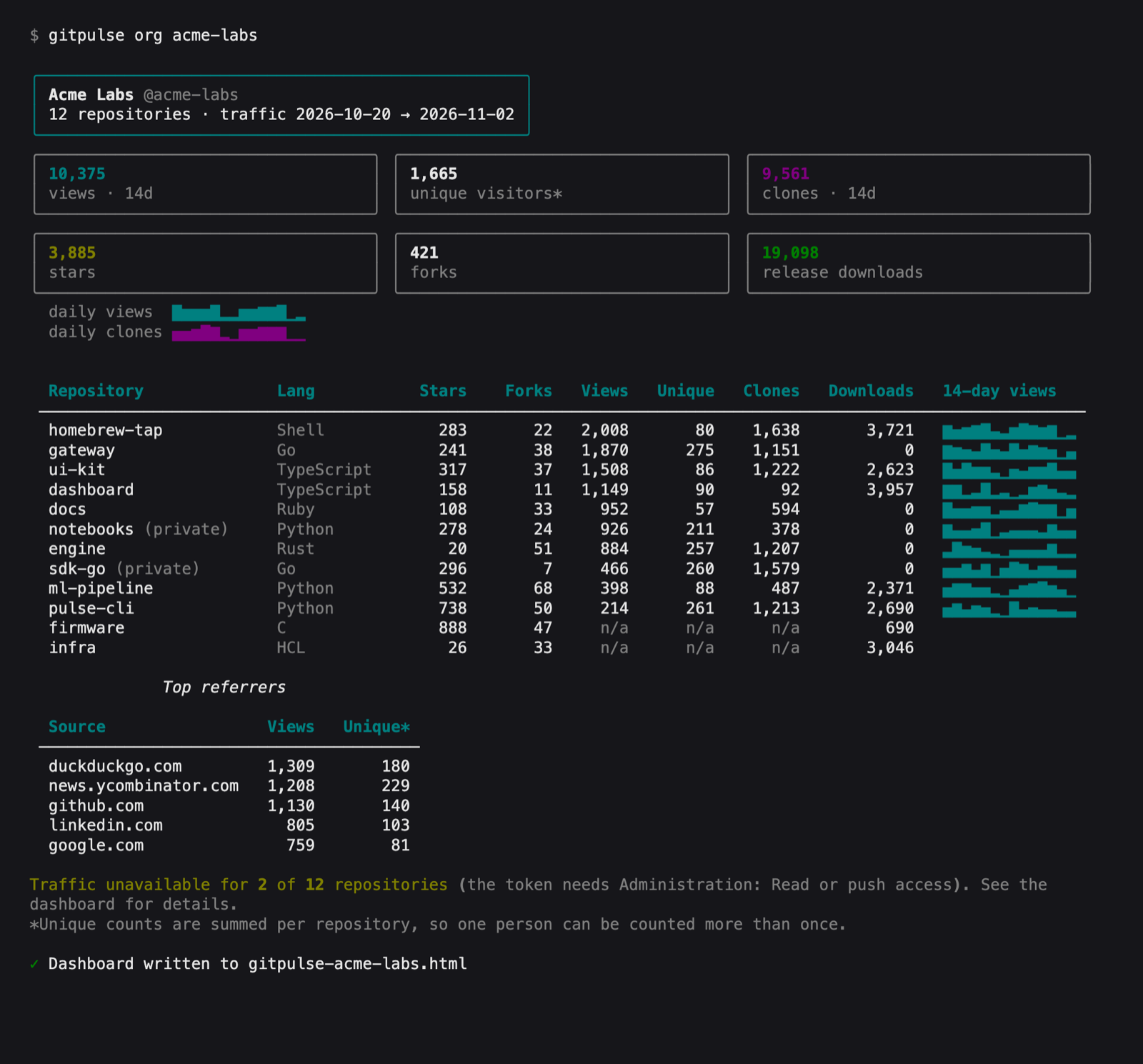
gitpulse org ORG --all --output reports/org.html # include forks and archived repos, custom pathorg works for an organization or a user account. It fetches every repository in parallel (--workers, default 8), then prints a summary in the terminal: totals, daily sparklines, a table of every repository, and the top referrers.
It also writes a self-contained HTML dashboard to gitpulse-ORG.html in the current directory, or to the path you pass with --output. The dashboard shows:
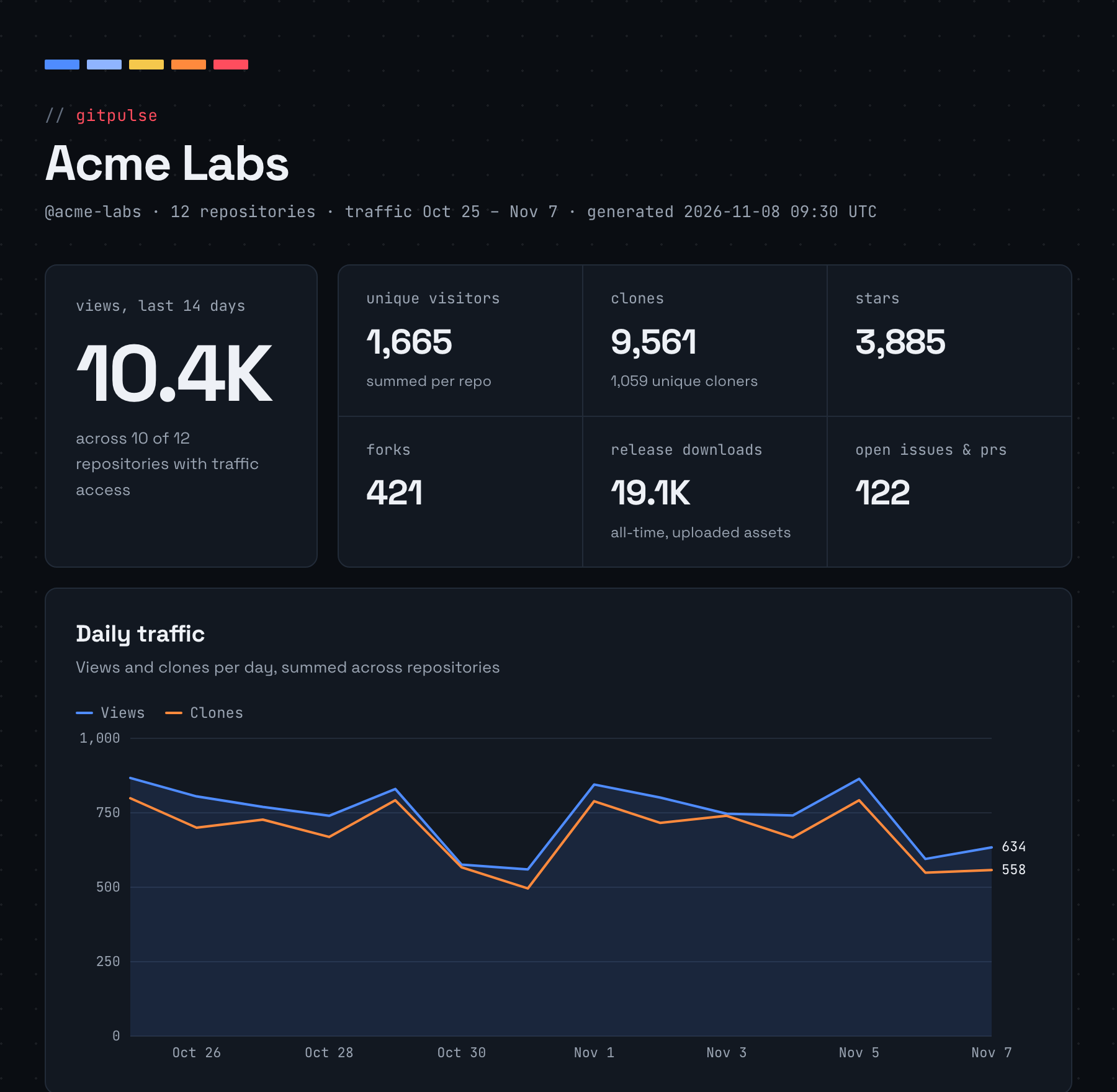
- Totals for views, unique visitors, clones, stars, forks, release downloads, and open issues and PRs
- Daily views and clones summed across repositories, with a hover readout for each day
- The most viewed and most starred repositories, a language breakdown, top referrers, and release downloads by repository
- A sortable, filterable table of every repository with a 14-day views sparkline
Styles, charts, and scripts are all inline. Only the owner's avatar and the Space Grotesk and JetBrains Mono web fonts load from the network; offline, the dashboard falls back to system fonts. It uses the dark Full-Stack-Spectrum style.
By default, forks and archived repositories are skipped; --all includes them. When your token can't read traffic for a repository, its stars, forks, and downloads still appear, and the dashboard lists which repositories are missing traffic and why. Unique visitor and cloner counts are summed per repository, so one person who visits two repositories is counted twice.
Screenshots show sample data.
gitpulse --help
gitpulse repos
gitpulse repos --all
gitpulse traffic OWNER/REPO
gitpulse traffic OWNER/REPO --metric clones
gitpulse traffic OWNER/REPO --metric referrers
gitpulse traffic OWNER/REPO --metric popular/paths
gitpulse traffic OWNER/REPO --metric views --save
gitpulse snapshot OWNER/REPO
gitpulse history OWNER/REPO --metric views
gitpulse history OWNER/REPO --metric clones
gitpulse downloads OWNER/REPO
repos lists repositories accessible to the authenticated account and filters forks and archived repositories by default. --all includes them.
traffic displays GitHub's recent traffic response. snapshot fetches views and clones and saves both responses locally. Run it on a schedule (for example, daily) to build a history beyond GitHub's 14-day window. history displays saved snapshots; it does not backfill earlier data.
downloads lists release asset download counts. It does not measure Homebrew formula installation.
Snapshots are stored at ~/.local/share/gitpulse/gitpulse.sqlite3. The database contains repository names and traffic responses, but no GitHub token. To use another location, set GITPULSE_DB to a SQLite file path.
Generated dashboards contain repository names, descriptions, and traffic numbers, including for private repositories. Treat them like any other internal report before sharing. gitpulse-*.html files are ignored by git.
For tap repositories, clone traffic and unique cloners can be useful directional signals, but they are not install totals. A tap clone, formula installation, and binary download are distinct events. GitHub does not expose an install-by-user report for formulae through these traffic endpoints.
Run tests with pytest and lint with ruff check ..
- Bump
__version__insrc/gitpulse/__init__.py. - In CHANGELOG.md, move the
Unreleasedentries under a newX.Y.Zheading with the date, and update the comparison links at the bottom. Merge tomain. - Publish a GitHub release with the tag
vX.Y.Zmatching that version, using that version's changelog section as the release notes.
The Release workflow checks that the tag matches the version, then publishes to PyPI. After that it pushes the multi-arch Docker image and updates the formula in homebrew-gitpulse. A release marked as a pre-release goes to PyPI and to Docker Hub under its exact version tag only, without moving latest or the Homebrew formula. The formula template lives in packaging/homebrew/; edit it there, not in the tap.