Same repo. Different skills. Find the difference.
SkillWhy compares the skills that fresh Codex CLI processes discover. Capture two local environments, inspect their differences, and prepare a small support bundle without sharing your full configuration.
Early alpha. Native discovery is limited to explicitly supported CLI and OS versions. A discovered or enabled skill is not proof that a model read or executed it. An existing Desktop session is not inspected.
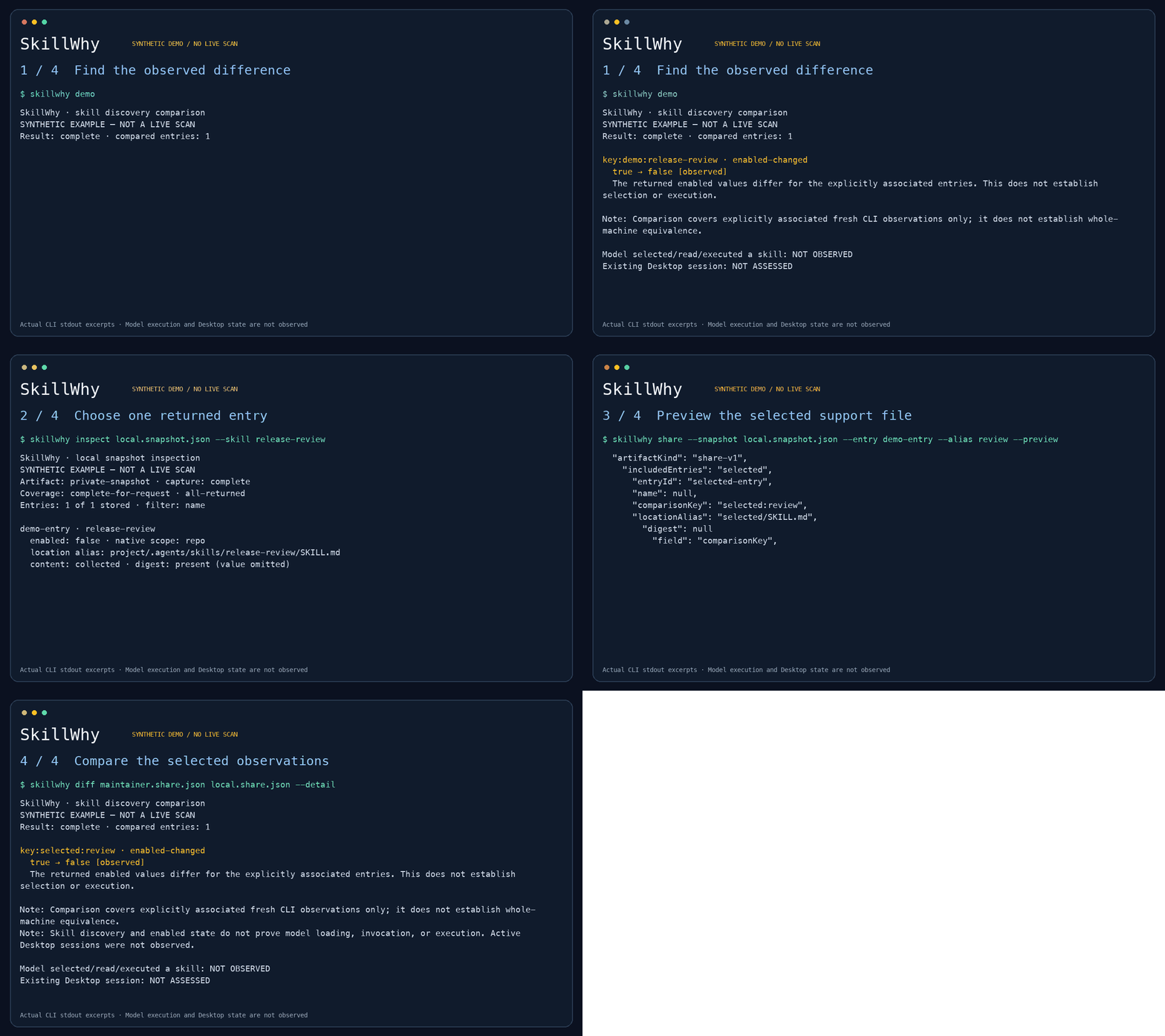
Actual alpha.3 CLI output from synthetic fixtures, shown as excerpts. The current default demo is shorter; demo --detail retains the diagnostic report. Video · Full transcript. This demonstrates the workflow; external user outcomes are still being evaluated.
Requires Node.js 22 or later:
npx --yes @hyscodebase/skillwhy@alpha demoThe first run downloads the compiled npm package. The demo uses synthetic snapshots. It needs no Codex installation, API key, or model call.
To install once and use the shorter skillwhy command:
npm install --global @hyscodebase/skillwhy@alpha
skillwhy demo
Use the explicit alpha tag while prereleases are being evaluated. GitHub release tarballs with SHA-256 checksums remain available. From a checkout, use npm ci, then npm run demo; replace skillwhy below with node dist/src/cli.js.
SkillWhy · demo complete
Synthetic example; your project was not scanned.

release-review: enabled → disabled

1 difference between two sample snapshots.
Scope: discovery metadata. No model or Desktop session was inspected.
This is the built-in example, not a capture of your environment. The command also
prints the next capture step. Use demo --detail for the full evidence notes or
demo --json for the structured comparison.
skillwhy capture --cwd ./my-project --out before.snapshot.json --digest
# After changing a skill or its configuration, capture the same project again:
skillwhy capture --cwd ./my-project --out after.snapshot.json --digest
skillwhy diff before.snapshot.json after.snapshot.json \
  --map-root project=project --detail
Capture asks a new local Codex process for metadata only. It sends no model turns or configuration writes. The native process can still have its own startup, cache, logging, and network behavior. Read the compatibility notes.
--map-root project=project explicitly confirms which roots correspond and limits comparison to those roots. Unselected global entries are counted as unassessed. SkillWhy preserves same-name copies, reports ambiguous matches, and keeps missing evidence unknown. It does not choose a winner or infer model routing.
Optional --digest fingerprints only SKILL.md files within the selected project. Matching fingerprints do not establish equality of scripts, dependencies, or behavior.
Inspect the snapshot to find the entry to share. Replace release-review with your skill's name. Duplicate names appear with separate IDs:
skillwhy inspect after.snapshot.json --skill release-review
skillwhy share --snapshot after.snapshot.json \
  --skill release-review --alias review --preview
skillwhy share --snapshot after.snapshot.json \
  --skill release-review --alias review --out local.share.json
skillwhy diff maintainer.share.json local.share.json --detail
Use the same explicit alias only for entries you have confirmed correspond. If names are duplicated, replace --skill release-review with --entry ENTRY_ID from inspect. This alpha exports one entry per bundle. inspect is a local view: it includes skill names and relative locations, so use share --preview for the file you intend to send.
By default, bundles exclude skill names, bodies, descriptions, source paths, fingerprints, logs, and unselected entries. --include-name and --include-digest are explicit opt-ins. Preview the file before sharing it yourself; the tool never uploads it. See data handling.
| Result | Meaning |
|---|---|
enabled-changed |
The two observations report different enabled values |
content-changed |
Collected SKILL.md fingerprints differ |
unknown |
A required observation or shared field is missing |
ambiguous-match |
Multiple entries could correspond; none was guessed |
inconclusive |
The comparison could not establish a complete result |
Exit 0 means the command completed; differences are normal. Exit 2 means input, collection, compatibility, or comparison was inconclusive. This alpha is not an automatic CI policy gate.
skillscope provides multi-host inspection. coding-agent-skills already verifies native discovery and catalog exposure. SkillWhy focuses on a small, inspectable comparison and support-file workflow. It does not claim a new discovery algorithm.
npm ci
npm test
npm run typecheck
No runtime dependencies. Tests use synthetic records and local fake subprocesses; live compatibility observations are documented separately. Tag releases run the test matrix, install the packaged CLI in a temporary directory, and publish the tarball with its checksum; see release maintenance.
The separate web app provides email authentication, profiles, administrator member status management, account deletion review requests, and an audit trail. Registration creates a least-privilege profile automatically. The portal uses its own Supabase project and needs Auth, email, and first-administrator setup before opening enrollment. Portal registrations are not measurements of CLI usage or external pilot success.
The CLI continues to run locally without a portal account. The portal receives no CLI snapshots or usage events. Its source is excluded from the CLI npm package.
Try the 10-minute pilot to report installation friction or a useful support case. External pilot outcomes have not yet been established.
For incomplete results, see troubleshooting. Maintainers can use the interview guide and weekly metrics to track feedback. npm distribution records publication and clean-install evidence.
Contributing · Security · 한국어 · Roadmap
MIT licensed. The CLI has no default telemetry, account requirement, or hosted service dependency.