

A CLI tool that scans adblock filter lists for rules that reference dead domains and fixes them.
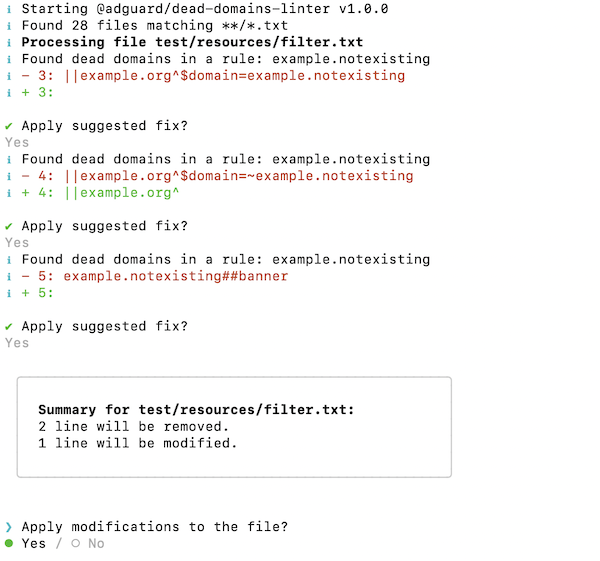
Dead Domains Linter is a command-line tool for maintainers of adblock filter lists (AdGuard, uBlock Origin, ABP). Filter lists accumulate rules that reference dead domains — domains that no longer resolve or are no longer visited by anyone. Finding and cleaning up such rules by hand is tedious and error-prone, which is what this tool automates.
The tool scans *.txt filter list files, extracts domains from each rule,
and checks them against the urlfilter.adtidy.org web service, which tracks
domains used by AdGuard DNS users within the last 24 hours. Domains absent
from that snapshot are treated as dead and, by default, double-checked with a
DNS query. For each affected rule the tool suggests a fix — remove the whole
rule or strip the dead domain from its pattern and modifiers — and applies it
interactively (with user confirmation), automatically (--auto), or not at
all (--show).
Note. The tool is meant to be replaced by an AGLint rule in the future.
Note on repositories. Active development happens in the private AdGuardSoftwareLimited/filters-dead-domains-linter repository; this public AdguardTeam/DeadDomainsLinter repository is a read-only mirror that is updated automatically from it.
Dead Domains Linter is distributed as an npm package and requires Node.js 18 or newer.
npm i -g @adguard/dead-domains-linterNote. npm users are unaffected by the package's
engines.pnpmfield. If you install with pnpm (pnpm add -g @adguard/dead-domains-linter), pnpm enforces that range on install, so you need pnpm 10.x (>=10.33.4 <11, as declared in the publishedpackage.json); other versions fail withERR_PNPM_UNSUPPORTED_ENGINE.
The tool is then available as the dead-domains-linter command. To update an
existing installation:
npm update -g @adguard/dead-domains-linterRun the tool in the directory that contains your filter lists. By default it
scans all *.txt files in the current directory and its subdirectories:
dead-domains-linterThe tool asks you to confirm every suggested fix. To review suggestions
without changing anything, use --show; to apply all fixes without prompts,
use --auto. Print the complete reference with:
dead-domains-linter --help| Flag | Default | Description |
|---|---|---|
-i, --input <glob> |
**/*.txt |
Glob expression that selects the files to scan. |
--dnscheck |
true |
Double-check dead domains with a DNS query. |
--commentout |
false |
Comment rules out instead of removing them. |
--export <file> |
— | Export the found dead domains to a file instead of modifying filter lists. |
--import <file> |
— | Import dead domains from a file and skip all other checks. |
--ignore <file> |
— | File with a list of domains to ignore. |
-a, --auto |
false |
Automatically apply suggested fixes without asking. |
-s, --show |
false |
Show suggestions without applying them. |
-v, --verbose |
false |
Run with verbose logging. |
--version |
— | Show the version number. |
-h, --help |
— | Show help. |
Pass a glob expression with -i to limit the scan to particular files or
directories:
dead-domains-linter -i filter.txt
dead-domains-linter -i "**/filters/**/*.txt"--auto applies all suggested fixes without prompting, which makes the tool
safe to run unattended (e.g., in CI):
dead-domains-linter --auto--show prints the suggested fixes without modifying any file:
dead-domains-linter --showWith --commentout, affected rules are commented out rather than deleted:
dead-domains-linter --commentoutProvide a file with one domain per line (blank lines are skipped) to treat those domains as valid:
dead-domains-linter --ignore=ignore.txtInstead of modifying filter lists, --export writes the unique dead domains
to a file so you can review them:
dead-domains-linter -i filter.txt --export=domains.txtAfter reviewing and cleaning up the exported list, make the tool use it exclusively — all other checks are skipped:
dead-domains-linter -i filter.txt --import=domains.txt --autoImportant. Please read this if you maintain a filter list with a large number of users.
The tool relies on an AdGuard DNS snapshot of the Internet domains that represents all domains used by 100M+ AdGuard DNS users for the last 24 hours. Using this snapshot is a good way to find dead domains, but it alone may not be 100% accurate and can produce false positives for really rarely visited domains. This is why the tool also double-checks dead domains with a DNS query.
If your filter list does not have a large number of dead domains, we recommend disabling that double-check:
dead-domains-linter --dnscheck=falseNote. AdGuard filter policy requires that a website be popular enough to be added to a filter list, so even if the tool produces a false positive with
--dnscheck=false, the domain most likely does not qualify for the list anyway.
| Code | Meaning |
|---|---|
0 |
The tool finished successfully. |
1 |
A fatal error occurred — e.g., an unreadable --import or --ignore file, or a file that could not be processed. |
- Input: filter list files selected by the
-iglob expression (default**/*.txt), optionally a list of dead domains to import (--import) and a list of domains to ignore (--ignore). - Output: suggested fixes are applied to the filter list files in place —
rules are removed, commented out, or stripped of dead domains. With
--export, the unique dead domains are written to the specified file instead, and the filter lists are left untouched. Progress, prompts, and summaries are printed to the console.
The tool is configured exclusively via command-line flags (see Flags). There are no configuration files and no environment variables.
- Development — how to set up and contribute
- LLM agent rules — AI-assisted development guidelines
- Changelog — version history