


Home • Web Platform • Installing • CLI Usage • Experiments • Trained Models • Local Web App • Citation
Use this repository for CLI training, prediction, and reproducible experiments. For browser-based use, visit the hosted platform without installing anything locally.
⭐ 2025 Google PhD Fellowship in Health Research awarded to support outstanding and innovative research in computer science and related fields, providing total funding of USD 30.000 over two years — [Link]
⭐ ISME Scholar Mobility Fund awarded with funding of € 2.300 for a research period in July 2026 at the Helmholtz Centre for Environmental Research (UFZ) in Leipzig, Germany
⭐ IRCAI Global Top 100 — Outstanding (2025 edition). Team recognition for BioAutoML from the International Research Centre on Artificial Intelligence (IRCAI), under the auspices of UNESCO. Recognises accessible machine learning for life sciences supporting UN Sustainable Development Goals 3 (health) and 10 (reduced inequalities). Official recognition.
⭐ BioAutoML was selected by Prototypes for Humanity as one of the top 100 projects from nearly 3,000 applications submitted by graduates from over 100 countries. The project received funding for participation and was presented at the international festival in Dubai. More information is available at: BioAutoML on the event website.
The prediction of biological sequence properties has traditionally relied on alignment-based methods that assume evolutionary homology and depend on curated reference databases. This, in turn, limits scalability and sensitivity for large or heterogeneous datasets, remote homologs, short sequences, and rapidly evolving genomic regions. Although Machine-Learning (ML) approaches offer alignment-free alternatives, their broader adoption is limited by: (i) the lack of standardized, externally validated benchmark models across diverse datasets, and (ii) the technical expertise required for feature engineering, model selection, and evaluation. Automated machine learning (AutoML) alleviates these challenges by systematically optimizing representations and models with minimal user intervention. However, most existing frameworks prioritize task-specific model construction and lack mechanisms for preserving trained models as persistent, comparable benchmarks. We introduce BioAutoML-FAST, an end-to-end web platform for automated ML analysis of nucleotide and amino acid sequences. It supports both classification and regression tasks and automates feature extraction, model training, and evaluation without requiring prior user expertise. Uniquely, it serves as a community benchmarking resource, hosting a continuously expanding repository of 60+ reusable, standardized models for genomic, transcriptomic, and proteomic applications. Extensive validation on independent datasets demonstrates performance comparable to or exceeding that of state-of-the-art methods, including protein language models such as ESM-2. BioAutoML-FAST is available at https://bioautoml.icmc.usp.br/. This website is free and open to all users, and there is no login requirement.
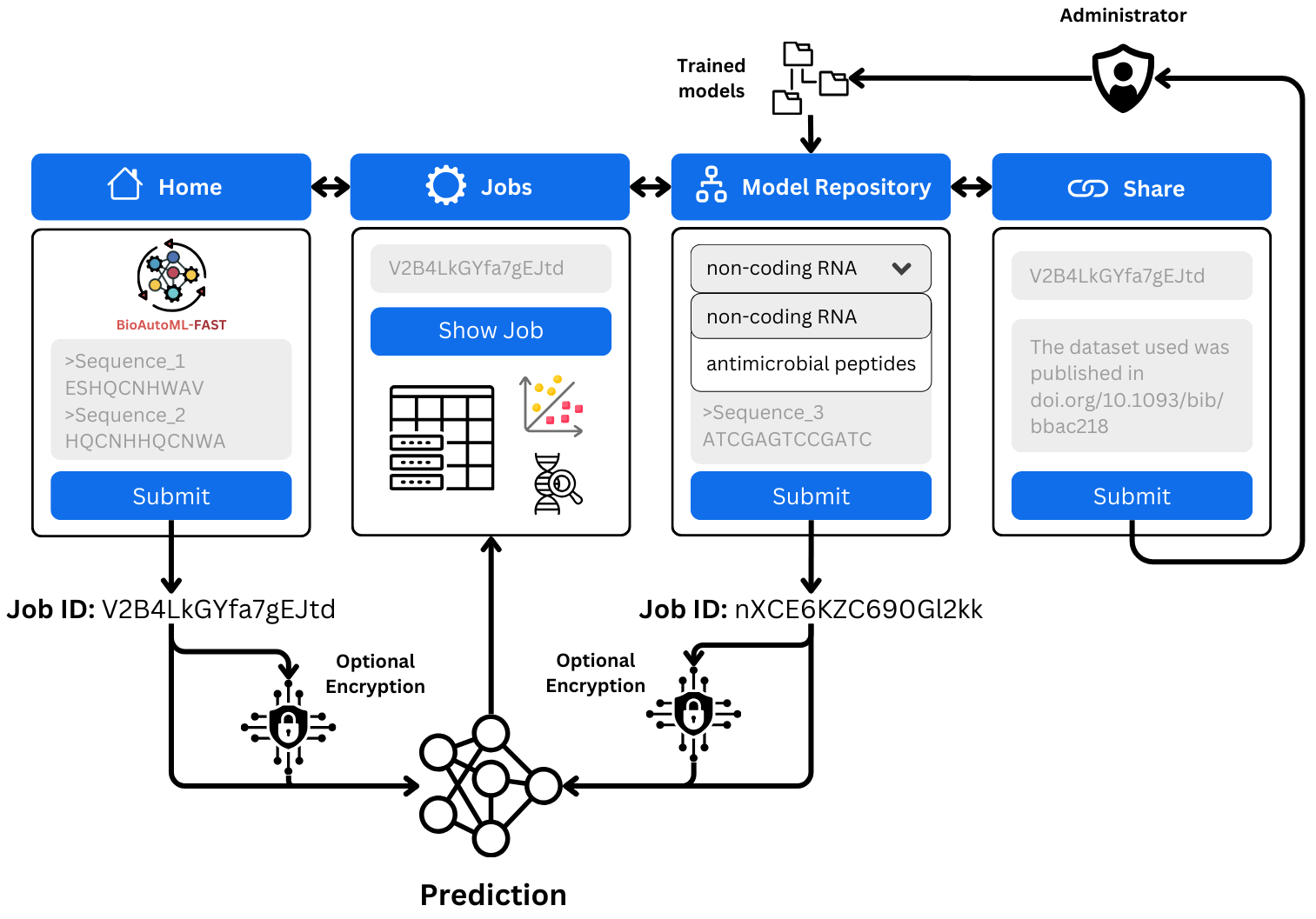
- Alignment-free machine learning for nucleotide and amino acid sequences
- Automated feature engineering — Bayesian optimization (Optuna) selects the best descriptor combination from a pool of 20 nucleotide descriptors and 23 protein descriptors
- Automated model training and hyperparameter optimization — supports LightGBM, XGBoost, and Random Forest with Optuna-driven tuning
- Classification and regression — binary, multiclass, and quantitative prediction tasks
- Structured data support —
generation.pycan be used directly with pre-computed feature matrices (CSV), without FASTA input - Pre-trained model repository — 60+ models spanning genomics, transcriptomics, and proteomics, browsable on the web platform
- Reusable models — trained models can be saved and re-applied to new sequences for prediction
- Web platform — hosted at bioautoml.icmc.usp.br, no login required; can also be self-hosted
-
Breno L. S. de Almeida, Robson P. Bonidia, Martin Bole, Anderson P. Avila-Santos, Peter F. Stadler, Ulisses Rocha, André C. P. L. F. de Carvalho
-
Correspondence: brenoslivio@usp.br, bonidia@utfpr.edu.br or ulisses.rocha@ufz.de
Silva de Almeida, B. L., Bonidia, R., Bole, M., Avila-Santos, A., Stadler, P. F., Nunes da Rocha, U., & de Carvalho, A. C. L. F. (2026). BioAutoML-FAST: an automated machine-learning platform for reusable and benchmarked biological sequence models. bioRxiv, 2026-04. DOI
Clone the repository and download MathFeature automatically:
git clone --recurse-submodules https://github.com/Bonidia/BioAutoML-FAST.git
cd BioAutoML-FAST
--recurse-submodules initializes and downloads MathFeature; no separate
git submodule commands are needed for a fresh clone.
Install Pixi 0.81–0.83, as allowed by pixi.toml, following the
official installation instructions.
The Docker build remains pinned to Pixi 0.81.0.
This installs the locked native tools, including MMseqs2, and Python dependencies:
pixi install --locked
pixi run sync
pixi run uv run --locked --no-dev python engineering.py --help
Prefix the CLI commands below with pixi run uv run --locked --no-dev to use
this environment. The current Pixi lock targets Linux x86-64.
If native tools are already installed, install uv and use it directly:
uv sync --locked
source .venv/bin/activate
python engineering.py --help
On Windows, activate with .venv\Scripts\activate. The uv environment does not
install native tools; homology-aware CV requires MMseqs2 on PATH.
Use deactivate to leave the environment.
BioAutoML-FAST uses a two-step pipeline: engineering.py handles feature extraction and descriptor selection, then automatically invokes generation.py for model training and hyperparameter optimization.
Run commands from the repository root in the installed environment.
Use python engineering.py --help or python generation.py --help for all options.
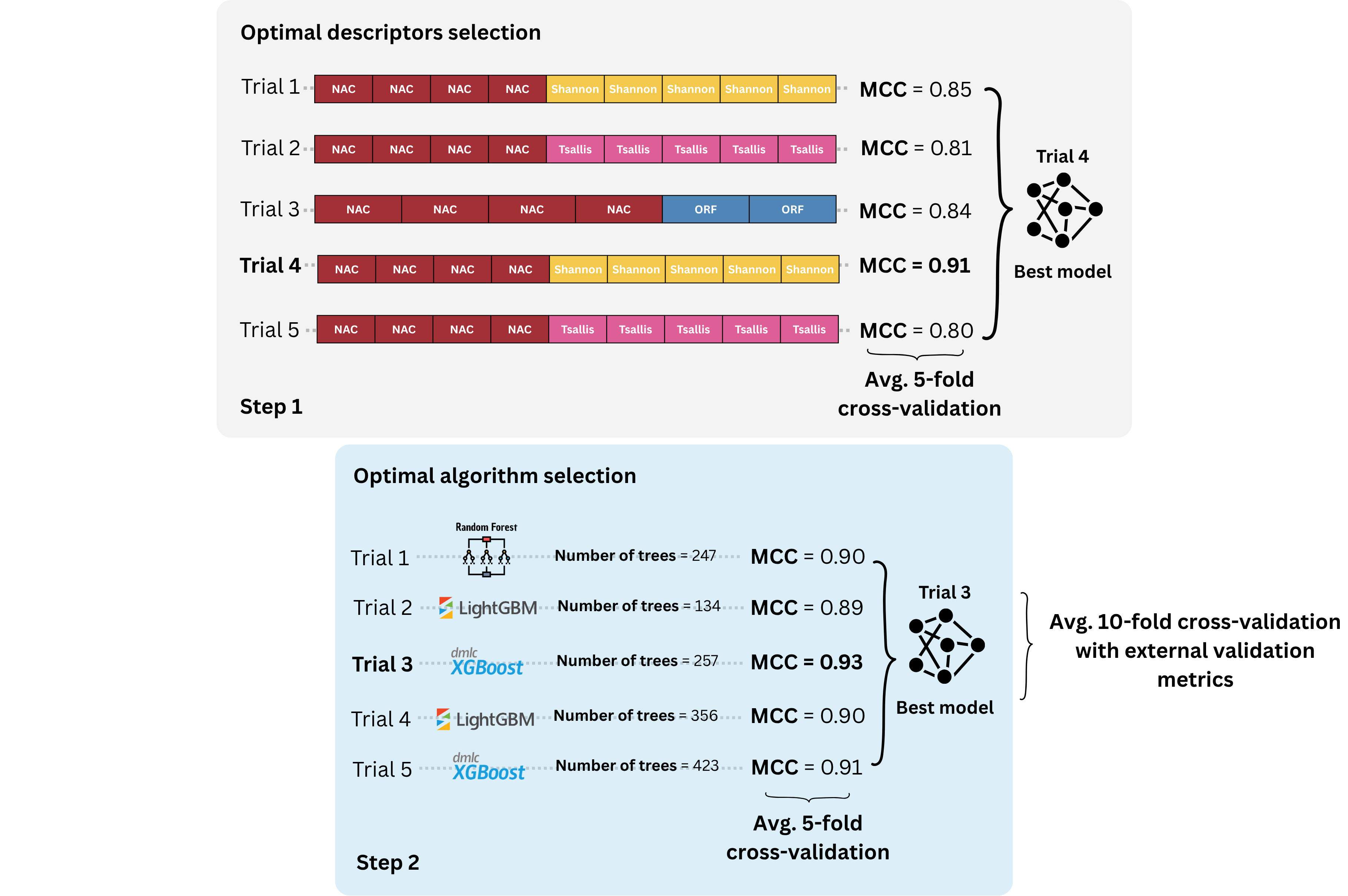
The engineering.py script performs the first step of BioAutoML-FAST. It extracts sequence descriptors from the input FASTA files, performs automated feature engineering/descriptor selection, and then automatically calls generation.py for model generation and hyperparameter optimization.
| Option | Description | Default |
|---|---|---|
-fasta_train, --fasta_train |
One or more training FASTA files. | Required |
-fasta_label_train, --fasta_label_train |
Labels associated with each training FASTA file. The order must match -fasta_train. |
Required |
-fasta_test, --fasta_test |
One or more testing FASTA files. | Optional |
-fasta_label_test, --fasta_label_test |
Labels associated with each testing FASTA file. The order must match -fasta_test. |
Optional |
-dtype, --dtype |
Type of input data. Supported values: DNA/RNA or Protein. |
DNA/RNA |
-task, --task |
Machine learning task. Use 0 for classification and 1 for regression. |
0 |
-estimations, --estimations |
Number of estimations used during automated feature engineering. | 200 |
-patience, --patience |
Number of trials without improvement before early stopping. | 80 |
-tuning, --tuning |
Number of trials used for hyperparameter optimization in generation.py. |
150 |
-difference, --difference |
Minimum improvement required before early stopping. | 0.001 |
-n_cpu, --n_cpu |
Number of CPU cores to use. Use -1 to use all available cores. |
-1 |
-output, --output |
Output directory where results will be saved. | Required |
Dataset 56 contains E. coli K12 RNA sequences from three classes: rRNA, sRNA, and tRNA. Use the included training and test FASTAs:
python engineering.py \
  -fasta_train App/datasets/dataset56_bonidia_dnarna_0/train/rRNA.fasta App/datasets/dataset56_bonidia_dnarna_0/train/sRNA.fasta App/datasets/dataset56_bonidia_dnarna_0/train/tRNA.fasta \
  -fasta_label_train rRNA sRNA tRNA \
  -fasta_test App/datasets/dataset56_bonidia_dnarna_0/test/rRNA.fasta App/datasets/dataset56_bonidia_dnarna_0/test/sRNA.fasta App/datasets/dataset56_bonidia_dnarna_0/test/tRNA.fasta \
  -fasta_label_test rRNA sRNA tRNA \
  -dtype DNA/RNA \
  -task 0 \
  -n_cpu 4 \
-output results/dataset56Dataset 2 contains anticancer peptides (positive) and negative examples:
python engineering.py \
  -fasta_train App/datasets/dataset2_yu_protein_0/train/negative.fasta App/datasets/dataset2_yu_protein_0/train/positive.fasta \
  -fasta_label_train negative positive \
  -fasta_test App/datasets/dataset2_yu_protein_0/test/negative.fasta App/datasets/dataset2_yu_protein_0/test/positive.fasta \
  -fasta_label_test negative positive \
  -dtype Protein \
  -task 0 \
  -n_cpu 4 \
-output results/dataset2The generation.py script performs the second step of BioAutoML-FAST. It trains and optimizes machine learning models using the descriptors generated during the feature engineering step. The module supports both classification and regression tasks, including hyperparameter optimization and external test evaluation.
Structured data:
generation.pycan also be used as a standalone script with any pre-computed feature matrix in CSV format — no FASTA input or feature extraction required. This makes it suitable for general tabular ML tasks beyond biological sequences.
| Option | Description | Default |
|---|---|---|
-path_model, --path_model |
Path to a previously trained model to be reused for prediction or evaluation. | '' |
-task, --task |
Machine learning task. Use 0 for classification and 1 for regression. |
0 |
-tuning, --tuning |
Number of hyperparameter optimization trials. | 150 |
-train, --train |
Training feature matrix in CSV format. | Required |
-train_label, --train_label |
Training labels in CSV format. | Required |
-train_nameseq, --train_nameseq |
CSV file containing sequence names/identifiers for the training set. | Required |
-test, --test |
Test feature matrix in CSV format. | Optional |
-test_label, --test_label |
Test labels in CSV format. | Optional |
-test_nameseq, --test_nameseq |
CSV file containing sequence names/identifiers for the test set. | Optional |
-n_cpu, --n_cpu |
Number of CPU cores to use. Use -1 to use all available cores. |
-1 |
-output, --output |
Output directory where models and results will be saved. | Required |
Set --n_cpu to limit descriptor workers and learner threads; -1 uses the
available CPU allocation. Test-set extraction uses only the selected descriptors.
Both training scripts accept these options:
| Option | Description | Default |
|---|---|---|
--seed |
Seed for learners and shuffled CV folds. | 63 |
--search_seed |
Optuna sampler seed. | Same as --seed |
--search_jobs |
Concurrent Optuna trials; keep at 1 for repeatable trial ordering. |
1 |
--pruning / --no-pruning |
Enable or disable fold-score pruning in descriptor selection and hyperparameter tuning. | On |
--homology_aware |
Automatic MMseqs2 sequence grouping for CV and train–test similarity auditing. Start from FASTA inputs with engineering.py; generation.py reuses its assignments. |
Off |
--homology_identity |
Minimum identity in percent (1–100); requires --homology_aware. |
90 |
--homology_coverage |
Minimum alignment coverage of each sequence in percent (1–100); requires --homology_aware. |
80 |
--filter_test_overlap |
Also evaluate test sequences without detected training matches; requires homology-aware training and a labelled FASTA test set. | Off |
The web training form provides the same Trial pruning checkbox, checked by default. Turning it off can increase training time. Search patience, trial caps, time limits, and rejection of invalid configurations remain unchanged. With tuning disabled, pruning still applies to descriptor selection; it does not affect prediction with a saved model. The choice is recorded in run settings and optimization reports.
Regression reports include MAE, MSE, RMSE, predictive R², and Pearson r. Both search stages optimize RMSE. Pearson measures association, not absolute accuracy; correlation squared is not predictive R². Undefined correlations are reported as missing rather than replaced with a score.
Classification probabilities are model estimates, not guaranteed confidence levels.
For an additional similarity-filtered test evaluation, add --filter_test_overlap
to the engineering.py --homology_aware command with a labelled test set. The web
app exposes the same option when homology-aware CV and Test set are selected.
It uses the selected identity/coverage thresholds, excluding exact duplicates and
detected similar training matches from the additional evaluation only. Training,
original test files, full predictions and full-test metrics are unchanged.
Prediction-only inputs and loaded models do not support this training option.
Additional outputs are results/metrics/filtered_test_metrics.csv,
results/predictions/filtered_test_predictions.csv, and
reports/homology/test_filter_membership.csv. The Jobs page shows retained counts
and filtered metrics. Undefined metrics are marked unavailable rather than replaced
with full-test scores. No detected matches does not establish absence of homology.
Add these options to an engineering.py training command:
--homology_aware --homology_identity 90 --homology_coverage 80MMseqs2 groups training sequences before CV. The defaults are 90% identity and
80% coverage of each sequence, for both proteins and nucleotides. Supply
percentages from 1 to 100 (90, not 0.9); threshold options require
--homology_aware. Choose thresholds before inspecting test performance.
Both search stages and the ten-fold report respect the training groups.
Classification uses stratified grouped folds. If valid grouped folds cannot be
formed, training stops instead of silently reverting to ordinary CV.
generation.py reuses assignments prepared by engineering.py; this option
requires sequence inputs, not an arbitrary feature matrix.
With test FASTAs, an exact train–test overlap audit runs even when homology-aware
CV is off. Enabling it adds a similarity audit. Reports and matches are saved in
reports/homology/. Auditing does not remove sequences or change the test set.
These thresholds detect close-sequence redundancy, not all homology. Grouped CV does not eliminate model-selection optimism or overlap in the preserved test set. Ten-fold results remain post-selection optimization CV, not nested evaluation.
Keep inputs, row order, dependencies, CPU allocation, seeds and budgets fixed.
Use --search_jobs 1 for repeatable trial ordering. Different search seeds measure
search variability, not same-seed repeatability; identical results across hardware
or package versions are not guaranteed. Preserve the MathFeature revision and
Docker image used for a run: rebuilding can retrieve newer upstream code.
Run from the repository root, using the locked environment and datasets in
App/datasets/. The commands below use 32 CPUs, model/fold seed 63, and search
seeds 6301–6305 (the first three for ablation, learner and pruning comparisons).
The primary benchmark uses tuning and pruning on, with ordinary CV.
Prepare the environment, including MMseqs2 for the homology experiment:
pixi install --locked
pixi run sync
Run the tasks individually, in this order. Each task runs only its own experiment; it does not launch prerequisites.
pixi run ablation               # 15 datasets × 6 conditions × 3 seeds
pixi run benchmark-first        # First seed across 64 datasets
pixi run learner-aware          # Alternative Stage 1 learners
pixi run budget-sweep           # Stage-specific trial budgets
pixi run homology               # Ordinary/homology-aware CV × original/filtered test sets
pixi run sequence-overlap       # Exact train–test overlap audit
pixi run pruning                # Pruning on/off, 3 datasets × 3 seeds
pixi run benchmark              # Complete/resume five benchmark seeds
The homology task automatically evaluates both CV strategies on the original test
set and the same filtered subset (excluding training matches at 90% identity and
80% coverage of both sequences). Completed training runs reuse saved predictions;
no retraining is needed to add filtered evaluations. All four conditions are in
manuscript/experiments/results/homology_comparison/results.csv. Original scores
are preserved in original_test_results.csv; filtered predictions, metrics and
membership CSVs are under filtered_test/<dataset>/runs/run_<n>/<cv>/.
Full and filtered test scores refer to different test populations.
Optional first-seed pruning-off benchmark:
pixi run benchmark-pruning-off- Options: append
--helpor--dry_run, e.g.pixi run homology --dry_run. - Resume: benchmark tasks resume automatically. Other tasks accept
--resume. Stop previous runners and workers before restarting. Compatible completed runs and descriptors are reused; interrupted benchmark attempts are archived. - Outputs: all scripts live directly in
manuscript/experiments/. The main benchmark writes toApp/datasets/; other experiments write tomanuscript/experiments/results/<experiment>/. Each experiment saves per-runresults.csvrows, with dataset, seed/condition where applicable, metrics and timings, plus its underlying artifacts and provenance. The budget sweep saves per-seed checkpoint rows; the overlap audit saves per-dataset counts. Cross-seed summaries, paired differences and comparison plots are left to your analysis. Existing historical outputs are preserved. Both benchmark tasks share the realApp/datasets/directory, with oneruns/run_N/directory per completed dataset/seed and a reusableshared/descriptor cache inside each dataset. Each dataset contains realtrain/,test/(when available),shared/andruns/directories. Reused results and caches are copied into this layout. Git includestrain/,test/, and bibliography files, but excludes generated results, runs, and shared caches. Missing seeds are not replaced with older models. Benchmark-wide tables (results.csv,results_index.csv), protocols, inventories, worker configurations and logs are stored in the ignored.benchmark/directory. Keep this directory to resume safely; only dataset folders andreferences.bibappear at the visible repository level. - Settings: use
--runs,--outputand--reuse_fromwith benchmark tasks as needed. Changed inputs, budgets or dependencies cannot be mixed into an existing benchmark. Imported artifacts retain their original provenance. - Interpretation: ten-fold scores are post-selection optimization CV, not unbiased evaluation. Report test MCC and regression R² separately. Cached or additive timings are not standalone end-to-end runtime measurements.
Dataset choices and full protocols are in the revision plan.
Use a fresh --output directory for each CLI execution. The main files are:
| Path | Contents |
|---|---|
model/trained_model.sav |
Saved model |
results/metrics/ |
Optimization-CV and test metrics |
results/predictions/ |
Predictions with original sequence names |
results/descriptors/ |
Selected descriptors, feature matrices and importance |
reports/optimization/ |
Trial histories, settings and stopping reasons |
reports/homology/ |
Sequence grouping and overlap audits |
reports/sequence_names/ |
Original headers and unique internal-ID mappings |
reports/performance_summary.csv |
Extraction, optimization and total time; peak memory |
run.json, timings.csv |
Run status, inputs, settings, versions and phase timings |
work/features/ |
Intermediate extracted features |
CLI summaries show minutes; CSV timings use seconds and memory uses bytes. Peak memory is sampled process-tree RSS, so shared pages may be counted more than once. Optimization time excludes final fitting and reporting CV. Failed or interrupted runs are not completed results.
Duplicate FASTA names are allowed: unique internal IDs preserve row alignment,
while prediction exports retain original names. Regression targets encoded after
| in FASTA headers are preserved.
Browse the model repository at bioautoml.icmc.usp.br. Models are also available for offline use on Zenodo.
CLI training saves an unsigned model in model/trained_model.sav. To use your own
model with generation.py, supply --path_model and --trust_unsigned_model,
along with the test feature inputs. Saved-model prediction does not rerun tuning.
After running the dataset 2 example above, reuse its model and extracted test features without retraining:
python generation.py \
  --path_model results/dataset2/model/trained_model.sav --trust_unsigned_model \
  --task 0 \
  --test results/dataset2/results/descriptors/best_test.csv \
  --test_nameseq results/dataset2/work/features/fnameseqtest.csv \
  --test_label results/dataset2/work/features/flabeltest.csv \
  --n_cpu 4 --output predictions/dataset2
Predictions are saved to predictions/dataset2/results/predictions/test_predictions.csv.
The saved-model command accepts feature CSVs, not raw FASTA files; their columns
must match the trained model.
For Python integrations:
from bioautoml.model_artifacts import load_model

model = load_model("results/dataset2/model/trained_model.sav", trust_unsigned=True)
Load unsigned models only if you trust their source: deserialization can execute
code. Use the provided loader rather than joblib.load(). Current-format bundles
and compatible dependency versions are required. The web platform accepts only
models signed by an approved deployment; CLI-created models cannot be uploaded
as trusted web models.
Use the hosted application at bioautoml.icmc.usp.br for browser-based training, prediction and model exploration. No local installation or login is required.
On Linux (amd64), with Docker running, Docker access without sudo, and curl
installed, deploy without cloning the repository:
curl -fsSLO https://raw.githubusercontent.com/Bonidia/BioAutoML-FAST/main/run-docker.sh &&
bash run-docker.sh
The launcher prompts for optional API keys; press Enter to skip either service.
The launcher creates persistent directories under App/ beside the script.
Datasets and pretrained models are optional; the Model Repository displays a warning
until its data is supplied. You can inspect run-docker.sh before executing it.
Later, run bash run-docker.sh again from this directory to pull and deploy updates.
From a repository checkout, start a local instance with:
./run-docker.shOpen http://localhost:8501. The script pulls ghcr.io/bonidia/bioautoml-fast:latest
and replaces both containers; running jobs are interrupted. Jobs and database
files remain in local bind-mounted directories. A failed download leaves the
existing containers running. Local source code does not override the published image.
See ./run-docker.sh --help for options.
Use IMAGE_NAME=ghcr.io/bonidia/bioautoml-fast:sha-<full-commit> ./run-docker.sh
to select a particular build, or specify an image digest for an exact deployment.
With a full repository checkout, build locally using ./run-docker.sh --build. For local UI development
with source mounts and live reload, use ./run-docker.sh --dev.
To stop and remove both application containers and the image without rebuilding:
./run-docker.sh --deleteRunning container jobs are interrupted. Local jobs, database files, datasets,
and signing keys are preserved. If you used custom CONTAINER_NAME or
IMAGE_NAME values, supply the same values when deleting the deployment.
For the default local-build image, use ./run-docker.sh --build --delete.
When run in a terminal, the launcher prompts for the Blablador and Mailgun API keys with hidden input. Press Enter or enter only whitespace to skip a service. Your answers replace any inherited API-key values, so a blank answer always means no key. Entered values are not written to a configuration file or shell history.
For automated launches without a terminal on standard input, no prompts are
shown; export BLABLADOR_API_KEY and MAILGUN_API_KEY beforehand if needed.
The launcher asks for an optional Ed25519 private-key file. Press Enter to reuse
or create ./.bioautoml/signing.pem under your current working directory.
This is the only file stored in .bioautoml/ and the only secret to back up.
Existing deployments keep their mounted key directory unless you explicitly
select another key or MODEL_KEYS_DIR. Supplied keys are copied into the protected
key directory; existing private keys are never overwritten. Incomplete or
mismatched key sets stop startup before any running containers are replaced.
Key setup runs through Docker; host Python is not required. Only the training
worker receives the private key, mounted read-only.
To use a different directory or restore keys from another machine:
MODEL_KEYS_DIR=/absolute/private/location/bioautoml-keys ./run-docker.sh
# Non-interactive import into a new directory:
MODEL_SIGNING_KEY=/private/signing.pem MODEL_KEYS_DIR=/private/new-keys ./run-docker.sh
To create keys manually from a clone with the project environment installed:
pixi run keys-create
pixi run keys-delete
keys-create creates .bioautoml/signing.pem, asking for confirmation before
replacing an existing private key. It automatically adds the matching public key
to deployment/official_public_keys.json, retaining previous public keys so
previously signed models remain verifiable. Explicit revocations are preserved.
Commit the public-key file and rebuild/publish the
image to distribute the updated trust; restart deployments to use the new key.
Never commit the private key. keys-delete confirms before deleting
only signing.pem; public keys and existing model trust are unchanged.
Revoke a compromised key explicitly using the public-key file's revoked list.
Back up the private key first:
replacement and deletion cannot be undone without a backup.
Normal launcher runs never replace existing keys or edit the bundled public keys. Pass
MODEL_TRUSTED_KEYS=/path/to/previous/trusted_keys.json on the first launch to retain
the previous public keys for existing models. Additional trust is persisted in the
automatically managed public verification configuration under
${XDG_CONFIG_HOME:-$HOME/.config}/bioautoml-fast/verification/<container>/.
It contains no private key and is mounted read-only. The public key and signer ID
are derived from signing.pem; they need no separate files. Custom trust/revocation
settings should also be backed up if you configure them.
The bundled deployment/official_public_keys.json and local public keys are merged
for verification on each launch; revocations take precedence. Local keys are not
automatically trusted by other deployments or the official server unless their
public keys are distributed there. Creating keys does not sign existing unsigned models.
Back up signing.pem securely. .bioautoml/ is excluded from Git and Docker
builds; private files use owner-only permissions. Never publish private keys.
CLI training does not require signing keys. App/datasets/references.bib is included in the repository;
trained model files must be supplied separately for the model repository.
The launcher resolves App/datasets and mounts the whole directory read-only
at /app/App/datasets. Set DATASETS_DIR to use a different repository directory.
Unsigned CLI benchmark artifacts still require trusted signing before web
loading; linking them does not bypass model verification.
GitHub Actions checks pull requests and pushes to the default branch by running
run-docker.sh --build with isolated containers and temporary data. It checks
Streamlit, Redis, both workers, CLI startup, and the interface in Chromium, then
trains a small example through the normal job queue with tuning enabled.
Before publishing, add the private PEM file as the repository Actions secret
EXAMPLE_MODEL_SIGNING_KEY (Settings → Secrets and variables → Actions). It must
match a trusted public key in deployment/official_public_keys.json. Only
default-branch pushes receive this secret; pull requests use disposable keys.
The private key is mounted only into the training worker, never copied into the
image or uploaded with the example.
The published image includes the signed example results. On startup they are installed into the persistent jobs directory and registered for the Example button in Jobs. This managed example is exempt from automatic expiry. CI also tests installation on empty storage, prediction, and restart without a private key.
Successful default-branch pushes publish the same tested image to GitHub Container
Registry as ghcr.io/bonidia/bioautoml-fast:latest and :sha-<full-commit>.
Pull requests only build and test; they never publish. Publication uses GitHub's
automatic GITHUB_TOKEN, not a personal token. After the first publication, set
the package visibility to Public in GitHub Packages to allow downloads without
logging in. Until an image is published, use ./run-docker.sh --build.
Images are built for Linux amd64; other architectures require a local build with
compatible dependencies. Publishing does not restart deployed applications:
run the launcher on the deployment machine when you are ready to update.
If you use this code in a scientific publication, we would appreciate citations to the following paper:
Silva de Almeida, B. L., Bonidia, R., Bole, M., Avila-Santos, A., Stadler, P. F., Nunes da Rocha, U., & de Carvalho, A. C. L. F. (2026). BioAutoML-FAST: an automated machine-learning platform for reusable and benchmarked biological sequence models. bioRxiv, 2026-04. DOI
@article{silva2026bioautoml,
  title={BioAutoML-FAST: an automated machine-learning platform for reusable and benchmarked biological sequence models},
  author={Silva de Almeida, Breno Livio and Bonidia, Robson and Bole, Martin and Avila-Santos, Anderson and Stadler, Peter F and Nunes da Rocha, Ulisses and de Carvalho, Andre CP L F},
  journal={bioRxiv},
  pages={2026--04},
  year={2026},
  publisher={Cold Spring Harbor Laboratory}
}