
Give your agent the browser you already use.
Search the web, read pages, and use signed-in sites through one small Rust CLI. Choose your existing Chrome or a separate profile. Your agent gets compact JSON or readable text, without a hosted browser service or a search API key.
Documentation · Agent reference · crates.io · npm
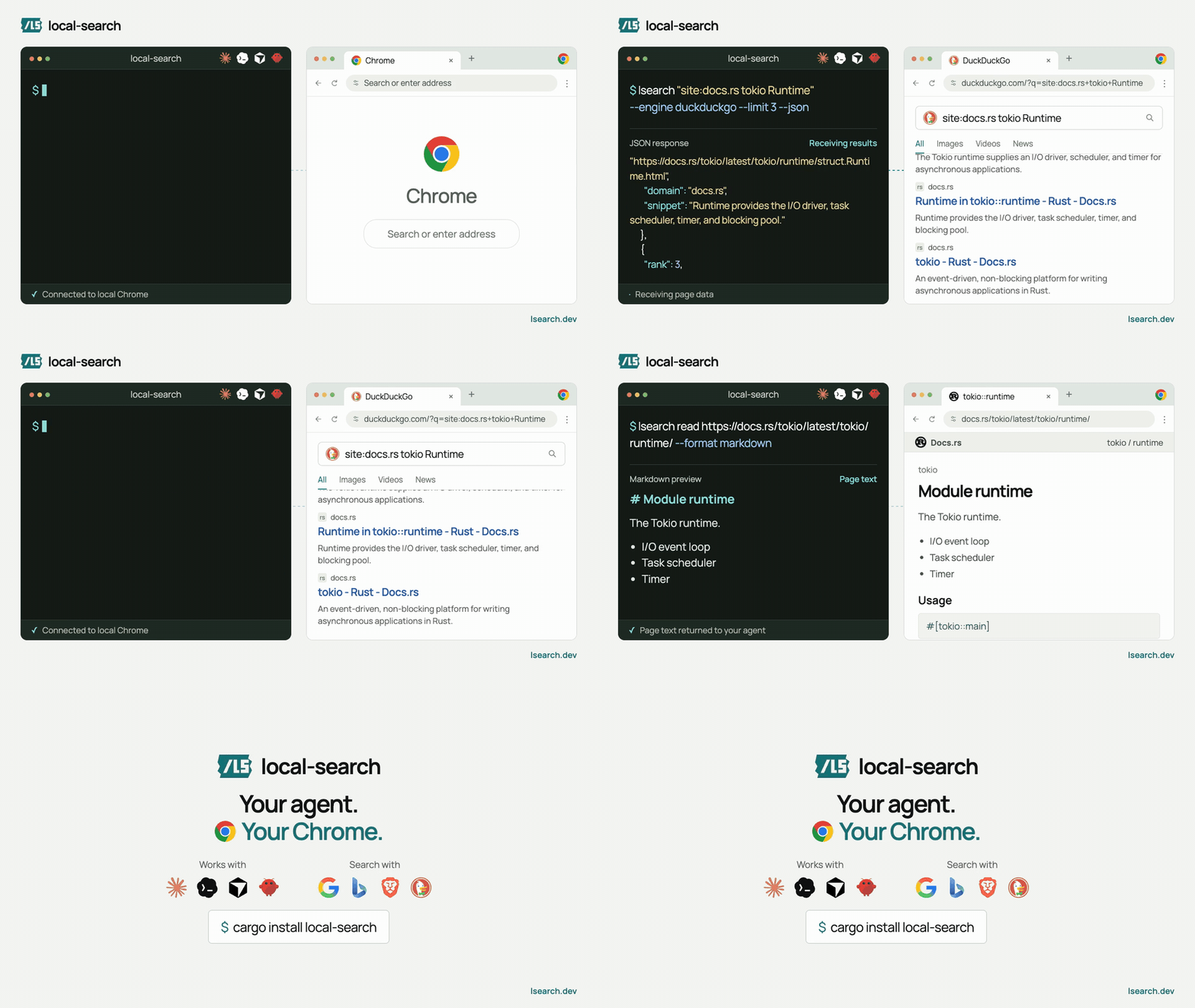
Illustrated demo, not a timing measurement. Download video.
cargo install local-searchOr use npm (requires Node.js 18+ and Rust/Cargo):
npm install -g @kevinliu01/localsearchCurrent release: 0.3.0 on Cargo and npm. The arm64 macOS release binary measures 1,355,744 bytes (1.36 MB), built with Rust 1.98.1 on October 14, 2026.
Both install the same native Rust CLI. Chrome or Chromium is required.
local-search and local-browser remain aliases for lsearch.
Choose one:
Use your existing logins. In Chrome 144+, enable remote debugging at
chrome://inspect/#remote-debugging. Then run this command and approve Chrome's
connection prompt:
lsearch connect --existingOne approved connection is reused across commands on macOS/Linux. Your logins stay in Chrome; you do not need to export cookies.
Keep agent work separate. Create a persistent local profile and sign into the sites your agent needs there:
lsearch connect --managedYour choice is remembered. If the browser disconnects, lsearch reports an error instead of silently switching profiles. To end existing-browser access without closing Chrome:
lsearch disconnect# Search Google, Bing, Brave, or DuckDuckGo
lsearch "rust async cancellation" --engine google --limit 3 --json
# Read a page as text or structured data
lsearch read https://docs.rs/tokio/latest/tokio/ --format markdown
# Read a signed-in page through the profile you chose
lsearch read https://www.linkedin.com/feed/ --format json
# Inspect the current page before interacting
lsearch snapshot --limit 40| Task | Command |
|---|---|
| Search with ranked titles, URLs, and snippets | lsearch "query" --engine bing --json |
| Read a page | lsearch read URL --format json |
| Extract repeated fields | lsearch extract SELECTOR --field name=SOURCE |
| Map links on a site | lsearch map URL --depth 1 --limit 20 |
| Interact with a page | lsearch snapshot, then click or fill |
| Make a browser-authenticated request | lsearch request URL |
| Capture a page | lsearch screenshot, html, or pdf |
Run lsearch COMMAND --help for options. The
command reference
also covers tabs, bounded reads, exports, and error handling.
Works with Claude Code, Codex, Cursor, OpenClaw, and any agent that can run shell commands. Give it the agent reference, then a task:
Use lsearch with my connected browser. Research this topic and return a short summary with source links. Do not post, send messages, or change settings. Ask before reconnecting or switching profiles.
Piped search output and --json use stable JSON. Progress stays on stderr.
Failures have a nonzero exit status and a structured error code.
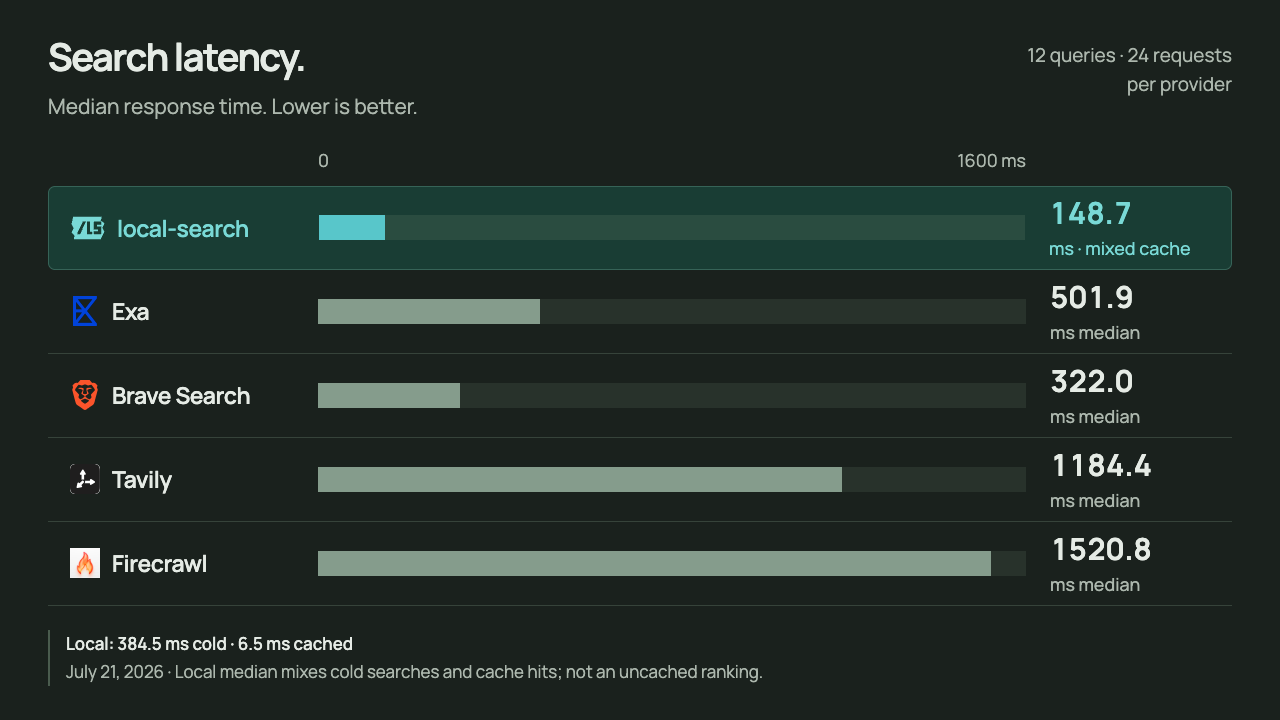
local-search recorded a 148.7 ms overall median, including cold searches and cache hits. Separately: 384.5 ms cold, 6.5 ms cached. This is the July run, not an uncached speed ranking.
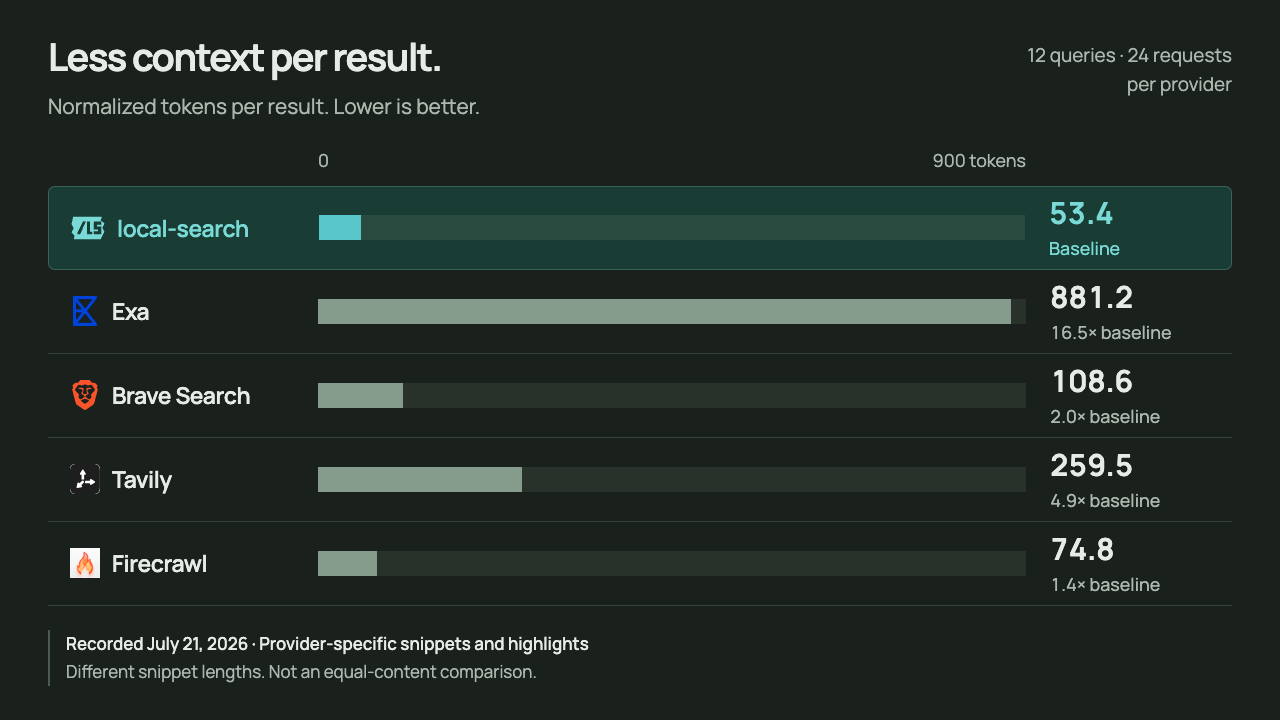
Recorded July 21, 2026: 12 queries at 3- and 10-result depths, 24 requests per provider. local-search used 53.4 median normalized tokens per result. Providers returned different amounts of snippet or highlight text, so this is not an equal-content or search-quality comparison.
July results and settings · September comparison with a shared 120-character snippet cap
Keep agents to the browser, sites, and tabs you mean them to use.
# A separate profile is real isolation: its own logins, history, and cookies
lsearch profile create research
lsearch profile use research

# Never open or read some sites, or allow only a few
lsearch policy block bank.com mail.google.com/mail
lsearch policy allow docs.rs github.com

# In your everyday Chrome, let agents use only the tabs they open
lsearch policy tabs own
lsearch tabs grant TARGET_ID     # hand over one tab yourself
Each profile (everyday, agent, and any you create) keeps its own rules.
Blocked sites return site_blocked, checked before every navigation, after
redirects, and before any command reads the current page; other tabs return
tab_not_allowed, and tabs list only counts them. Browser pages such as
chrome://settings are always off limits. These are guardrails for agents you
trust, not a sandbox; see the security model.
Browser work happens on your machine. Existing-browser approval gives broad access to that Chrome session, so connect only trusted agents and define their task clearly. A separate profile keeps agent logins apart from everyday browsing.
Sites still control access. lsearch does not bypass logins, CAPTCHAs, or site restrictions. Cookie values are redacted by default. See the security model.