Repository navigation
[Feature]: Engines page: one Ready status that says where each engine comes from #867
Description

What would you like Filee to do?
On Settings → Engines, show every engine that works as Ready, with one line saying which copy Filee uses and where it is. And when Filee's own download hides a copy that's already on the computer, say so and offer to use it instead.

Why / when would you use it?
The page answers "does this engine work, and which copy is used?", and today it answers in three different words that read like three different states:
- Installed, Found on this PC and Your copy all mean it works. "Found on this PC" in particular reads as if something were still missing. For an engine Filee can download, the page then offers Install Filee's copy next to it, which invites a second copy (LibreOffice: 1.3 GB on disk) on top of one that already works.
- Once Filee's download is installed, a copy already on the computer is never looked for, so it isn't mentioned anywhere, and nothing says how to switch back to it.
- Removing Filee's download shows "Not installed", even when the copy on the computer takes over the moment it's gone.
- The Update recommended warning is grey, not the warning colour, so it's easy to miss (a style-priority bug: measured #6B6A66 on the rendered page).
Ideas for how it could work
1. One status for every engine that works

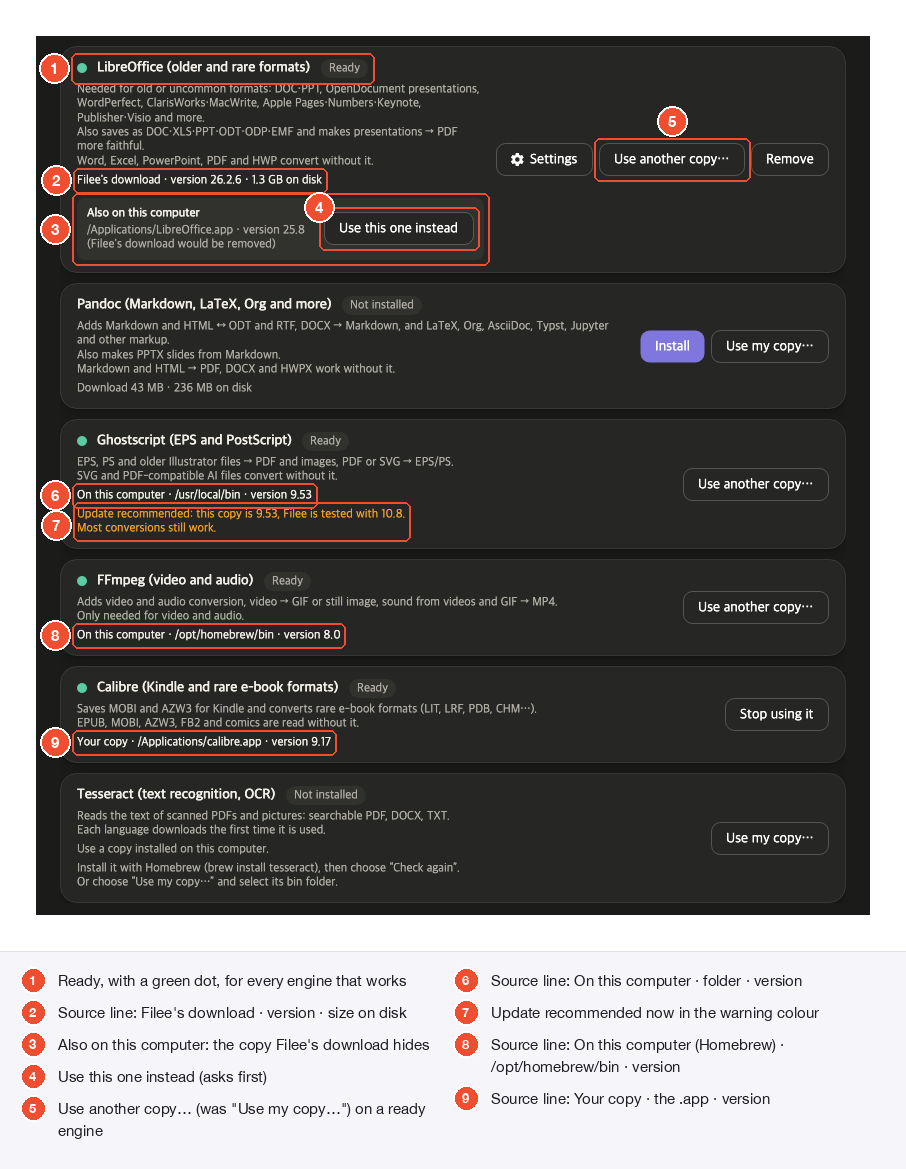
- Ready, with a green dot, for every engine that works, whatever the copy.
- Source line, Filee's download: "Filee's download · version 26.2.6 · 1.3 GB on disk".
- Also on this computer: a copy Filee's download is hiding (section 2 below).
- Use this one instead switches to that copy (section 2 below).
- Use another copy… replaces "Use my copy…" on an engine that's ready: it picks a different copy, nothing is missing.
- Source line, a copy on the computer: "On this computer · /usr/local/bin · version 9.53".
- Update recommended in the warning colour (section 4 below).
- Source line, a Homebrew copy: "On this computer · /opt/homebrew/bin · version 8.0".
- Source line, the user's own copy: "Your copy · /Applications/calibre.app · version 9.17". A macOS app's program folder is shown as the
.app, notContents/MacOS.
Versions are read from the program, the same way the existing "Update recommended" note already reads them.
2. "Also on this computer"

When Filee's download is installed, Filee now also looks for a copy on the computer. If there is one:
- The card shows Also on this computer, with its folder and version, and that Filee's download would be removed.
- Use this one instead switches to it. It asks first, naming the copy that takes over:

- Confirming removes Filee's download (it can be downloaded again any time), and the card then shows the copy on the computer as Ready. Removing Filee's download with Remove does the same: the card shows the copy that takes over instead of "Not installed".
3. Help only while it's needed

- The download size and the Homebrew / package-manager instructions show only while the engine is missing.
- Install Filee's copy is offered over a copy on the computer only when that copy is older than the version Filee is tested with (with the existing Update recommended note). Over an up-to-date copy it isn't offered.
4. The warning colour

Works with what's there today
- Upstream's download queue ([Bug]: Installing one engine disables the Install button on all other engines #819) is unchanged: Queued, Downloading and Unpacking keep their own badges, Cancel, progress and speed. After an install the status is read again from disk instead of being set to Installed, after the queue has moved on.
- Light and dark themes (dark below), and all 19 languages: the new strings would be translated in every catalog.
- Nothing changes in how engines are found or chosen; only what the page says and the one new button.
Dark theme
How it would be built
- The card's status comes from one place: Ready plus a source (Filee's download, on this computer, your copy), and an optional "also on this computer" copy found by the same discovery that runs when no download is installed.
engines.state.system_copy("Found on this PC") would be removed; the new strings go in all catalogs; docs/ENGINES.md updated.- Tests: Ready and the source line for each kind of copy; Filee's download offered only over an older copy; the unused copy and its text; a macOS app shown as the
.app; guidance only while missing; the warning colour on the real page (fails before the fix); the "Use this one instead" button and its confirmation.
Status
Working code: I built and tested this on Filee 2.2.0, then rebased it onto current main, where it builds and its tests pass. The screenshots above are from that build, rendered by the UI tests. Happy to change the wording or drop any part before opening a PR, which would be this one change on its own.
Activity
KnifeLemon commentedon Oct 31, 2026
Thanks! This one waits for #825 (engine status rules moving into
Filee.Engines), so please build on top of it once merged. The plan for the whole batch is here: #856 (comment)KnifeLemon commentedon Nov 4, 2026
#825 is done, so this is unblocked:
filee engineslanded in #935 (with #977), and the engine status rules now live inFilee.Engines(EngineInstaller.StatusOf,EngineCopy). Both are in 2.3.0.Two later changes touch the same page, so please rebase onto current
main:EnginesPageViewModel,EngineInstaller);In the plan's order it comes after Add background (#1081) and the Metadata tool (#362). If you'd rather do it before #362, that's fine too: one PR at a time.