






CreatePowerpointCheckpoint talk.pptx --compare --selectiveThis opens your diff tool with only the slides that changed, side by side. It compares your uncommitted edits to the last commit that changed the deck. With no uncommitted edits, it compares the last two commits that changed it.
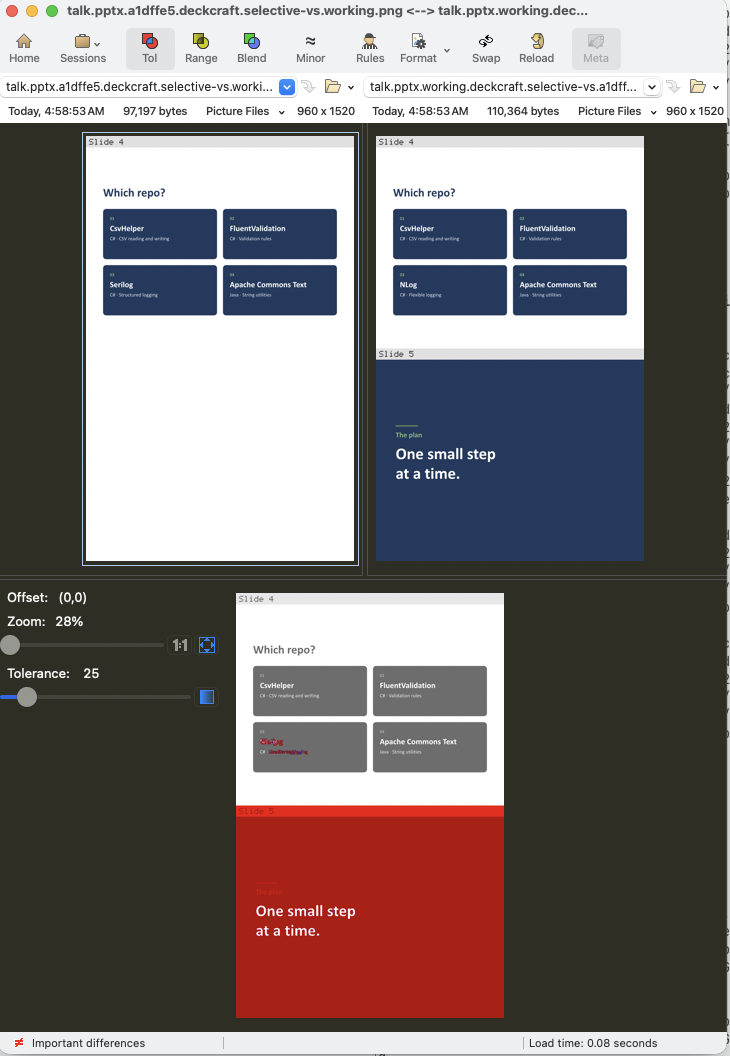
- Slide 4 edited: lower left card, Serilog → NLog
- Slide 5 added: opposite a blank
- Differences: in red at the bottom, with the last commit on the left and your edits on the right
dotnet tool install --global PowerPointCompareForGitThe first compare sets up two things:
- Slide drawing: slides are drawn by DeckCraft, and the tool offers to install it if it's missing.
- Diff tool: you choose a PNG-capable diff tool. It suggests any it finds (Beyond Compare, Kaleidoscope, P4Merge, Araxis Merge, WinMerge), or you can enter a custom command such as
mytool --flags {file1} {file2}.
Your answer is saved to ~/.createpowerpointcheckpoint/settings.json.
# working copy vs a sha, tag or branch
CreatePowerpointCheckpoint talk.pptx --compare oslo --selective

# one version vs another
CreatePowerpointCheckpoint talk.pptx --compare oslo berlin --selective

# every slide, not just the changed ones
CreatePowerpointCheckpoint talk.pptx --compare

# only slides 2 to 25, stitched into one PNG per version
CreatePowerpointCheckpoint talk.pptx --compare --pages 2-25

# write a PNG of the last commit that changed the deck, and open nothing
CreatePowerpointCheckpoint talk.pptx

# write a PNG of each of these commits
CreatePowerpointCheckpoint talk.pptx --commit sha1,sha2,sha3

# write a PNG of only slide 40; past the end means the last slide
CreatePowerpointCheckpoint talk.pptx --pages 40

# draw with LibreOffice instead of DeckCraft
CreatePowerpointCheckpoint talk.pptx --renderer LibreOffice

# clear local settings
CreatePowerpointCheckpoint --reset
--selective can't be combined with --pages.
- Slides that moved but didn't change are hidden, and listed in the terminal as
Slides moved but unchanged: 19→23, 20→24. - If no slide looks different, nothing opens and the terminal says so.
- Speaker notes, animations and transitions aren't in the images, so changes to them won't show.
- Previews are cached in
.git/pptx-previews/, so git never tracks them and each commit is rendered only once.
skills/powerpoint-compare/SKILL.md is an Agent Skill that teaches coding agents how to use this tool. Copy the powerpoint-compare folder into your agent's skills directory (e.g. .claude/skills/).
Apache-2.0. See LICENSE.