Repository navigation
gui: Refactor Copy button to use Tools API, remember user preference and use StringIO - #7404
Merged
Merged
Conversation


- Limit Python API options in the copy menu strictly to the recommended Tools API
- Persist the user's last chosen copy format (Shell, Python, or JSON) across sessions using wx.Config
- Support io.StringIO for inline file inputs (e.g., r.colors rules typed directly into the field) to make the copied Python code fully portable
 github-actions
Bot
added
GUI


Member
|
I think this PR is a step in the right direction. On the other hand, users should still have the option to switch to the scripting or the PyGRASS API when needed. The settings could managed by the GUI configuration ( |

petrasovaa
reviewed
May 18, 2026
petrasovaa
reviewed
May 20, 2026

…rence to settings

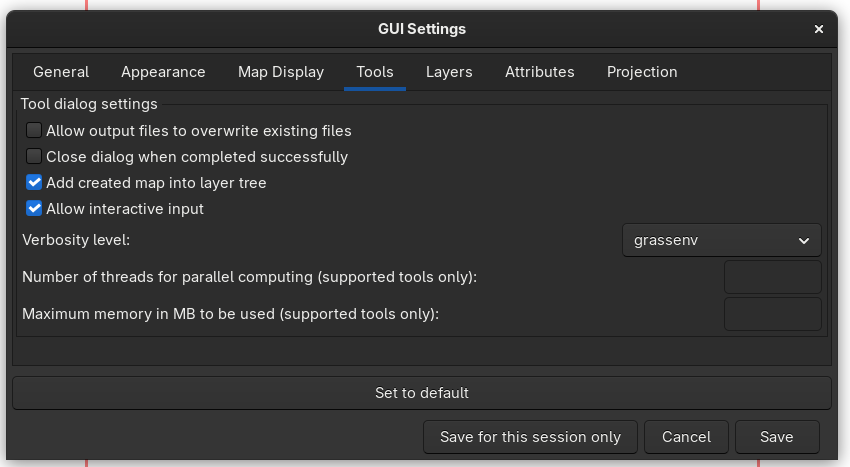
- Integrate a default Python API flavor selector (Tools, Script, or PyGRASS) into GUI Preferences -> Tools tab via UserSettings
- Update module dialog Copy button tooltips and code generation dynamically based on the globally chosen API style
- Implement robust multi-line script formatting for interactive file fields using io.StringIO for Tools API and tempfile for external process APIs
- Enhance JSON Copy/Paste mechanism to seamlessly embed and extract raw inline text inputs instead of volatile temporary file paths

polucifier
force-pushed
the
gui-copy-button
branch
from
May 21, 2026 19:00
0a66dbc to
45fe903
Compare
polucifier
force-pushed
the
gui-copy-button
branch
from
May 22, 2026 06:18
45fe903 to
1b94185
Compare
petrasovaa
previously approved these changes
May 22, 2026
 petrasovaa
left a comment
petrasovaa
left a comment
Contributor
There was a problem hiding this comment.
This looks great, thank you!
petrasovaa
approved these changes
May 23, 2026

ninsbl
pushed a commit
to ninsbl/grass
that referenced
this pull request
Jul 7, 2026

…and use StringIO (OSGeo#7404)

- Limit Python API options in the copy menu strictly to the recommended Tools API
- Persist the user's last chosen copy format (Shell, Python, or JSON) across sessions using wx.Config
- Support io.StringIO for inline file inputs (e.g., r.colors rules typed directly into the field) to make the copied Python code fully portable
- Integrate a default Python API flavor selector (Tools, Script, or PyGRASS) into GUI Preferences -> Tools tab via UserSettings
- Update module dialog Copy button tooltips and code generation dynamically based on the globally chosen API style
- Implement robust multi-line script formatting for interactive file fields using io.StringIO for Tools API and tempfile for external process APIs
- Enhance JSON Copy/Paste mechanism to seamlessly embed and extract raw inline text inputs instead of volatile temporary file paths
This file contains hidden or bidirectional Unicode text that may be interpreted or compiled differently than what appears below. To review, open the file in an editor that reveals hidden Unicode characters.
Learn more about bidirectional Unicode characters
Sign up for free
to join this conversation on GitHub.
Already have an account?
Sign in to comment


Add this suggestion to a batch that can be applied as a single commit.This suggestion is invalid because no changes were made to the code.Suggestions cannot be applied while the pull request is closed.Suggestions cannot be applied while viewing a subset of changes.Only one suggestion per line can be applied in a batch.Add this suggestion to a batch that can be applied as a single commit.Applying suggestions on deleted lines is not supported.You must change the existing code in this line in order to create a valid suggestion.Outdated suggestions cannot be applied.This suggestion has been applied or marked resolved.Suggestions cannot be applied from pending reviews.Suggestions cannot be applied on multi-line comments.Suggestions cannot be applied while the pull request is queued to merge.Suggestion cannot be applied right now. Please check back later.
Description
This PR addresses the follow-up design and UX improvements for the newly introduced "Copy" button in GUI tool dialogs, as outlined in issue #7368. It focuses on unifying the Python API selection within the global GUI settings, introducing persistence for the chosen copy format, and ensuring fully portable script generation and parameter sharing across all available Python APIs and JSON formats.
Fixes #7368
Key Changes & Visual Proofs
1. Global Python API Selector in Preferences
cmdgroup usingUserSettings.pythonAPIwithincore/settings.pyand connected viawx.Choiceingui_core/preferences.py.Example of the new dropdown selector inside the GUI Settings -> Tools tab:
The menu:
2. Dynamic Copy Button Tooltips & Sticky Mode
wx.Config(CmdPanel/CopyMode), remembering whether the user last copied a Shell command, Python script, or JSON settings._updateCopyButtonUI) to explicitly state the active mode and selected Python API flavor.3. Fully Portable Python Code with Inline File Support
_getInlineFiles).r.colors).repr()formatting ({!r}).Generated Outputs Examples (
r.colorswith custom text rules):4. Seamless JSON Copy/Paste for Interactive Content
OnCopyJSONandOnPaste.OnPasteintercepts the text parameters, safely clears out the text field for paths, and properly populates the secondary multiline interactive input control (wxId[1]).Generated Output Example (
r.colorswith custom text rules):{ "module": "r.colors", "params": { "flags": "", "map": "elevation@PERMANENT", "rules": "0 red\n50 yellow\n100 blue" } }Screencast demonstrating copying a tool configuration to JSON, completely wiping out the input fields, and cleanly restoring the multiline rules via Paste:
Paste1.webm
5. Other changes
gtask.cmd_to_python_argsto cleanly return formatted argument strings, allowing the GUI frontend to handle the closing syntax gracefully.How to Test
r.colorsor any other tool with direct multiline text input blocks.