Role-aware pharmacy operations (admin, inventory, customer) in a lean procedural PHP MVC stack with modern AJAX interactions.






- Purpose: run a small/medium pharmacy with clear ownership—admins handle users/reports, inventory managers handle stock/expiry, customers order safely.
- Philosophy: keep it simple (procedural PHP, no heavy frameworks), but still structured (MVC), secure (prepared statements + hashed passwords), and fast to deploy on XAMPP/Apache.
- Modern UX: real-time search and AJAX cart operations for seamless customer experience.
- Backend: PHP 8+, MySQL (mysqli), procedural MVC,
.htaccessrouting - Frontend: HTML5, CSS (custom), vanilla JS (ES6+, Fetch API)
- Server: Apache (XAMPP-friendly)
- AJAX: Fetch API for real-time search and cart operations
- Auth: register, login, remember-me, role-based redirects
- Admin: dashboards, user management, transactions, system config, reports
- Inventory Manager: product CRUD, low-stock and expiry tracking, price/stock adjustments, order visibility
- Customer: browse medicines (real-time search), cart with AJAX, checkout, order history
- AJAX Features:
- UX: flash messages, responsive layout, clean navigation, debounced search
index.php                      # single entry (routes + static asset guard)
.htaccess                      # rewrites to index.php
test_db_connection.php         # database connection test utility
config/
  └── config.php               # app constants, BASE_URL, DB creds, timezone
core/
  ├── App.php                  # router, render, error helper
  ├── Controller.php           # auth/role helpers, redirect, flash
  ├── Database.php             # mysqli init + query helpers
  └── Model.php                # helper base (kept for structure)
helpers/
  ├── session_helper.php       # session start, user data getters
  ├── cookie_helper.php        # cookie management
  ├── url_helper.php           # BASE_URL, redirect helpers
  └── validation_helper.php    # form validation helpers
app/
  ├── controllers/
  │   ├── HomeController.php           # home/about pages
  │   ├── AuthController.php           # login, register, logout
  │   ├── AdminController.php          # admin dashboard, user management, reports
  │   ├── CustomerController.php       # browse, search (AJAX), cart, orders
  │   ├── InventoryManagerController.php # product CRUD, low stock, expiry tracking
  │   ├── ProductController.php        # product operations (shared logic)
  │   ├── OrderController.php          # order operations
  │   └── ProfileController.php        # user profile, change password
  ├── models/
  │   ├── User.php              # user queries, auth
  │   ├── Product.php           # product queries, search, stock
  │   ├── Cart.php              # cart operations
  │   ├── Order.php             # order queries
  │   ├── OrderItem.php         # order item operations
  │   ├── Category.php          # category queries
  │   ├── Transaction.php       # transaction records
  │   └── SystemConfig.php      # system settings
  └── views/
      ├── layouts/
      │   ├── header.php               # nav, role-aware menu
      │   └── footer.php               # footer, script tags
      ├── admin/
      │   ├── dashboard.php            # admin dashboard
      │   ├── users.php                # user list
      │   ├── create_user.php          # create user form
      │   ├── edit_user.php            # edit user form
      │   ├── reports.php              # report filters (uses reports.js)
      │   ├── sales_report.php         # sales analytics
      │   ├── stock_report.php         # stock analytics
      │   ├── user_report.php          # user activity report
      │   ├── transaction_history.php  # transaction log
      │   ├── inventory_oversight.php  # inventory overview
      │   ├── edit_product.php         # edit product form
      │   └── system_config.php        # system settings
      ├── inventory_manager/
      │   ├── dashboard.php            # inventory dashboard
      │   ├── products.php             # product list
      │   ├── add_product.php          # add product form (uses product-validation.js)
      │   ├── edit_product.php         # edit product form (uses product-validation.js)
      │   ├── low_stock.php            # low stock alerts
      │   ├── expiring_items.php       # expiring soon items
      │   ├── expired_items.php        # expired items
      │   ├── orders.php               # orders for fulfillment
      │   └── order_details.php        # order item details
      ├── customer/
      │   ├── home.php                 # featured products (uses cart.js)
      │   ├── browse_medicines.php     # search + browse (uses search.js & cart.js)
      │   ├── product_search.php       # search results page
      │   ├── cart.php                 # cart view & checkout
      │   ├── checkout.php             # checkout process
      │   ├── order_history.php        # customer's past orders
      │   └── order_details.php        # order details view
      ├── auth/
      │   ├── login.php                # login form (uses auth.js)
      │   └── register.php             # registration form (uses auth.js)
      └── profile/
          ├── view.php                 # user profile view
          ├── edit.php                 # edit profile form
          └── changePassword.php       # change password form (uses change-password.js)
public/
  └── assets/
      ├── css/
      │   └── style.css                # main stylesheet (responsive layout, components)
      └── js/
          ├── main.js                  # shared helpers (flash fade, form validation)
          ├── search.js                # real-time medicine search (GET AJAX)
          ├── cart.js                  # add-to-cart handler (POST AJAX)
          ├── auth.js                  # login/register form validation & toggle
          ├── product-validation.js    # product add/edit form validation
          ├── reports.js               # report filters & UI toggles
          └── change-password.js       # password match validation
database/                      # schema or seed scripts
┌─ Traditional Form Submit
│  Browser → .htaccess → index.php
│    → core/App.php parses URL (e.g., customer/browseMedicines)
│    → loads controller function (customer_browseMedicines)
│    → controller calls models (mysqli via core/Database.php)
│    → data passed to view
│    → layout renders with page reload
│
└─ AJAX Request (Real-time Search / Add to Cart)
   JavaScript (Fetch API) → Backend endpoint (same router)
     → Controller detects AJAX header (X-Requested-With or Accept: application/json)
     → Returns JSON response instead of HTML
     → Frontend updates DOM without page reload
Real-time Medicine Search – search.js
- Type: GET request
- Endpoint:
customer/searchMedicines?q={query} - Trigger: Debounced input (300ms) on search bar
- Response: JSON with
{ success, products, count } - UX: Loading state → products grid → result count
// Example: search.js initiates GET
fetch(baseUrl + 'customer/searchMedicines?q=' + encodeURIComponent(searchQuery), {
    headers: { 'Accept': 'application/json', 'X-Requested-With': 'XMLHttpRequest' }
})
Server-side: CustomerController.php → customer_searchMedicines()
Add to Cart (AJAX) – cart.js
- Type: POST request
- Endpoint:
customer/addToCart - Trigger: Form submit on "Add to Cart" button
- Request Body:
FormData(product_id, quantity) - Response: JSON with
{ success, message, error } - Validation:
- Checks if product already in cart → returns
{ success: false, error: "Product already in cart" } - Validates stock → returns error if out of stock
- On success → displays inline feedback + button state change
- Checks if product already in cart → returns
- Fallback: If server responds with non-JSON (e.g., HTML redirect), treats as soft success
// Example: cart.js initiates POST
fetch(form.action, {
    method: 'POST',
    headers: { 'X-Requested-With': 'XMLHttpRequest', 'Accept': 'application/json' },
    body: new FormData(form)
})
Server-side: CustomerController.php → customer_addToCart()
Prerequisites
- PHP 8+
- MySQL 5.7+/MariaDB
- Apache with mod_rewrite (XAMPP is fine)
Installation
-
Clone into
xampp/htdocs/(or your Apache docroot):git clone <repo-url> WebTech_Project-Pharmacy_Management_System
-
Create DB and import schema (choose one method):
Method A: Using MySQL Command Line
CREATE DATABASE pharmacy_management;
USE pharmacy_management;
SOURCE database/schema.sql;   -- adjust path if needed
Method B: Using phpMyAdmin
- Open phpMyAdmin in browser (
http://localhost/phpmyadmin) - Create a new database named
pharmacy_management - Go to SQL tab
- Copy all code from database/schema.sql
- Paste into the SQL editor and click Go
- Open phpMyAdmin in browser (
-
Configure app: edit config/config.php for
DB_HOST/DB_USER/DB_PASSWORD/DB_NAMEandBASE_URL. -
Start Apache + MySQL (XAMPP).
-
Visit
http://localhost/WebTech_Project-Pharmacy_Management_System/.
Default Roles & Routes
- Admin:
/admin/dashboard - Inventory Manager:
/inventory_manager/dashboard - Customer:
/customer/home(featured products + AJAX search)
| File | Purpose |
|---|---|
| public/assets/css/style.css | Main stylesheet (responsive layout, buttons, cards, grid) |
- Render a view with data:
render('admin/dashboard', ['totalUsers' => $count, 'totalProducts' => $products]);
- Run a parametrized query (mysqli prepared):
$lowStock = fetchAll('SELECT * FROM products WHERE quantity < ?', 'i', [10]);
- Detect AJAX & return JSON:
if (isAjax()) {
    header('Content-Type: application/json');
    echo json_encode(['success' => true, 'message' => 'Product added']);
    exit;
}
- Fetch with headers (JavaScript):
fetch(url, {
    headers: { 'X-Requested-With': 'XMLHttpRequest', 'Accept': 'application/json' }
})
| Route | Purpose |
|---|---|
/ |
Role-aware landing |
/home/about |
About page |
/auth/login |
Login form |
/auth/register |
Registration form |
/admin/dashboard |
Admin dashboard |
/inventory_manager/dashboard |
Inventory dashboard |
/inventory_manager/products |
Product list & CRUD |
/customer/home |
Featured medicines (AJAX cart) |
/customer/browseMedicines |
Search + browse (real-time AJAX search) |
/customer/cart |
Cart view & checkout |
/customer/orderHistory |
Past orders |
/customer/searchMedicines?q={query} |
AJAX endpoint (GET, returns JSON) |
/customer/addToCart |
AJAX endpoint (POST, returns JSON) |
- Index page –
- About page –
- Customer dashboard –
- Customer order page –
- Inventory manager dashboard –
- Inventory manager order management –
- Inventory manager product management –
- Inventory manager expired products –
- Admin dashboard –
- Admin inventory oversight –
- Admin transaction history –
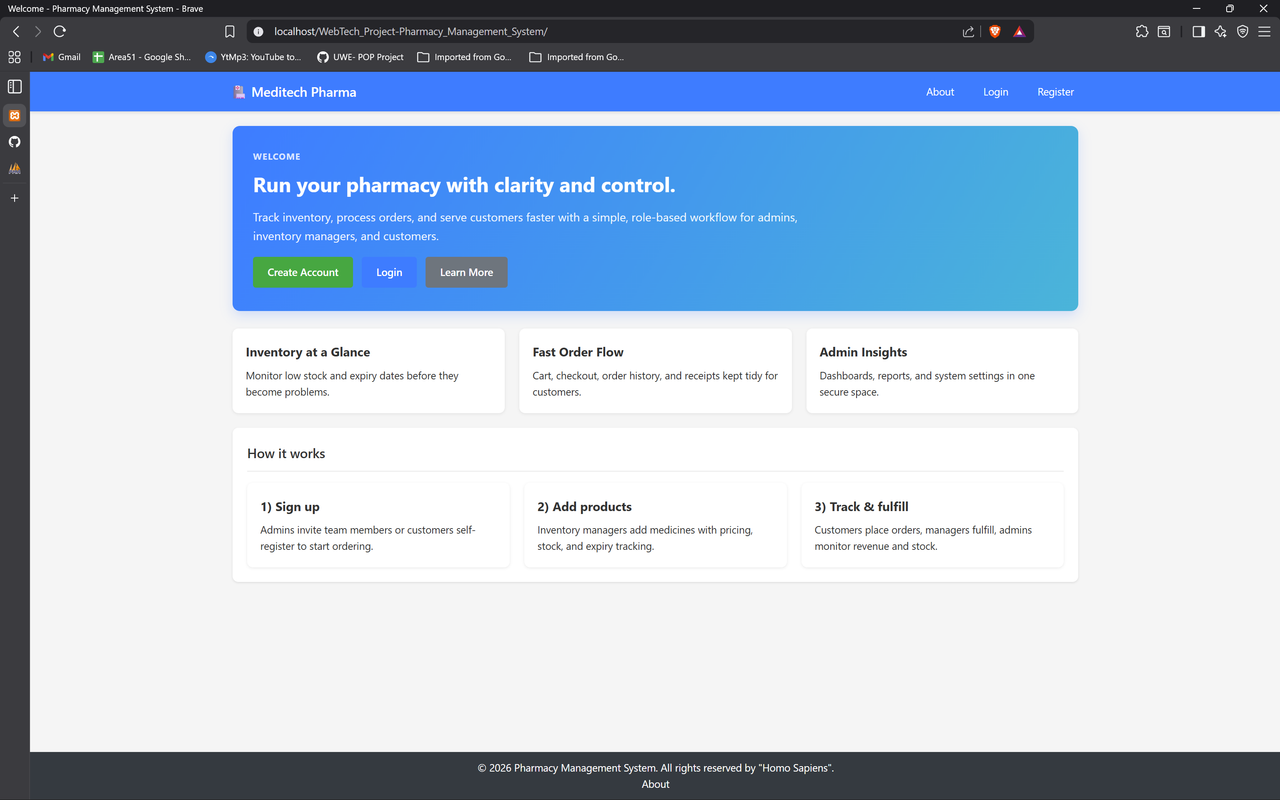
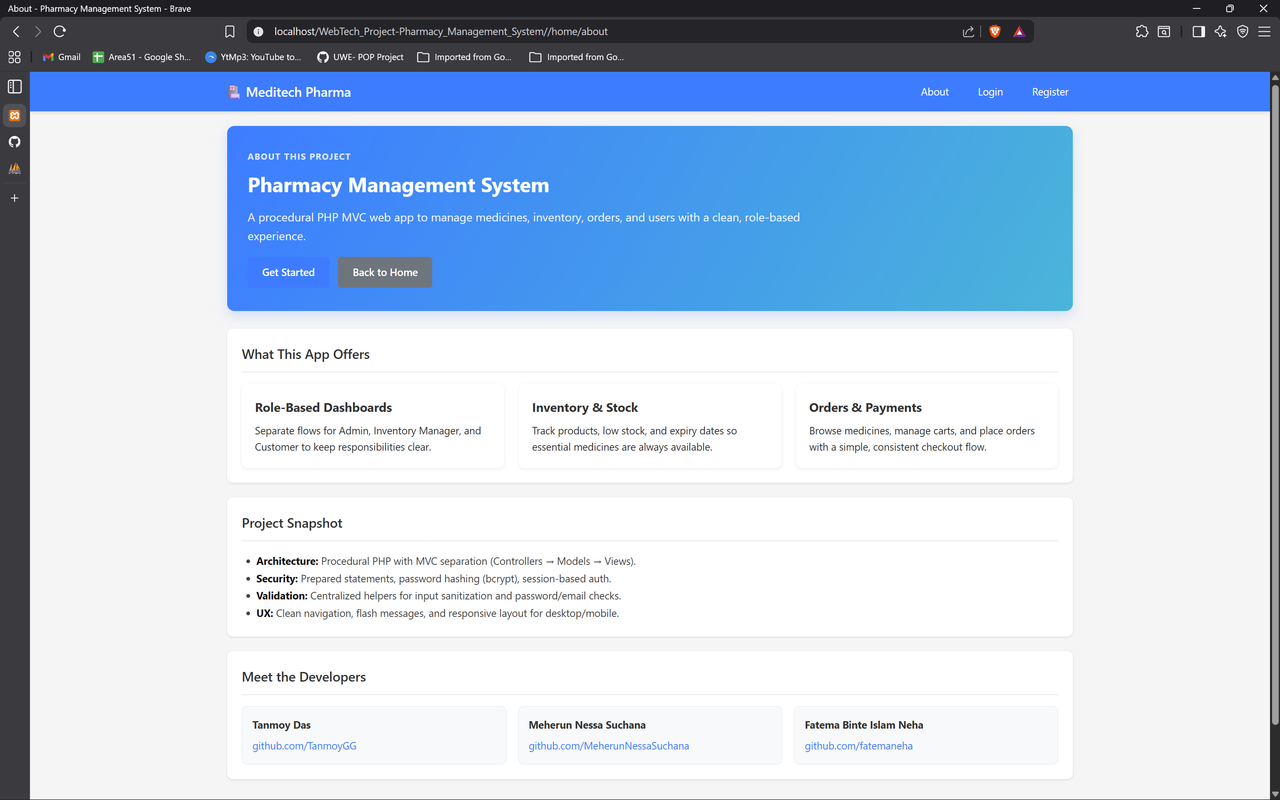
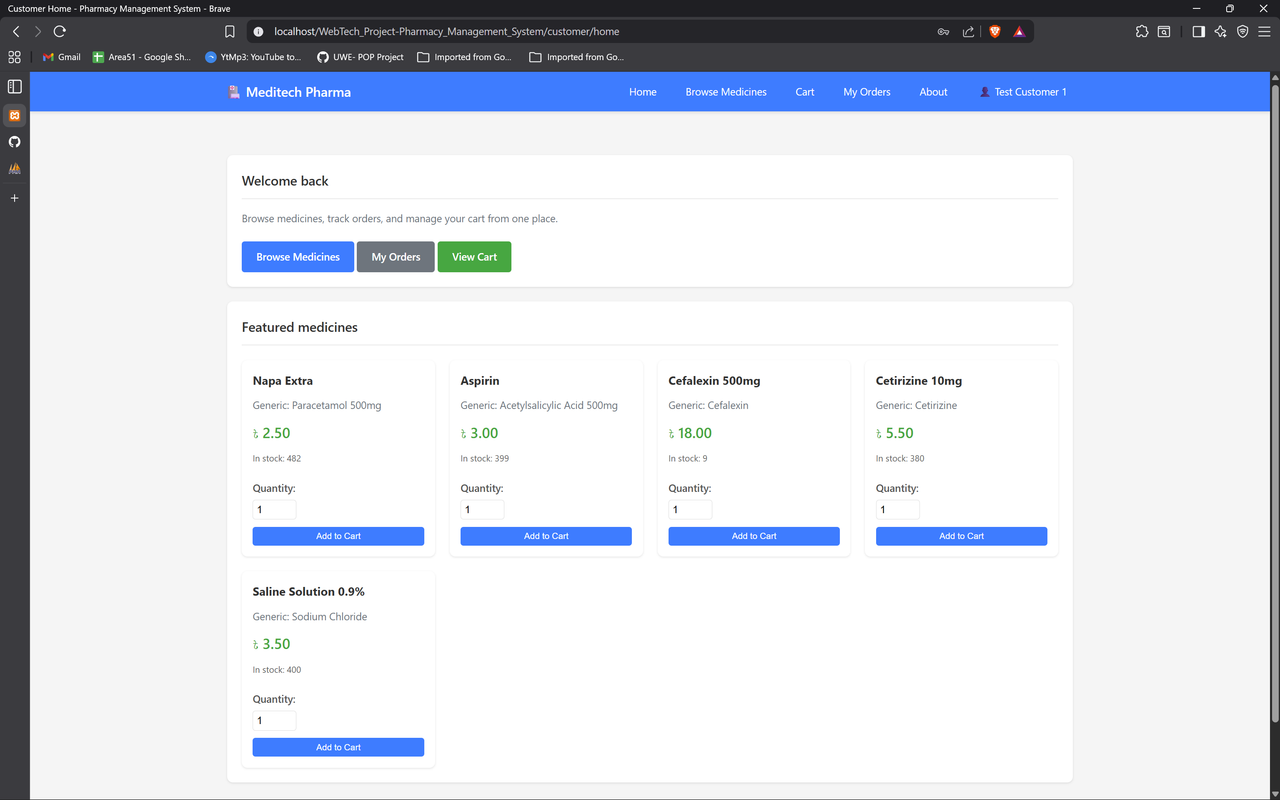
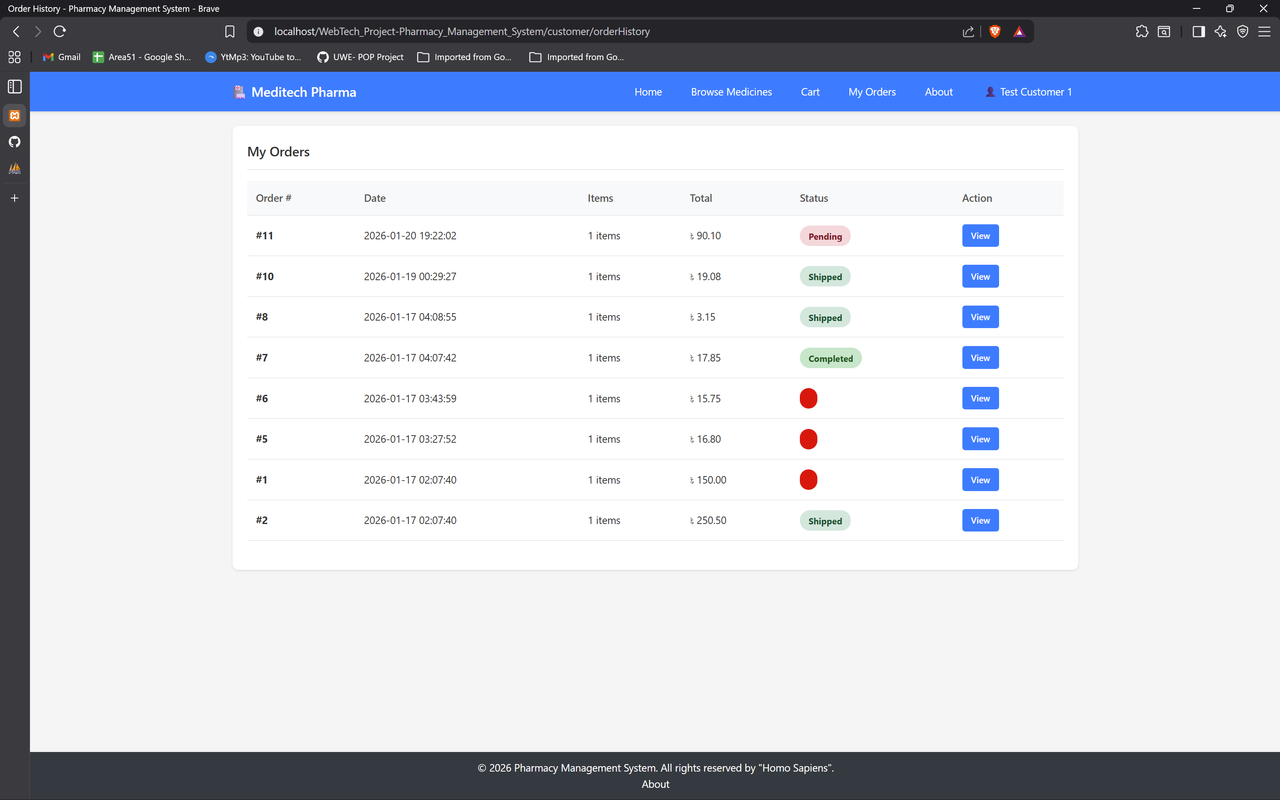
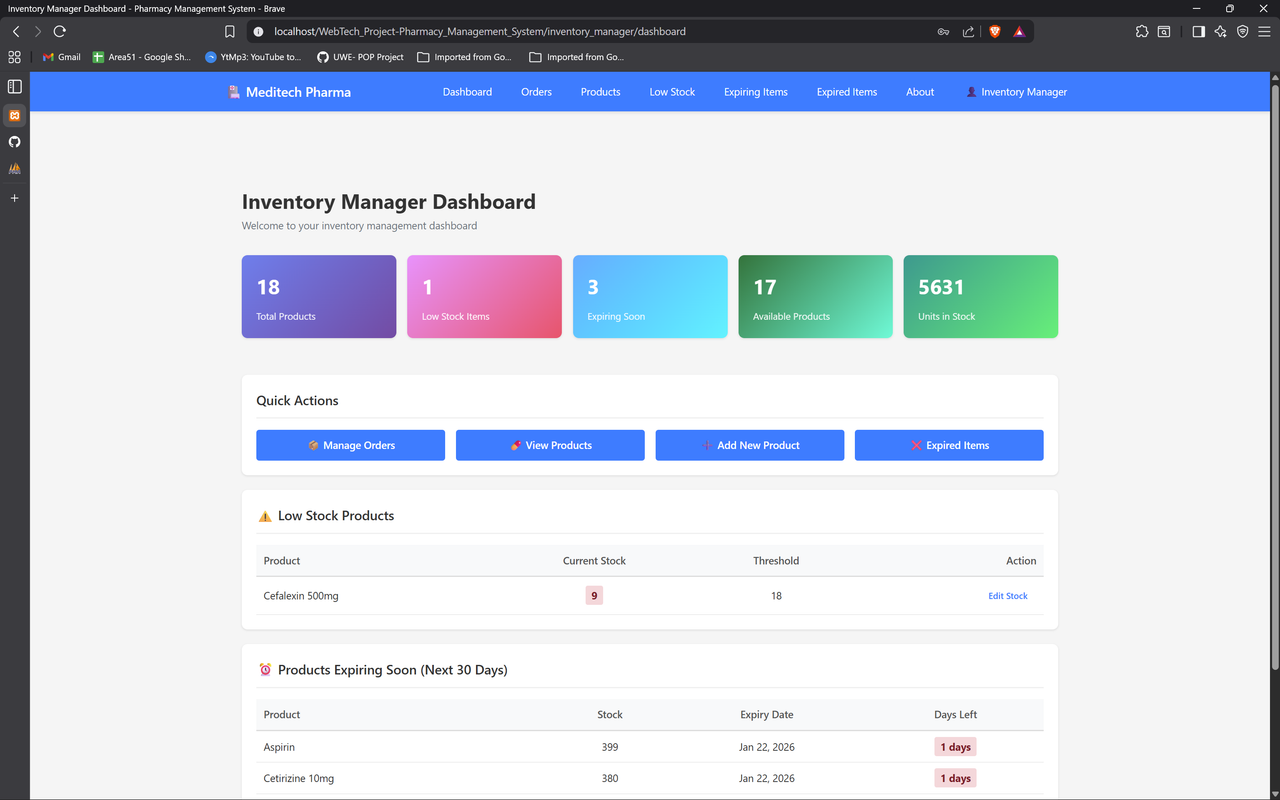
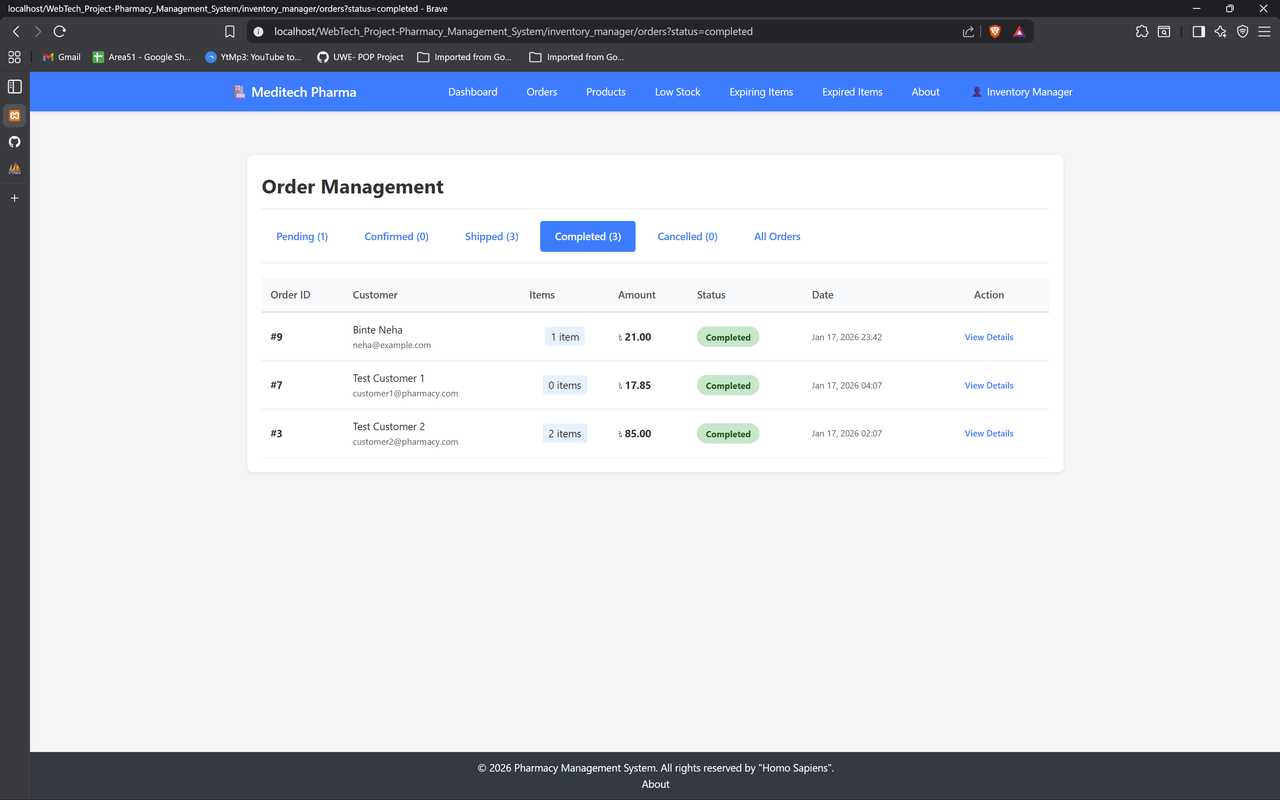
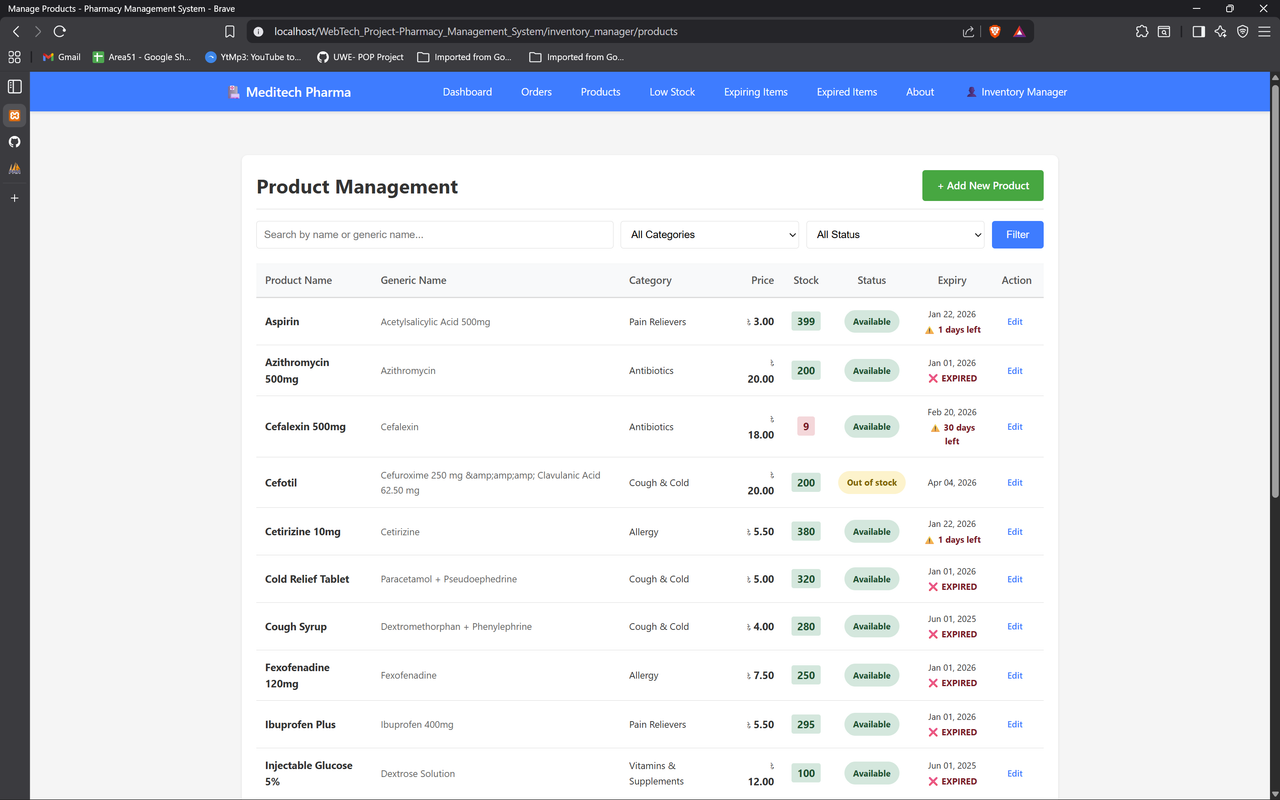
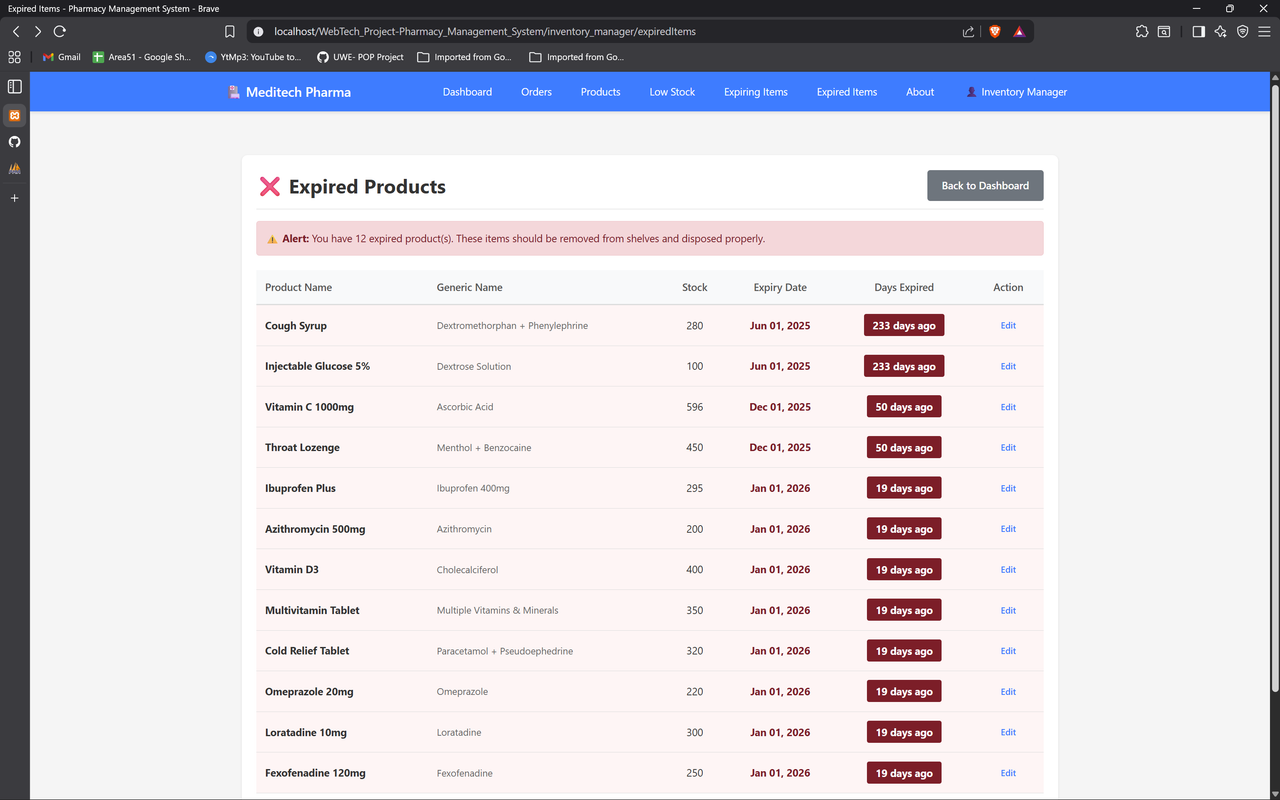
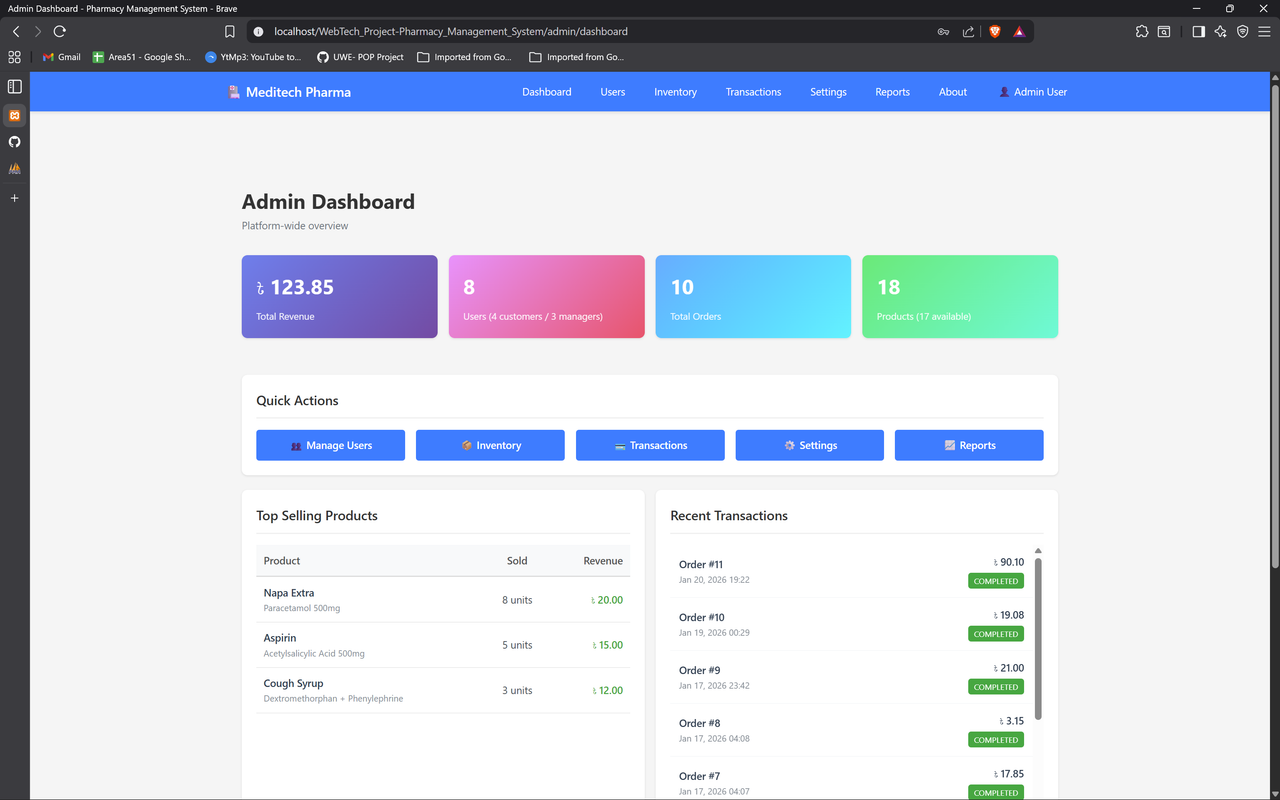
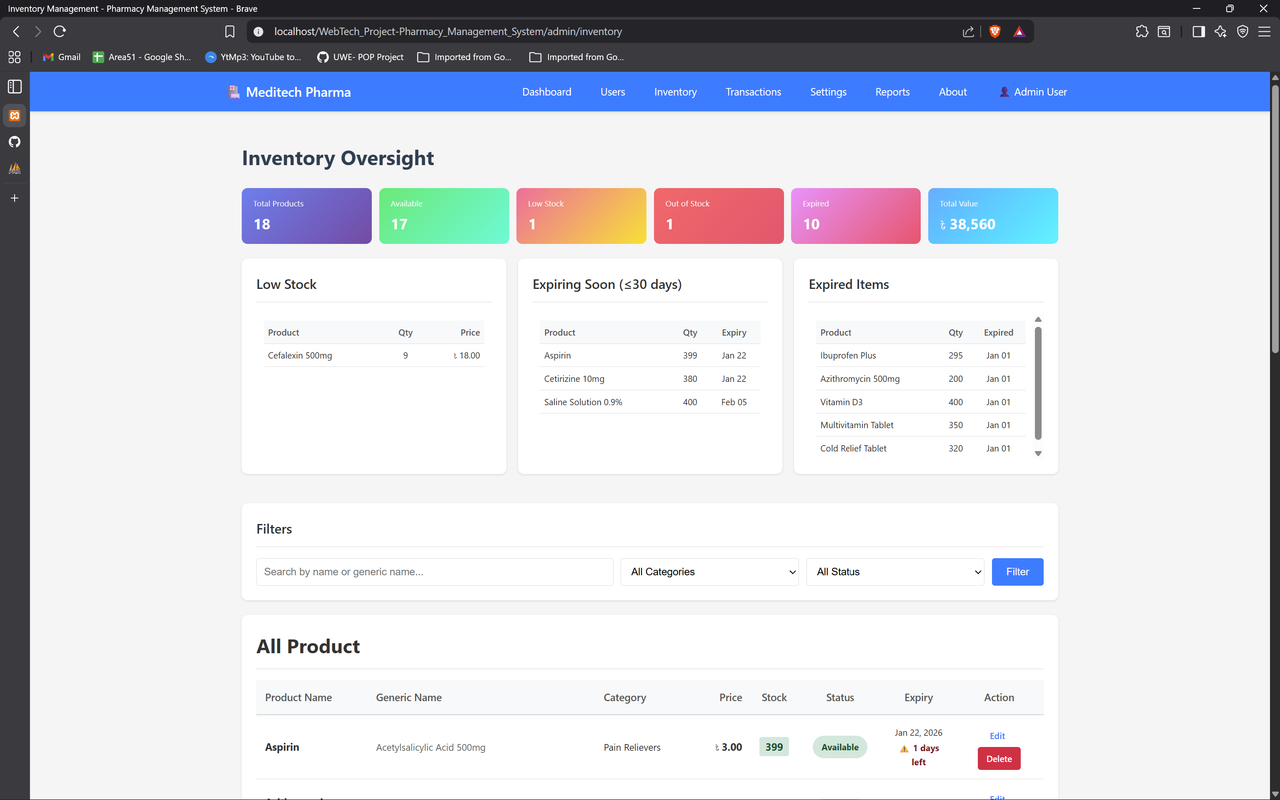
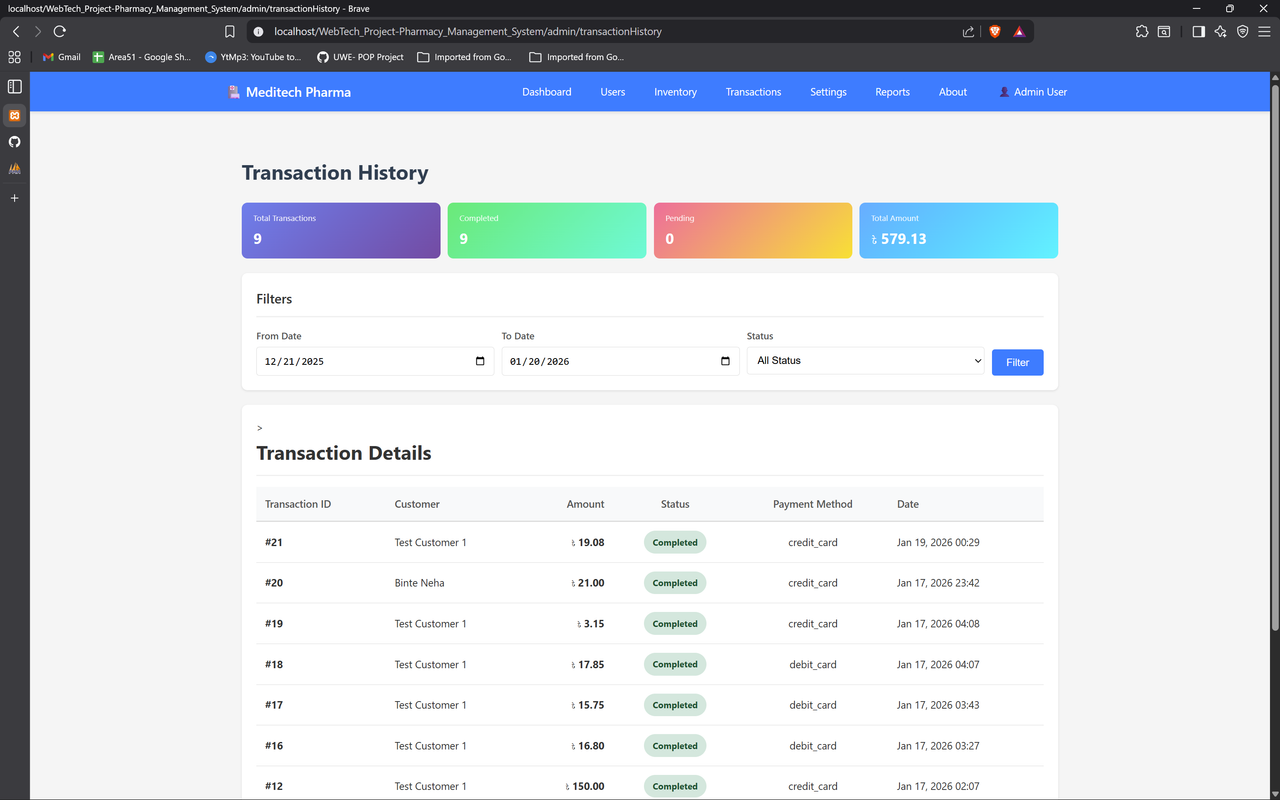
- Issues/PRs welcome. Please:
- Fork → branch (
feature/your-change) - Keep changes minimal and procedural (no frameworks)
- For AJAX: ensure endpoint returns JSON when headers
X-Requested-With: XMLHttpRequestorAccept: application/jsonare present - Test in modern browsers (Chrome, Firefox, Edge) and IE11 if needed
- Include clear steps to reproduce and test notes.
- Fork → branch (
- All DB queries use prepared statements (mysqli
bind_param) - Passwords hashed with
password_hash()(bcrypt) - Session-based auth with role validation
- AJAX endpoints check auth and return JSON errors (no HTML dumps)
- SQL injection & XSS mitigated via parameterized queries +
htmlspecialchars()
- Educational use — 2026.