
A self-hosted job radar that reads the fine print. Point it at the companies you care about. boardwatch watches their official ATS job boards, catches new postings early, and ranks them against your profile with an explainable score. It reads each posting for the hard requirements that quietly rule people out (visa sponsorship, security clearance, a required degree, years of experience, a location) and flags the ones you could not actually apply to, each backed by the exact sentence it read. For the leads worth your time it renders a one-page résumé PDF tailored from what you wrote, never adding a claim you did not make, and lays them out in a local web page to work through. Nothing is guessed, nothing phones home, and it all runs on your own machine.




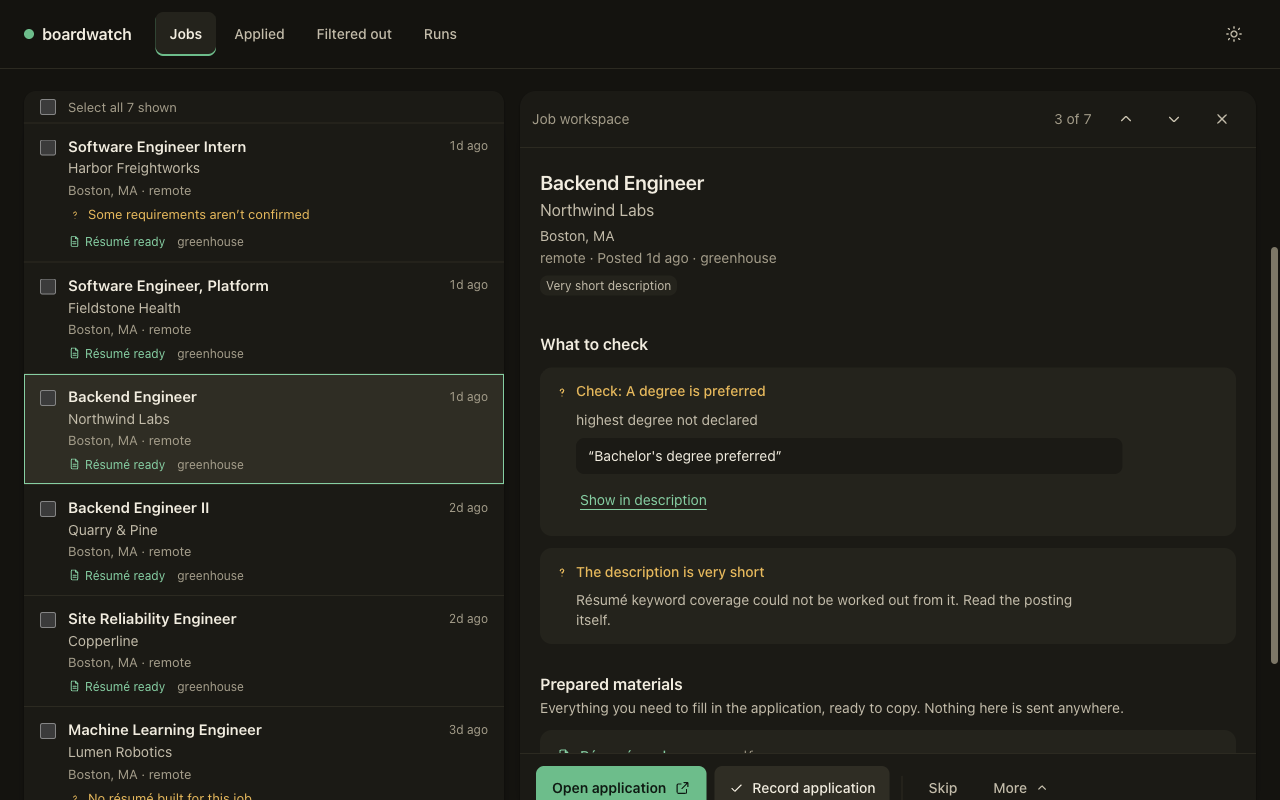
The review page (boardwatch web), on synthetic data. Every check quotes the sentence it read.
Status: pre-release, under active development. boardwatch does not submit applications: it finds and evaluates postings, and you decide what to do with them. No telemetry. The default install needs no accounts and no API keys (the LLM tiers are opt-in). Your data stays on your machine: a local SQLite file and the folders
runwrites.
Job boards optimize for their advertisers, not for you. LinkedIn/Indeed bury fresh roles under sponsored noise and stale reposts; paid trackers put a subscription (and their servers, and your search history) between you and postings that are already public.
boardwatch takes the direct route. Greenhouse, Lever, Ashby, Workable, SmartRecruiters, Workday, Eightfold, Oracle HCM, Phenom and Jibe each serve every board they host from a public, keyless endpoint, the same data the company's own careers page renders; Amazon's and Apple's own career sites are read the same way. boardwatch polls those endpoints politely, on your schedule, and tells you what's new since last time.
| boardwatch | LinkedIn/Indeed | Paid trackers | |
|---|---|---|---|
| Source of truth | company's own ATS | aggregated + sponsored | aggregated |
| Freshness | as fast as you poll | ranking-dependent | vendor-dependent |
| Reads eligibility | audit + quoted proof | no | no |
| Your data | local SQLite, yours | the product | on their servers |
| Cost | free (self-hosted) | free-ish (ad-driven) | subscription |
| Auto-apply / spam | never | no comment | sometimes |
Honest limits. It covers companies hosted on the providers above, plus Amazon and Apple: a
large slice of tech, but not everyone (no Taleo yet). Its bundled role knowledge covers software
roles; another field can declare its own role families at init, but the eligibility catalog is
still software-first. Opt-in discovery lanes can add postings from beyond the ATS boards and are
held to a different standard; read Responsible use before enabling
one.
Prerequisites. Python 3.11–3.13 and pipx (or
uv). Scanning and ranking need nothing else. Building résumé PDFs
also needs tectonic and poppler's pdfinfo on PATH:
brew install tectonic poppler                       # macOS
sudo apt-get install poppler-utils                  # Debian/Ubuntu (tectonic: see its docs)
boardwatch doctor reports whether both are present.
Supported on macOS and Linux. Windows is best-effort; see
platform support.
pipx install boardwatch      # isolated, on your PATH (or: uv tool install boardwatch)
boardwatch init              # pick companies, then describe what you are looking for
boardwatch scan              # poll the watched boards (polite, conditional GETs)
boardwatch top               # ranked shortlist
boardwatch show <#>          # one posting: score breakdown and eligibility evidence
init offers a starter set of 15 well-known boards in one keystroke, a search of the bundled
registry, or any board URL you paste. On the starter set the first scan takes under a minute
and the first top about two, because it evaluates every new posting once; after that top
answers in a second or two.
$ boardwatch top 5
 #   Title                            Company     Score   Eligibility   Why
 12  Senior Backend Engineer          Stripe      0.86    no flags      covers 9/11 skills · title · 1d
 7   Software Engineer, Platform      Linear      0.81    check         covers 7/10 skills · title · 3d
 33  Backend Engineer (Payments)      Ramp        0.74    no flags      covers 6/9 skills · 2d
 5   Full-Stack Engineer              Supabase    0.68    no flags      covers 5/8 skills · title · 6d
 18  Infrastructure Engineer          OpenAI      0.61    check         covers 4/9 skills · 4d
2 hidden as ineligible. "no flags" means no catalogued disqualifier was detected, not that you qualify.
41 hidden as non-software roles — see them with --include-non-swe, each with the title text that vetoed it.
→ `boardwatch show <#>` for the full posting and eligibility evidence
(Illustrative output. # is the posting id to pass to show. "no flags" means no catalogued disqualifier was found, not that you are
cleared to apply; "check" means the posting was ambiguous.)
Next: the first run in detail,
including the two profile settings most people want (target seniority and target countries).
boardwatch guide prints the full command reference for your installed copy.
Docker, or from source
docker run --rm -it -v boardwatch-data:/data \
  ghcr.io/mit112/boardwatch:latest --data-dir /data init
docker run --rm -v boardwatch-data:/data \
  ghcr.io/mit112/boardwatch:latest --data-dir /data scan
docker run --rm -v boardwatch-data:/data \
  ghcr.io/mit112/boardwatch:latest --data-dir /data top
init asks questions, so it needs -it. Everything lives in the boardwatch-data volume: the
database at /data, and your settings, résumé files and role taxonomy under /data/config. The
image bundles tectonic and poppler. The review app binds loopback only, so it cannot be reached
from outside the container; for the daily pipeline, install natively.
git clone https://github.com/mit112/boardwatch && cd boardwatch
uv sync                      # https://docs.astral.sh/uv/
uv run boardwatch initscan and top answer "what is new and worth a look". boardwatch run does the whole job in
one command: scan, evaluate eligibility, rank, re-check that each shortlisted posting is still
live, and render a tailored one-page résumé PDF for every lead in the apply lane.
boardwatch web opens those leads in the local review page shown above.
boardwatch tailor init       # scaffold resume.yaml, then edit it (boardwatch never parses a PDF)
boardwatch tailor validate   # confirm it loads
boardwatch run --top 10      # scan → eligibility → rank → liveness → tailored PDFs
boardwatch web               # review the delivered leads in your browser
In the review page you read each lead's evidence, open its résumé, copy your saved answers to
common application questions, and mark it applied so it never resurfaces. Nothing is ever
typed into an employer's page. Schedule run once a day and it becomes an unattended driver.
More: the daily pipeline · tailoring · running it unattended
Ranking tells you how well a posting fits. The eligibility audit tells you whether you could
apply at all, and shows its work. You describe your situation once
(boardwatch eligibility facts set work_authorization.status citizen, and so on), and every
posting is read for catalogued requirements and resolved against those facts:
Eligibility: ineligible
  unmet · required: work authorization / sponsorship
quote: "This role is not able to sponsor employment visas now or in the future."- Evidence-linked. Every requirement carries the exact sentence it was read from. Nothing is paraphrased or invented.
- Deterministic by default. The same posting and the same facts always produce the same verdict. Out of the box there is no language model in the loop; an opt-in model-assisted final gate exists and must quote what it relied on.
- Honest. "no flags" never means "cleared", and ambiguous wording reads as "check" rather than a false all-clear.
More: the eligibility audit, including the role and seniority filters and what the audit cannot see.
| Command | What it is for |
|---|---|
digest, top --new |
What changed since you last looked: new, reopened, updated, closed |
track |
Record what you did with a posting, or import history from another tool |
stats |
Qualified opportunities this week, and the discovery pipeline |
export |
Every posting with your funnel state and its verdict, as JSONL or CSV |
companies |
Add, remove, search, import and export watched boards (--verify probes first) |
doctor |
Board connectivity and freshness, a database integrity check, and the PDF tools |
config, settings |
Tune politeness and ranking weights; see and toggle every opt-in feature |
notify |
Desktop or webhook notifications for new matches |
All of it is in the user guide.
Greenhouse, Lever, Ashby, Workable, SmartRecruiters, Workday, Oracle HCM, Eightfold, Phenom and
Jibe, plus Amazon's and Apple's career sites, all through public endpoints with no
authentication. boardwatch companies add https://boards.greenhouse.io/acme just works for most
of them. A bundled registry of 37 verified public boards, 15 of them a starter set, lets init
work offline.
More: naming a board on each provider · provider matrix · per-provider limits
By default boardwatch reads the same public, keyless endpoints that power each company's own careers page — a JSON API for most providers, and for Apple (and the first request of an Eightfold scan) the data embedded in that public page. It does not log in, present credentials, or bypass any access control. That is deliberately the least-invasive way to get this data. Still, these are third-party services, and using them responsibly is on you:
- Keep the politeness defaults. The defaults (≥1 request/sec per host, conditional
GETs, bounded retries, a descriptive User-Agent) are intentionally gentle. Don't crank
scan_workersup orper_host_delay_secondsdown to hammer a board. - It's for personal job-search use, not bulk data resale or redistribution of posting content. boardwatch stores postings locally for your review.
- Provider terms & rate limits can change and may restrict automated access. You are responsible for complying with each provider's Terms of Service. If a provider asks you to stop, stop.
- No warranty. These are undocumented-stability public endpoints; they can change or break without notice.
If you're unsure whether your use is appropriate, err toward watching fewer boards, less often. A job seeker checking a dozen companies once a day is the intended shape.
The opt-in discovery lanes do not all meet that bar, which is why each is off unless you name
it in lanes_enabled (linkedin, indeed, hiringcafe, jsonld, jobapps). They read
listings beyond an employer's own board. jsonld — like the GitHub new-grad lists and grnh.se
links that it and companies discover read — sends no key or credential and identifies itself
honestly, and jobapps only reads a folder another local tool writes. The rest go further: the
LinkedIn guest-search pages and the hiring.cafe search those lanes read are disallowed by those
sites' robots.txt, and the Indeed lane calls Indeed's mobile-app API while presenting that
app's own client identity. Each lane's module docstring under src/boardwatch/lanes/ states
exactly what it requests and why. Whether to enable one is your decision, under that site's
terms.
- Local-first. Its primary store is one SQLite database in your platform data directory;
the opt-in LLM tier also caches raw responses there as plain files on disk (override with
--data-dir). No server, no account, no cloud. - No telemetry. boardwatch phones home to nobody.
- Every credential you supply is opt-in and read from the environment only, never written
to disk. The default path authenticates to nothing. The LLM tiers read
BOARDWATCH_LLM_API_KEY, the webhook notifierBOARDWATCH_NOTIFY_WEBHOOK_URL, and an unattendedruncan pingBOARDWATCH_HEARTBEAT_URL(a dead-man's switch) and post its warnings toBOARDWATCH_ALERT_URL. The optional final-eligibility gate takes no key: it runs your ownclaudeCLI. The one secret boardwatch creates itself is the review app's bearer token, written at mode 0600 to{config_dir}/web-tokenon first use. SECURITY.md says exactly what each one sends.
Where your files live.
| What | macOS | Linux | Override |
|---|---|---|---|
Settings and authored files (config.toml, resume.yaml, resume_template.tex, answers.yaml, career-profile/) |
~/Library/Application Support/boardwatch/ |
~/.config/boardwatch/ |
BOARDWATCH_CONFIG_DIR |
The database (boardwatch.db) and caches |
~/Library/Application Support/boardwatch/ |
~/.local/share/boardwatch/ |
--data-dir, BOARDWATCH_DATA_DIR |
| The delivery queue | ~/boardwatch-queue/ |
~/boardwatch-queue/ |
run/web --queue-root |
| Each run's PDFs and reports | ~/boardwatch-applications/ |
~/boardwatch-applications/ |
run --out, web --out-root |
- User guide — every part of boardwatch, in the order you meet it.
- Configuration — every setting and where it lives.
- Running the pipeline unattended and scheduling scans.
- Opt-in LLM tailoring.
- All docs.
Shipped: PyPI and Docker releases, notifications, change detection, twelve providers including Workday, data export, deterministic résumé tailoring with a no-fabrication guarantee, the unattended daily pipeline and review app, deduplication, applied-state suppression, and a liveness re-check before a résumé is built.
Next:
- An onboarding flow that fits fields other than software, so the eligibility taxonomy is gathered from you rather than assumed
- A measured acceptance run — the daily numbers published rather than asserted (in progress)
- Broader company coverage, but only after the above shows the funnel converts; breadth multiplies whatever is downstream of it, including the mistakes
main can run ahead of the latest release;
CHANGELOG.md is the record of what
shipped in the version pipx install boardwatch gives you; anything under Unreleased needs an
install from source.
Have a company on a board boardwatch doesn't reach yet, or an ATS you want supported? Open an issue.
Contributions welcome: code, registry entries, or bug reports. The smallest useful one is
adding a public board — see the Contributing a board walkthrough,
which has a one-command local check. See CONTRIBUTING.md for dev setup
(uv sync, make check) and the registry guide for the
catalog schema. All changes land via PR against a branch-protected main. Questions and ideas
are welcome as issues too.
MIT.