


A small live chat ("shoutbox") for NodeBB 4: a dock on every page (a bottom sheet on phones) and a widget, running over the NodeBB websocket, with global privileges, writing rules, mutes with a moderation log and mentions with notifications.
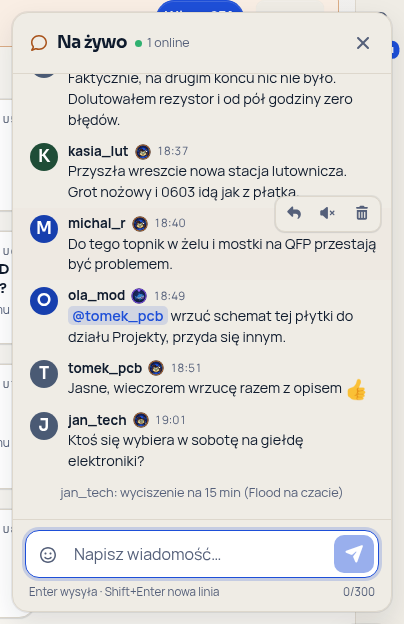
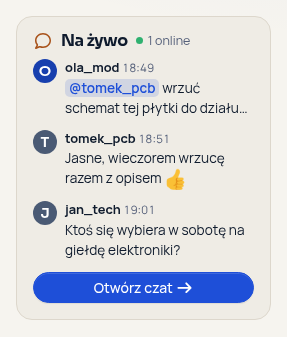
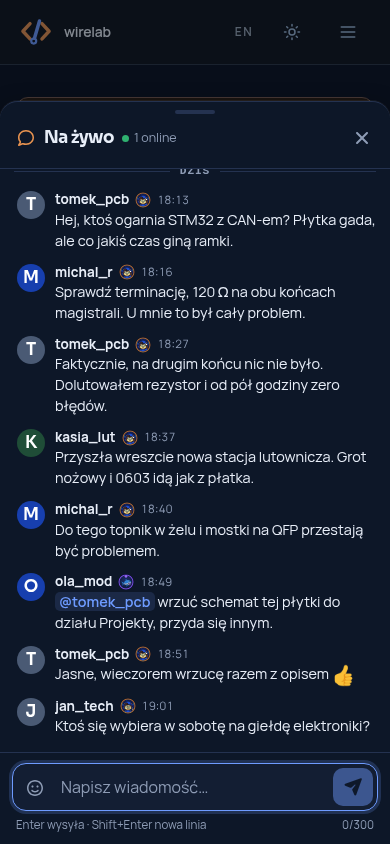
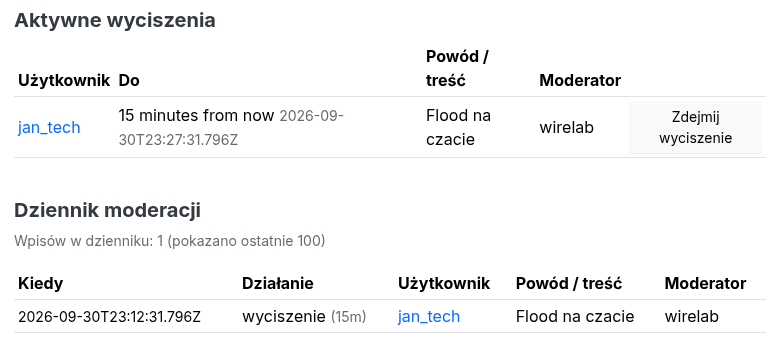
Screenshots in Polish, with a custom theme; the chat is called "Na żywo", the Polish default name.
- Author: nairda · Licence: MIT
- Source and issues: github.com/nairdaweb/nodebb-plugin-wirelab-shoutbox
- Dock on every page: a button in the bottom-right corner opens the chat panel; on phones the
panel is a modal bottom sheet. The button shows the number of unread messages and marks mentions;
it stays above a fixed bottom bar of the theme (e.g. Harmony's mobile navigation). Opening
/?shoutbox=openopens the dock (used by mention notifications). - Widget with the three latest messages and a button that opens the dock. Put it in any widget area (ACP → Extend → Widgets → Shoutbox), e.g. the sidebar of the categories page. Visitors can collapse it; when it is alone in the sidebar, the page gets the full width back.
- Live over the NodeBB websocket: new messages, deletions, mutes and the number of users online arrive without reloading. 50 messages on open, older ones on demand.
- Plain text with light formatting: inline Markdown (
**bold**,*italic*/_italic_,~~strike~~,`code`), http(s) autolinks,@mentionswith a suggestion list and emoji (:smile:and a picker, through nodebb-plugin-emoji when it is active). No HTML from users reaches the page. - Mentions send a regular NodeBB "mention" notification to users who can read the shoutbox.
- Writing rules: confirmed email address, account age and forum posts; links only from a rank level of nodebb-plugin-rank-badges or from a number of posts; rate limit. See Writing rules.
- Moderation: delete any message, mute a user for 15 minutes, 1 hour, 24 hours or permanently with a reason shown in the chat; active mutes and a moderation log in the ACP. Users can delete their own messages.
- Rank badges (optional): with nodebb-plugin-rank-badges active, badge images are shown next to names and its rank ladder can gate links. Nothing breaks without it.
- Accessible: the message list is a
role="log"live region; the dock is a dialog (Esccloses it and returns focus to the button that opened it; the bottom sheet keeps focus inside);Entersends,Shift+Enteradds a line; the mention list works with the arrow keys,EnterandTab; reduced motion is respected. - Themeable: colours come from Bootstrap variables, so light and dark mode follow the theme; every
colour is a
--sb-*CSS custom property. - No tables of its own: messages, mutes and the log are kept in the NodeBB database (Redis, PostgreSQL or MongoDB); old messages are pruned automatically.
- Translated: en-GB and pl (other languages fall back to en-GB).
- NodeBB
^4.15.0(the ACP page uses the{{tx()}}template helper that core switched its admin templates to in 4.15), tested with NodeBB 4.16. NodeBB 3.x and older are not supported. - Node.js 22 or newer.
- Optional: nodebb-plugin-emoji (emoji and picker), nodebb-plugin-rank-badges (badges and the link rule by rank).
Install and activate it in ACP → Extend → Plugins (search for wirelab-shoutbox), or from the command line:
cd /path/to/nodebb
npm install nodebb-plugin-wirelab-shoutbox
./nodebb activate nodebb-plugin-wirelab-shoutbox
./nodebb build
./nodebb restart
On first start the plugin grants its default privileges once (see Privileges). Then open ACP → Plugins → Shoutbox.
Uninstalling leaves the shoutbox:* keys and the settings:shoutbox hash in the database; they are
not used by anything else.
ACP → Plugins → Shoutbox
- Chat name — shown in the dock header, on the launcher button and in the widget. Empty (the default) uses the translated name: "Live" in English, "Na żywo" in Polish. A name typed here is plain text (at most 40 characters) and the same in every language.
- Who can write — require a confirmed email address (default on), minimum account age in hours (default 24), minimum forum posts (default 1).
- Links — minimum rank level when nodebb-plugin-rank-badges is active (default 2, the second rank
of its ladder), minimum forum posts otherwise (default 5).
0allows links for everyone. - Rate limit — messages per window (default 5), window in seconds (default 20), minimum gap between two messages in seconds (default 2).
- Active mutes — with an "Unmute" button, also for deleted accounts.
- Moderation log — the latest 100 of up to 5000 entries: mutes, unmutes and messages deleted by a moderator (with an excerpt of the message).
Fixed limits: 300 characters and 6 lines per message; messages are kept for 7 days or up to 2000 messages, whichever is reached first; a mute reason has at most 200 characters.
A user can write when all of these hold (checked on the server for every message):
- they are signed in and have the
shoutbox:writeprivilege; - they are not muted;
- their email address is confirmed (if required);
- their account is old enough and they have written enough forum posts.
Moderators (see below) skip rules 2–4 but still need the privilege. The dock tells a user who cannot write why, e.g. "You can write 24 hours after signing up".
Links (including bare domains such as example.com, a common spam trick) are refused until the
user reaches the rank level set in the ACP when nodebb-plugin-rank-badges is active, or the number of
forum posts set in the ACP when it is not installed or not active. Moderators can always post links.
Rate limit: at most N messages per window and a minimum gap between two messages, per user. The counter is kept in memory, per NodeBB process.
Moderators can mute a user from the message menu for 15 minutes, 1 hour, 24 hours or permanently. A reason is required; it is shown to everyone in the chat and kept in the log. A muted user sees until when and why. Moderators cannot mute themselves or another moderator. Expired mutes are removed automatically; any mute can be lifted early in the ACP (Active mutes).
ACP → Extend → Widgets → Shoutbox. It shows the three latest messages (live) and a button that opens the dock, and renders nothing for users who cannot read the shoutbox.
The arrow in the widget header (Collapse chat / Show chat) folds the widget:
- Alone in the sidebar (screens 992 px and wider): the sidebar column disappears, the category or topic list takes the full width and a narrow tab with the chat icon and name stays at the right edge. Clicking the tab brings the widget and the layout back.
- With other widgets in the sidebar, and on phones and tablets (where the sidebar sits below the content): only the widget folds, to a single line with its name; the column stays.
The choice is kept per browser in localStorage (key sb:widget-collapsed) and applied before the
first paint by a tiny inline script the plugin adds to <head> through the custom HTML slot of the
header (filter:middleware.renderHeader; the ACP custom HTML is kept), so the page does not jump on
load. With storage blocked (some private modes) the widget still collapses for the current page.
The dock and its corner button are not affected.
The button has aria-expanded / aria-controls and keeps focus; the animation is short and off with
prefers-reduced-motion. Detecting "alone in the sidebar" uses CSS :has() and works with the
[data-widget-area="sidebar"] column of Harmony and themes based on it; without :has() the widget
just folds to one line.
Three global privileges (ACP → Privileges → Global):
| Privilege | Label | Granted on first start to |
|---|---|---|
shoutbox:read |
Shoutbox: read | guests, registered users, Global Moderators |
shoutbox:write |
Shoutbox: write | registered users, Global Moderators |
shoutbox:moderate |
Shoutbox: moderate | Global Moderators |
The defaults are granted once; after that the plugin never changes privileges, so you can take them
away (e.g. hide the shoutbox from guests). Administrators and global moderators can always read and
moderate. Users without shoutbox:read do not see the dock or the widget.
Review and scanning. Every release runs the unit tests and the linter. In October 2026 the code went through an independent code review and a Snyk Code scan; all reported issues were fixed, and the scan showed no open findings at that time. This is a point-in-time result, not a guarantee. Please report vulnerabilities privately — see SECURITY.md.
- Messages are stored as plain text and rendered to HTML on the server. Everything is escaped; the
only markup added is inline formatting, line breaks, links to existing users for
@mentionsand http(s) links withrel="nofollow ugc noopener noreferrer". Control characters, bidi overrides and zero-width characters are removed. The browser never turns typed text into HTML. - Every socket call checks the privileges and rules again on the server; the client only hides controls. Mutes, deletions and the ACP unmute are logged with the moderator.
- The user search for mentions requires the forum's "search users" privilege and returns at most 6 users.
- Mention notifications go only to users who can read the shoutbox.
- Mute reasons and log entries are escaped in the ACP.
- Badge images from nodebb-plugin-rank-badges are shown with
referrerpolicy="no-referrer".
en-GB and pl are included; other languages fall back to en-GB. Strings live in
languages/<code>/shoutbox.json; pull requests with new languages are welcome. The default chat name
is the title / widget.title key; to change it in every language at once, use Chat name in the
ACP.
Colours are CSS custom properties on .sb-root (dock) and .sb-widget:
.sb-root, .sb-widget {
  --sb-bg: …; --sb-surface: …; --sb-ink: …; --sb-muted: …; --sb-line: …; --sb-tint: …;
  --sb-primary: …; --sb-on-primary: …; --sb-accent: …; --sb-accent-soft: …;
  --sb-launcher-bg: …; --sb-launcher-ink: …; --sb-shadow: …; --sb-radius: 16px;
}
By default they follow Bootstrap's variables (--bs-body-bg, --bs-primary, …), so light and dark
mode work with Harmony and other Bootstrap themes. The author's own theme defines --wl-* tokens,
which are read first when present; other themes can ignore them.
The collapsed state is the sb-collapsed class on <html>; style html.sb-collapsed .sb-widget to
change the folded look.
| Key | Content |
|---|---|
shoutbox:messages |
sorted set of message ids by time |
shoutbox:message:<mid> |
message (uid, content, timestamp, deleted, deletedBy) |
shoutbox:mutes, shoutbox:mute:<uid> |
active mutes |
shoutbox:log, shoutbox:log:<id> |
moderation log (last 5000 entries) |
settings:shoutbox |
ACP settings |
plugins.shoutbox.init, .send, .loadMore, .delete, .mute, .unmute, .searchUsers;
admin.plugins.shoutbox.unmute. Events sent to clients: event:shoutbox.message, .deleted,
.muted, .unmuted, .refresh.
Once a day the plugin asks updates.wirelab.pl whether a newer version exists, and shows "Version X is available — what's new" on its ACP page when it does.
- What is sent: nothing beyond a plain
GET https://updates.wirelab.pl/api/nodebb-plugin-wirelab-shoutbox.json. No query string, no cookies, no forum URL, user or usage data. TheUser-Agentheader isnodebb-plugin-wirelab-shoutbox/<installed version>. As with any web request, the server (GitHub Pages) sees the forum server's IP address. - How often: at most once a day, in the background and when the ACP page is opened (from a cache kept in the database). 5 s timeout; network errors are logged at verbose level only.
- Switching it off: ACP → Plugins → this plugin → "Check for updates". When it is off, no request is made at all.
npm install
npm test      # node:test — limits, writing rules, links, mutes, rate limit, sanitising, rendering
npm run lint  # eslint
lib/rules.js and lib/format.js hold the rules and rendering without NodeBB dependencies;
lib/store.js is the storage; library.js wires them into NodeBB hooks and the socket API.
See CHANGELOG.md.