
Revolutionizing physics labs through 3D simulation.
GLV is a 3D virtual physics laboratory built with Unity. Students enter a sci-fi lab environment, assemble the equipment for an optics experiment piece by piece, predict the outcome, and then watch the simulated result: laser beams, diffraction orders and measured values. A PC build can also connect to a mobile VR client, so the same experiment can be run in virtual reality.
The project was developed at the Semillero Prometeo research group (director: Pablo Carreño) between 2018 and 2020.
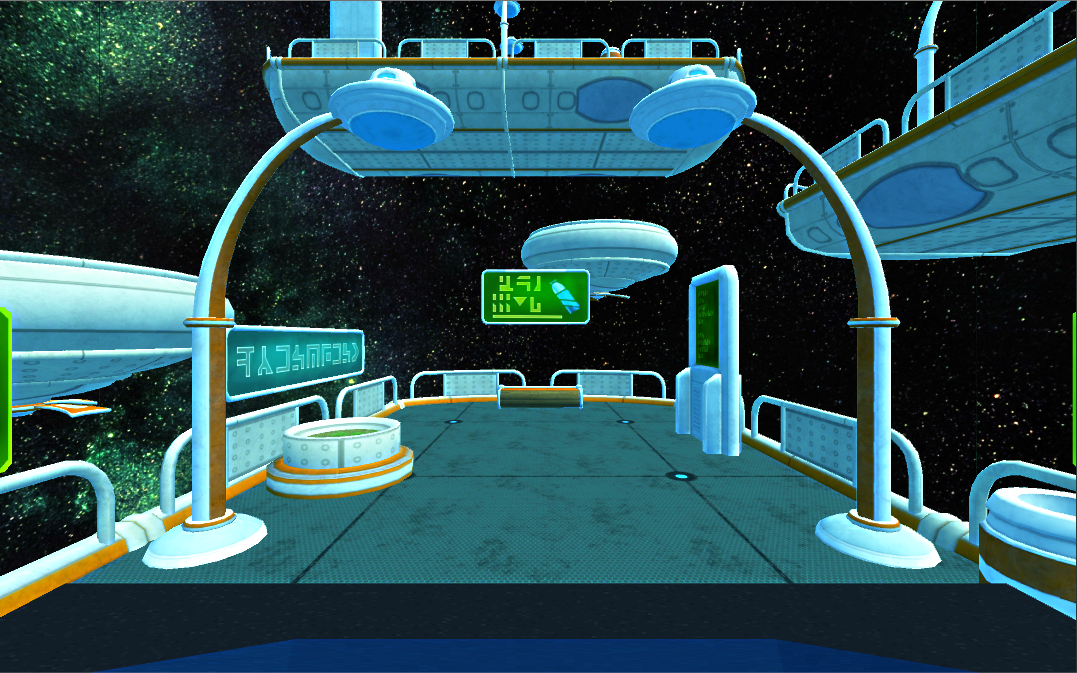
Real physics labs need expensive, fragile equipment, scheduled lab time and supervision. Many students only see an experiment once, if at all. Optics experiments are a good example: lasers, gratings and precise alignments are hard to share across a whole class.
GLV recreates the lab in 3D so students can:
- practice assembling the experiment before (or instead of) touching real equipment,
- change the parameters freely and see the effect right away,
- check their predictions against the computed result,
- repeat the experiment as often as they want, on a regular PC or in VR.
Young's experiment (diffraction grating), which is the experiment fully implemented in this repository:
- Lab assembly step. Place the laser, the supports, the grating rack and the screen using on-screen move, rotate and re-center controls. The assembly is validated, and the experiment only starts once every piece is in the right position.
- Parameter input. Enter the grating density N (lines/mm), the wavelength λ (400 to 700 nm) and the diffraction order m. The distance L is read live from the position of the rack.
- Two calculation modes. Compute the fringe position y from λ, or compute λ from a measured y, using
y = m·λ·L / dwithd = 1 mm / N. - Visual result. The simulated laser beams and pointers are drawn for each diffraction order, and the laser color follows the chosen wavelength (violet through red).
- Prediction panel to write down the expected result before running the simulation.
Environment and UX
- 3D main menu, with a choice of three sci-fi lab environments (scenarios) for VR sessions.
- Animated camera views using the keyboard (W/A/S/D), a pause menu (Esc) and an in-lab experiment guide (G).
- Message console with step-by-step feedback during the experiment. The UI is in Spanish.
- Custom 3D models, including a character model (Lemus), and a credits screen.
VR mode
- The PC build connects over TCP (port 4444) to a mobile VR client built with Google VR (see GLVMobile).
- The PC sends the selected lab and map, the positions, rotations and scales of the objects, collisions, the assembly state and the predictions, which keeps both sides in sync.
The main menu also has an entry for a Lloyd's mirror experiment. In this repository, Young's experiment is the one that is complete.
| Area | Details |
|---|---|
| Engine | Unity 2019.3.0f6 (project upgraded from an earlier 2018 version) |
| Language | C# |
| UI | Unity UI and TextMesh Pro |
| Rendering | Unity Post Processing Stack |
| Networking | System.Net.Sockets TCP client (PC to mobile VR) |
| VR | Google VR (mobile companion app) |
| Targets | Standalone PC build; a WebGL build was also produced during development |
PC Build/                      Unity project (open this folder in Unity Hub)
├── Assets/
│   ├── Scenes/
│   │   ├── Menu/Menu.unity    Main menu (build index 0)
│   │   └── Map 1/MapPC.unity  Lab scene (build index 1)
│   ├── Scripts/               Camera, menu, guide, console, TCP connection
│   │   └── Young/             Young's experiment: assembly, physics, lasers, results
│   └── Animations/, PostProcessing/, TextMesh Pro/, ...
├── Packages/manifest.json
└── ProjectSettings/           ProjectVersion.txt → 2019.3.0f6
- Install Unity 2019.3.0f6 through Unity Hub. A later 2019.x version should also work after an automatic upgrade.
- Clone the repository. It is large (about 1.7 GB, because the Unity
Libraryfolder and 3D assets are committed), so a shallow clone helps:git clone --depth 1 https://github.com/teamzz111/GLV.git
- In Unity Hub, choose Add and select the
PC Buildfolder. - Open
Assets/Scenes/Menu/Menu.unityand press Play. - Pick the Young experiment, assemble the lab, set N, λ and m, and run it.
To try VR mode, run the mobile client from GLVMobile on a phone on the same network. Then enter the phone's IP address in the VR menu of the PC build and press Connect.
- GLV-2 is the continuation of the project (2020–2021), with additional mechanics experiments and result export.
- GLVMobile is the mobile/VR client.
Developed by the Semillero Prometeo research group, under the direction of Pablo Carreño.
| Contributor | GitHub |
|---|---|
| Andrés Largo | @teamzz111 |
| Nicolás Angarita Ortiz | @nicoloso100 |
| Erika Infante | @MonoAncestral |
Released under the GNU GPL v3.