


A MOS 6502 CPU emulator build in Rust
Note
A Nerd Font is strongly recommended in your terminal emulator for proper rendering of UI icons like the disk, file, folder icons. Modern terminal emulator are recommended for better visuals.
- Table of Contents
- What is the MOS 6502
- Core Features
- Built with...
- Installation & Quick Start
- Implemented Demo Programs:
- Stardance Devlogs ᕙ( •̀ ᗜ •́ )ᕗ
- Development
- Test & Validation
- Documentation
- Boring Stuff
The MOS 6502 is an 8-bit microprocessor that was designed by a small team led by Chuck Peddle for MOS Technology [...].
When it was introduced, the 6502 was the least expensive microprocessor on the market by a considerable margin. It initially sold for less than one-sixth the cost of competing designs from larger companies, such as the 6800 or Intel 8080. Its introduction caused rapid decreases in pricing across the entire processor market. Along with the Zilog Z80, it sparked a series of projects that resulted in the home computer revolution of the early 1980s.
Source: Wikipedia
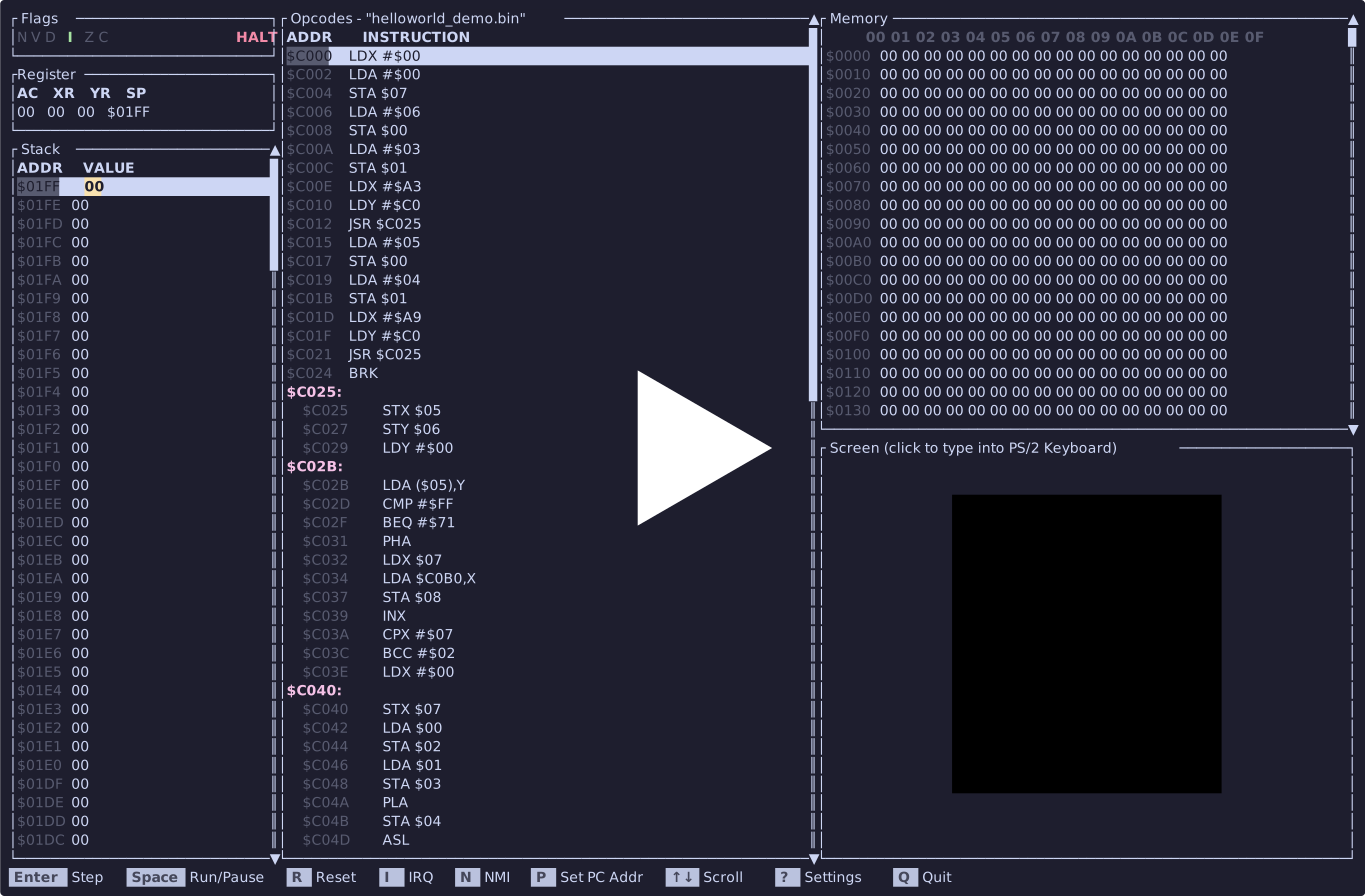
 Home |
 Settings |
||||||
 Running |
|||||||
-
Virtual Screen: A 32x32 pixel screen using the Unicode half-block character
▀with a custom color palette. For more information, see the Screen Documentation.- Color Palette: Supports 16 custom colors. For more information, see the Color List.
-
Flags Container: Displays the status flags (
$N, V, D, I, Z, C$ ), highlighting active flags in bright green. -
Register Container: Live tracking of registers (
$AC, XR, YR, SP$ ). - Stack Viewer: A scrollable list showing stack addresses and values, with the current stack pointer highlighted.
- Memory Viewer: A hexadecimal grid tracking system memory layout, complete with vertical scrolling.
- Disassembly Program Viewer: Automatically disassembles loaded ROM bytes into opcodes and functions (with indented code and labeled addresses). Includes a scrollbar.
- PS/2 Keyboard: Once the screen is clicked (captured), every keystroke is translated into PS/2 keyboard scancodes. For more information, see the Keyboard Documentation
- Set PC: Move the PC address
- Serial Monitor: Useful to print debug value or to use Wozmon. For more information, see Serial Monitor Documentation
-
Settings Menu: Adjustable CPU speed settings and repository links.
- Tips: Random tips for a better use of the emulator.
- Footer Bar: List all keyboard shortcuts and controls.
- File Browser: Lists files and folders present in the current directory, enhanced with Nerd Font icons. Demo files are represented with a disc icon
-
Force Address Toggle: If set off, the CPU will look at the reset vector
$FFFD-$FFFCto move the PC at his correct place. -
Start Address: Automatically detects files ending with
_demo.binand configures the start address to0xC000. Address can change from a demo file to another (like the Wozmon or the Snake) - Emulation Speed: Adjusts the Hz / MHz target.
- Mouse Support: in the Home Menu or in the Emulator everything can be use via the mouse
ദ്ദി(˵ •̀ ᴗ - ˵ ) ✧
This project was built to help me learn Rust while using my emulator knowledge. Here is what I have used
- Rust: for the whole app !
ദ്ദി(˵ •̀ ᴗ - ˵ ) ✧ - Ratatui: to create a nice looking TUI
- ca65: to compile the ASM code
- ld65: to link the
.ofile into a.binfile
The easiest way to get the emulator is to install it directly via crates.io using Cargo:
cargo install rust6502Tip
To fully test the emulator, download the demo .bin files attached to the Github Release !
- Just run
rust6502and use the built-in File Explorer to navigate to your.binfiles and press Start
ദ്ദി(˵ •̀ ᴗ - ˵ ) ✧


On Stardance you can watch the full development process via all the devlogs I've created here: Rust 6502 Devlogs
- Clone the repository with
git clone https://github.com/wirenux/Rust-6502.git
cd Rust-6502- Then install the dependencies and run the program with:
cargo runThis emulator is able to run the Apple I OS (Wozmon) using the custom Serial Monitor I built.
To build custom assembly files without error (handling proper memory origin segments and interrupts), it is recommended to use the cc65 toolchain (ca65 for assembly and ld65 for linking):
ca65 program.s -o program.o
ld65 program.o -C linker.cfg -o program.bin
To verify instruction behavior and debugging assembly routines I have used the Masswerk 6502 Assembler & Emulator
For more information about the emulator subsystem, check out the dedicated documentation:
- Assembly & Toolchain Guide: Step by step guide to writing 6502 assembly, configuring
linker.cfg, and compiling withcc65. - Color Palette: Reference guide for the 16 custom display colors.
- Screen Documentation: Details on the memory-mapped video buffer, resolution, and pixel rendering.
- Serial Monitor: Details on how the Monitor works and how to use it.
- Keyboard: Details on how a PS/2 keyboard works and how it can be used
- Apple I: Details on how the Apple I works how I modified it run on
rust6502using the custom Serial Monitor I built.
- Writing small ASM programs during development to test CPU behavior, and brainstorming.
This project is created by @wirenux in Rust and use Ratatui.
This project is release under the MIT License.