Repository navigation
Conversation


…d assume a positive min cell value


|
If 0 < max <= GRASS_EPSILON? Just default color.. Maybe, the max color from the source rule would be better. |
|
Still, ideally, it would be better to find actual positive min and use that instead of GRASS_EPSILON. Any fast and efficient approach for this? |
 HuidaeCho
added
raster
HuidaeCho
added
raster
|
Probably, setting anything below the positive min cell value (or GRASS_EPSILON currently) to the min color rather than default would be better when the default "default color" is white? Or would the default white be better to let the user know that the raster has non-positive cells (current PR)? |
…hes the color space too much; it was/is the default behavior for absolute log
|
I think GRASS_EPSILON was too small. I changed v.to.rast input=censusblk output=censusblk_median_age use=attr attrcol=MEDIAN_AGE
r.colors map=censusblk_median_age col=plasma -g
r.colors map=censusblk_median_age col=plasma -aproduces the same output. |
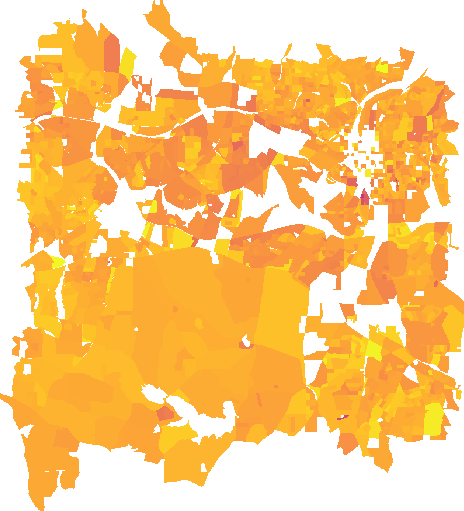

|
I’m traveling and won’t be able to check this until next week. Maybe see if @nilason, @petrasovaa, or @hmitaso can test. |
|
Maybe, to be consistent with #1507, for max <= 0, fatal error rather than using the max color only? |
|
Is there something to test here or has it been merged into master/7.8? |
No, it's not merged yet. The main test should be with rasters with min=0. Without this PR, you'll see #1480. |


| if (max <= 0) { | ||
| /* we cannot apply log colors to a non-positive raster, so let's use | ||
| * the max color from the source rule for the entire raster */ | ||
| G_warning(_("Max cell value <= 0; using the max color only")); | ||
| Rast_get_d_color(&max, &red, &grn, &blu, src); | ||
| Rast_add_d_color_rule(&min, red, grn, blu, | ||
| &max, red, grn, blu, dst); | ||
| return; | ||
| } | ||
|
|
||
| if (min <= 0) { | ||
| if (max <= eps) { | ||
| /* min <= 0 < max <= eps; we cannot assume a positive min cell | ||
| * value of eps because max is not greater than eps; let's use the | ||
| * max color from the source rule for the entire raster */ | ||
| G_warning(_("Min cell value <= 0 < max cell value <= %g; " | ||
| "using the max color only"), eps); | ||
| Rast_get_d_color(&max, &red, &grn, &blu, src); | ||
| Rast_add_d_color_rule(&min, red, grn, blu, | ||
| &max, red, grn, blu, dst); | ||
| return; | ||
| } | ||
|
|
||
| /* min <= 0 < eps < max; assume that the positive min cell value is | ||
| * equal to eps when we cannot use log(min) because min <= 0; if the | ||
| * true positive min value is less than eps, it'll get assigned the | ||
| * default color */ | ||
| G_warning(_("Min cell value <= 0 < %g < max cell value; " | ||
| "setting to the default color for cells <= %g and " | ||
| "assuming a positive min cell value of %g"), eps, eps, eps); | ||
| /* use the default color for min up to eps */ | ||
| Rast_add_d_color_rule(&min, red, grn, blu, | ||
| &eps, red, grn, blu, dst); | ||
| min = eps; | ||
| lmin = log(min); | ||
| } |
There was a problem hiding this comment.
I feel that these explanations are wrong. The only thing we need to guard against is values of <=0. If we replace the function call to log(min) with GRASS_EPSILON or some other value that exp() will happily accept we will have something that makes sense. In other words, in this part of the function we just want to make sure that we don't try to do log(x<=0). The actual color ramp needs to always cover the whole space of min to max of the actual map (src). Otherwise you will end up with values outside of the rules and end up with default or null value parts. It will be much easier to simply replace this with:
    if (min < GRASS_EPSILON) {
	lmin = GRASS_EPSILON;
    }
    else {
	lmin = log(min);
    }
    if (max < GRASS_EPSILON) {
	lmax = GRASS_EPSILON;
    }
    else {
	lmax = log(max);
}There was a problem hiding this comment.
you will end up with values outside of the rules and end up with default or null value parts. It will be much easier to simply replace this with:
My PR actually does not use colors outside the rules, but you're right that it doesn't use the full color space for rasters whose max cell value is less than eps (currently 1) because only the max color is used in this case. Also, it starts from the color for eps in the src map, which is why it can truncate too much of the src color space when you have negative and positive cell values (min = eps can be removed to change this behavior).
If I had a negative raster without 0 and used a logarithmic color scheme, my expectation would be to see a fatal error or a single color for all non-null cells because simply log(negative) is not possible, instead of color gradients.
Please try this with your PR:
r.mapcalc ex="tmp=-censusblk_median_age-40" # to make a negative raster
r.colors map=tmp col=plasma -g
and check the colr file of tmp.
% -125.599998 1.0000000000000011
nv:255
*:255
-125.599998:13:8:135 1.0000000000000011:20:7:137
-40:240:249:33 1.0000000000000011:241:244:38
This color file contains contradicting rules or the second rule overrides the first if that was intended. It happens because lmin or lmax is always set to GRASS_EPSILON if either is less than GRASS_EPSILON, but the actual max is less than exp(GRASS_EPSILON) approx 1. Also, what this color file implies is that there are changing colors for negative values, which is illogical to me for logarithmic colors.
This is the color file using my PR.
% -125.599998 -40
nv:255
*:255
-125.599998:240:249:33 -40:240:249:33
The actual range of tmp is -125.599998 to -40.
I think the question is
- Do we want to apply the color scheme to negative values even in logarithmic color schemes?
- Does doing so make sense?
- Which color should be used to start the rules for positive values? I think the
mincolor of the color space makes sense, not the color for theepsvalue (my current PR), to fully use the color space. - What about positive rasters with very small values less than
eps, e.g., a coefficient raster in [0, 1]? - What about negative up to
epsrasters? I tried to address this issue, but as far as I know, there is no API functions that can quickly read the positive max value of the raster, which we'll need to stretch the color space.
| if (amax == 0) { | ||
| /* use the max color from the source rule for the entire raster whose | ||
| * max absolute cell value is 0; that is min == max == 0 */ | ||
| G_warning(_("Max absolute cell value is 0; using the max color only")); | ||
| Rast_get_d_color(&max, &red, &grn, &blu, src); | ||
| Rast_add_d_color_rule(&min, red, grn, blu, | ||
| &max, red, grn, blu, dst); | ||
| return; | ||
| } | ||
|
|
||
| if (amin == 0) { | ||
| if (amax <= eps) { | ||
| /* amin == 0 < amax <= eps; we cannot assume a min absolute cell | ||
| * value of eps because the max absolute cell value is not greater | ||
| * than eps; let's use the max color from the source rule for the | ||
| * entire raster */ | ||
| G_warning(_("Min absolute cell value == 0 < " | ||
| "max absolute cell value <= %g; " | ||
| "using the max color only"), eps); | ||
| Rast_get_d_color(&max, &red, &grn, &blu, src); | ||
| Rast_add_d_color_rule(&min, red, grn, blu, | ||
| &max, red, grn, blu, dst); | ||
| return; | ||
| } | ||
|
|
||
| /* amin == 0 < eps < amax; assume that the min absolute cell value is | ||
| * equal to eps when we cannot use log(amin) because amin == 0; if the | ||
| * true min absolute value is less than eps, it'll get assigned the | ||
| * default color */ | ||
| G_warning(_("Min absolute cell value == 0 < %g < " | ||
| "max absolute cell value; " | ||
| "setting to the default color for absolute cells <= %g and " | ||
| "assuming a min absolute cell value of %g"), eps, eps, eps); | ||
| /* use the default color for 0 up to eps */ | ||
| Rast_add_d_color_rule(&min, red, grn, blu, | ||
| &eps, red, grn, blu, dst); | ||
| /* use the default color for -eps up to 0 */ | ||
| eps = -eps; | ||
| Rast_add_d_color_rule(&eps, red, grn, blu, | ||
| &min, red, grn, blu, dst); | ||
| eps = -eps; | ||
| amin = eps; | ||
| lamin = log(amin); | ||
| } |
There was a problem hiding this comment.
Same thing here as with Rast_log_colors, except in this case we are not actually using min. Instead we are building a symmetrical log color ramp that goes from 0 to max, and is mirrored on both the positive and negative side. That is why the function ignores min. This means that all this should be replaced with:
    /* Calculate the minimum and maximum absolute values (so that we know the absolute max). */
    absmin = fabs(min);
    absmax = fabs(max);
    amax = MAX(absmin, absmax);
    amin = MIN(absmin, absmax);
    if (amin < GRASS_EPSILON) {
	lmin = 0.0;
    }
    else {
	lmin = log(amin);
    }
    if (amax < GRASS_EPSILON) {
	lmax = 1.0;
    }
    else {
	lmax = log(amax);
    }

    lamax = MAX(lmin, lmax);
lamin = MIN(lmin, lmax);There was a problem hiding this comment.
a symmetrical log color ramp that goes from 0 to max, and is mirrored on both the positive and negative side.
If we include 0, it should be from 0 to MAX(min, max) and my current PR has a bug. It creates color rules between amin and amax, not between -amax and amax.
|
|
||
| if (i == 0) | ||
| x = 1; | ||
| x = amin; |
There was a problem hiding this comment.
Here we need to use 0, the symmetry point of the color ramp.
| x = amax; | ||
| else { | ||
| lx = 0 + lamax * i / samples; | ||
| lx = lamin + (lamax - lamin) * i / samples; |
There was a problem hiding this comment.
The original expressions was right, though I'd write it simply as:
lx = lamax * i / samples;There was a problem hiding this comment.
Oh and line 381-382 has a bug in it it should swap x0 and x1
	    Rast_add_d_color_rule(&x1, red, grn, blu,
&x0, red2, grn2, blu2, dst);There was a problem hiding this comment.
Oh and line 381-382 has a bug in it it should swap
x0andx1Rast_add_d_color_rule(&x1, red, grn, blu, &x0, red2, grn2, blu2, dst);
I don't agree with this. Check the color file from your swapped code:
81.874567146847312:241:244:38 85.599997999999999:240:249:33
-85.599997999999999:241:244:38 -81.874567146847312:240:249:33
vs. my original color rule:
81.874567146847312:241:244:38 85.599997999999999:240:249:33
-85.599997999999999:240:249:33 -81.874567146847312:241:244:38
Both 81.874567146847312 and -81.874567146847312 should use the same color 241:244:38.
|
I think #1937 is better than this PR. |


An attempt to address #1480.
A potential issue with this assumption: If cell values are between 0 and 1, they'll get assigned the default color.